# joinery
**Repository Path**: vx-github/joinery
## Basic Information
- **Project Name**: joinery
- **Description**: java版的Pandas
- **Primary Language**: Unknown
- **License**: GPL-3.0
- **Default Branch**: master
- **Homepage**: None
- **GVP Project**: No
## Statistics
- **Stars**: 1
- **Forks**: 0
- **Created**: 2024-07-09
- **Last Updated**: 2024-07-31
## Categories & Tags
**Categories**: Uncategorized
**Tags**: None
## README
joinery
==========
- joinery [joi-nuh-ree]
-
1. In woodworking, the craft of joining together
pieces of wood to produce more complex items.
-
2. In Java, a data analysis library for joining together
pieces of data to produce insight.
----------
[](https://github.com/cardillo/joinery/actions/workflows/build.yml)
[](https://codecov.io/gh/cardillo/joinery)
[](https://search.maven.org/artifact/sh.joinery/joinery-dataframe/1.10/jar)
quick start
==========
Remember **FizzBuzz** (of course you do!), well imagine you have just
solved the puzzle (well done!) and you have written the results to
a comma-delimited file for further analysis. Now you want to know
how many times are the strings `Fizz`, `Buzz`, and `FizzBuzz`
printed out.
You could answer this question any number of ways, for example you
could modify the original program, or reach for Python/pandas, or even
(for the sadistic among us, you know who you are) type out a one-liner
at the command prompt (probably including `cut`, `sort`, and `uniq`).
Well, now you have one more option. This option is especially good
if you are 1) using Java already and 2) may need to integrate your
solution with other Java applications in the future.
You can answer this question with **joinery**.
```java
df.groupBy("value")
.count()
.sortBy("-number")
.head(3)
```
Printing out the resulting data frame gives us the following table.
```
value number
0 Fizz 27
1 Buzz 14
2 FizzBuzz 6
```
See [FizzBuzz.java](https://github.com/cardillo/joinery/blob/master/src/test/java/examples/FizzBuzz.java)
for the complete code.
next steps
==========
Get the [executable jar](https://repo.maven.apache.org/maven2/sh/joinery/joinery-dataframe/1.10/joinery-dataframe-1.10-jar-with-dependencies.jar) and try it for yourself.
```javascript
$ java -jar joinery-dataframe-1.10-jar-with-dependencies.jar shell
# Joinery -- Data frames for Java, 1.10-deb702e
# OpenJDK 64-Bit Server VM, Oracle Corporation, 1.8.0_92-internal
# Rhino 1.7 release 2 2009 03 22
> df = new DataFrame()
[empty data frame]
> df.add("value")
[empty data frame]
> [10, 20, 30].forEach(function(val) {
df.append([val])
})
> df
value
0 10
1 20
2 30
>
```
maven
==========
Since version 1.10, joinery is included in the central repo. If you are upgrading from a prior version, note the new group id.
```xml
sh.joinery
joinery-dataframe
1.10
```
utilities
==========
**joinery** includes some tools to make working with data frames easier.
These tools are available by running `joinery.DataFrame` as an application.
```bash
$ java joinery.DataFrame
usage: joinery.DataFrame [compare|plot|show|shell] [csv-file ...]
```
show
----------
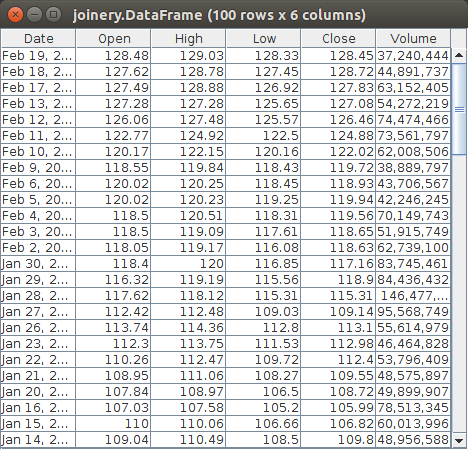
Show displays the tabular data of a data frame in a gui window.
```bash
$ java joinery.DataFrame show data.csv
```
plot
----------
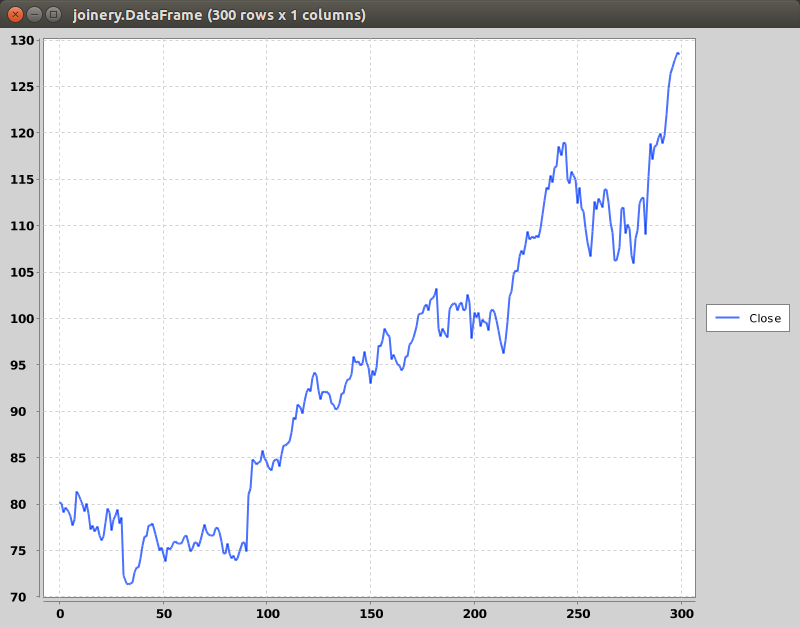
Plot displays the numeric data of a data frame as a chart.
```bash
$ java joinery.DataFrame plot data.csv
```
shell
----------
Launches an interactive JavaScript shell for working with data frames.
```javascript
$ java joinery.DataFrame shell
# Joinery -- Data frames for Java, 1.10-deb702e
# OpenJDK 64-Bit Server VM, Oracle Corporation, 1.8.0_92-internal
# Rhino 1.7 release 2 2009 03 22
> df = DataFrame.readCsv("https://www.quandl.com/api/v1/datasets/GOOG/NASDAQ_AAPL.csv")
Date Open High Low Close Volume
0 2015-03-20 128.25 128.4 125.16 125.90000000 68695136.00000000
1 2015-03-19 128.75 129.25 127.4 127.50000000 45809490.00000000
2 2015-03-18 127.0 129.16 126.37 128.47000000 65270945.00000000
3 2015-03-17 125.9 127.32 125.65 127.04000000 51023104.00000000
4 2015-03-16 123.88 124.95 122.87 124.95000000 35874300.00000000
5 2015-03-13 124.4 125.4 122.58 123.59000000 51827283.00000000
6 2015-03-12 122.31 124.9 121.63 124.45000000 48362719.00000000
7 2015-03-11 124.75 124.77 122.11 122.24000000 68938974.00000000
8 2015-03-10 126.41 127.22 123.8 124.51000000 68856582.00000000
... 8649 rows skipped ...
8658 1980-12-12 0.0 4.12 4.11 4.11000000 14657300.00000000
> df.types()
[class java.util.Date, class java.lang.String, class java.lang.String, class java.lang.String, class java.lang.Double, class java.lang.Double]
> df.sortBy("Date")
Date Open High Low Close Volume
8658 1980-12-12 0.0 4.12 4.11 4.11000000 14657300.00000000
8657 1980-12-15 0.0 3.91 3.89 3.89000000 5496400.00000000
8656 1980-12-16 0.0 3.62 3.61 3.61000000 3304000.00000000
8655 1980-12-17 0.0 3.71 3.7 3.70000000 2701300.00000000
8654 1980-12-18 0.0 3.82 3.8 3.80000000 2295300.00000000
8653 1980-12-19 0.0 4.05 4.04 4.04000000 1519700.00000000
8652 1980-12-22 0.0 4.25 4.23 4.23000000 1167600.00000000
8651 1980-12-23 0.0 4.43 4.41 4.41000000 1467200.00000000
8650 1980-12-24 0.0 4.66 4.64 4.64000000 1500100.00000000
... 8649 rows skipped ...
0 2015-03-20 128.25 128.4 125.16 125.90000000 68695136.00000000
> .reindex("Date")
Open High Low Close Volume
1980-12-12 0.0 4.12 4.11 4.11000000 14657300.00000000
1980-12-15 0.0 3.91 3.89 3.89000000 5496400.00000000
1980-12-16 0.0 3.62 3.61 3.61000000 3304000.00000000
1980-12-17 0.0 3.71 3.7 3.70000000 2701300.00000000
1980-12-18 0.0 3.82 3.8 3.80000000 2295300.00000000
1980-12-19 0.0 4.05 4.04 4.04000000 1519700.00000000
1980-12-22 0.0 4.25 4.23 4.23000000 1167600.00000000
1980-12-23 0.0 4.43 4.41 4.41000000 1467200.00000000
1980-12-24 0.0 4.66 4.64 4.64000000 1500100.00000000
... 8649 rows skipped ...
2015-03-20 128.25 128.4 125.16 125.90000000 68695136.00000000
> .retain("Close")
Close
1980-12-12 4.11000000
1980-12-15 3.89000000
1980-12-16 3.61000000
1980-12-17 3.70000000
1980-12-18 3.80000000
1980-12-19 4.04000000
1980-12-22 4.23000000
1980-12-23 4.41000000
1980-12-24 4.64000000
... 8649 rows skipped ...
2015-03-20 125.90000000
> .plot(PlotType.AREA)
```
documentation
==========
The complete api documentation for the `DataFrame` class is available
at https://joinery.sh