# bga_issue_blog
**Repository Path**: tiny1998/bga_issue_blog
## Basic Information
- **Project Name**: bga_issue_blog
- **Description**: Flutter 或 Vue 全家桶(Vue + VueRouter + Vuex + Axios)抓取 GitHub 上的 Issues,结合 GitHub Pages 搭建个人博客站点,支持 GitHub 登录和评论
- **Primary Language**: Unknown
- **License**: Not specified
- **Default Branch**: master
- **Homepage**: None
- **GVP Project**: No
## Statistics
- **Stars**: 0
- **Forks**: 0
- **Created**: 2019-11-15
- **Last Updated**: 2024-11-24
## Categories & Tags
**Categories**: Uncategorized
**Tags**: None
## README
:running:bga_issue_blog:running:
============
* 当前为 Flutter 版本,一套代码支持 Android、iOS、Web、Desktop,[点击进行预览](http://issues.bingoogolapple.cn)
* [查看 Vue 版本](https://github.com/bingoogolapple/bga_issue_blog/tree/vue)
### [使用了该博客系统的个人博客站点列表](https://github.com/bingoogolapple/bga_issue_blog/issues/4),如果你的个人博客站点也使用了该博客系统,希望你能追加你的个人博客站点链接到这里面
## 目录
* [项目背景](#项目背景)
* [效果图](#效果图)
* [使用方法](#使用方法)
* [关于我](#关于我)
* [打赏支持](#打赏支持)
## 项目背景
刚接触 GitHub 的时候就开始在仓库 [bingoogolapple.github.io](https://github.com/bingoogolapple/bingoogolapple.github.io) 里创建 [Issues](https://github.com/bingoogolapple/bingoogolapple.github.io/issues) 来记录学习笔记,那时候我还不知道有 GitHub Pages,后来了解到了可以通过 GitHub Pages 来搭建 [个人博客站点](http://www.bingoogolapple.cn),但是如果涉及到在文章里嵌套图片的话还是比较麻烦的
通过 Issues 记录学习笔记的优点:
- [x] 在线编辑和预览,随时添加和提交(不用担心电脑坏了导致笔记丢失)
- [x] 当笔记里到嵌套图片时,支持粘贴屏幕截图和拖拽添加图片
- [x] 带有搜索和排序功能
- [x] 可通过 Label 来对 Issues 进行分类
- [x] 可以把每一个 Comment 作为一个小的知识点不停的追加到 Issue 里
- [x] 结合 GitHub Pages 绑定域名来搭建个人博客站点
## 效果图
Web - PC | Desktop |
| ------------ | ------------ |
| 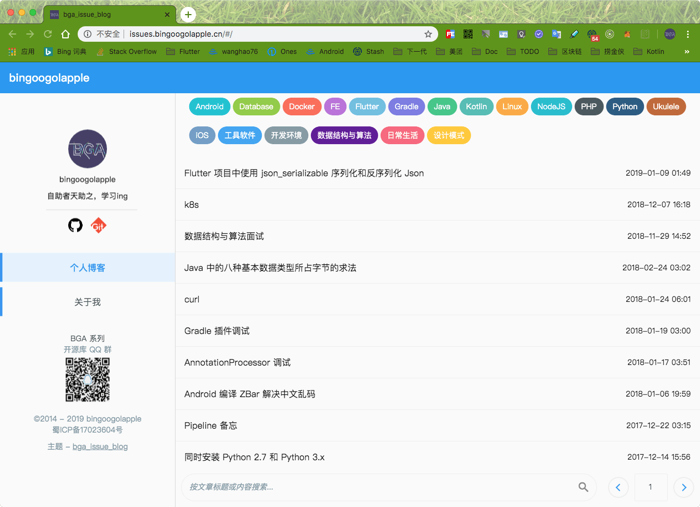 |  |
| Web - Phone | Web - Phone | Web - Phone |
| ------------ | ------------- | ------------- |
|  |  |  |
| Phone | Phone | Phone |
| ------------ | ------------- | ------------- |
|  |  |  |
## 使用方法
#### 本地运行
> 1.安装依赖
```
flutter pub get
```
> 2.在浏览器中运行
```
flutter run -d chrome
```
> 3.修改个人配置「bga_issue_blog/lib/utils/config.dart」
```dart
class Config {
// 配置个人 GitHub 名称
static final gitHubUsername = 'bingoogolapple';
// 根据 GitHub 名称自动组装存放 issues 的仓库
static final repo = '$gitHubUsername/$gitHubUsername.github.io';
// 配置个人链接图片映射
static final personalLinkMap = {
'images/github.png': 'https://github.com/bingoogolapple',
'images/git.png': 'https://bingoogolapple.gitbooks.io/bgalearningnotes-git',
};
// QQ 配置信息
static final qqTitle = 'BGA 系列\n';
static final qqDesc = '开源库 QQ 群';
static final qqQrImg = 'images/qq-group.png';
// 网站备案信息
static final webSiteInfo = '©2014 - ${DateTime.now().year} bingoogolapple\n蜀ICP备17023604号';
}
```
#### 发布到 GitHub Pages
> 1.打包
```
dart build_web_preview.dart
```
> 2.发布
```
拷贝「bga_issue_blog/docs」目录里的所有文件到「GitHub Pages」的根目录下
并将「GitHub Pages」仓库 PUSH 到 GitHub 上
```
#### 绑定域名到 GitHub Pages
> 1.在「GitHub Pages」根目录下添加文件名为「CNAME」的文件,文件内容就是你的二级域名,例如我的是
```
www.bingoogolapple.cn
```
> 2.登录你的域名控制台添加域名解析
```
「记录类型」选择「CNAME」
「主机记录」填「www」
「记录值」填「GitHub用户名.github.io」,例如我的是「bingoogolapple.github.io」
```
## 关于我
| 个人主页 | 邮箱 | BGA系列开源库QQ群
| ------------- | ------------ | ------------ |
| bingoogolapple.cn | bingoogolapple@gmail.com |  |
## 打赏支持
如果您觉得 BGA 系列开源库帮你节省了大量的开发时间,请扫描下方的二维码随意打赏,要是能打赏个 10.24 :monkey_face:就太:thumbsup:了。您的支持将鼓励我继续创作:octocat:
如果您目前正打算购买通往墙外的梯子,可以使用我的邀请码「YFQ9Q3B」购买 [Lantern](https://github.com/getlantern/forum),双方都赠送三个月的专业版使用时间:beers:

## License
Copyright 2016 bingoogolapple
Licensed under the Apache License, Version 2.0 (the "License");
you may not use this file except in compliance with the License.
You may obtain a copy of the License at
http://www.apache.org/licenses/LICENSE-2.0
Unless required by applicable law or agreed to in writing, software
distributed under the License is distributed on an "AS IS" BASIS,
WITHOUT WARRANTIES OR CONDITIONS OF ANY KIND, either express or implied.
See the License for the specific language governing permissions and
limitations under the License.