# jQuery-KingTable
**Repository Path**: other-open-source/jQuery-KingTable
## Basic Information
- **Project Name**: jQuery-KingTable
- **Description**: No description available
- **Primary Language**: JavaScript
- **License**: MIT
- **Default Branch**: master
- **Homepage**: None
- **GVP Project**: No
## Statistics
- **Stars**: 0
- **Forks**: 0
- **Created**: 2021-10-12
- **Last Updated**: 2023-03-15
## Categories & Tags
**Categories**: Uncategorized
**Tags**: None
## README
# jQuery-KingTable
Library for administrative tables that are able to build themselves, on the basis of their input data.
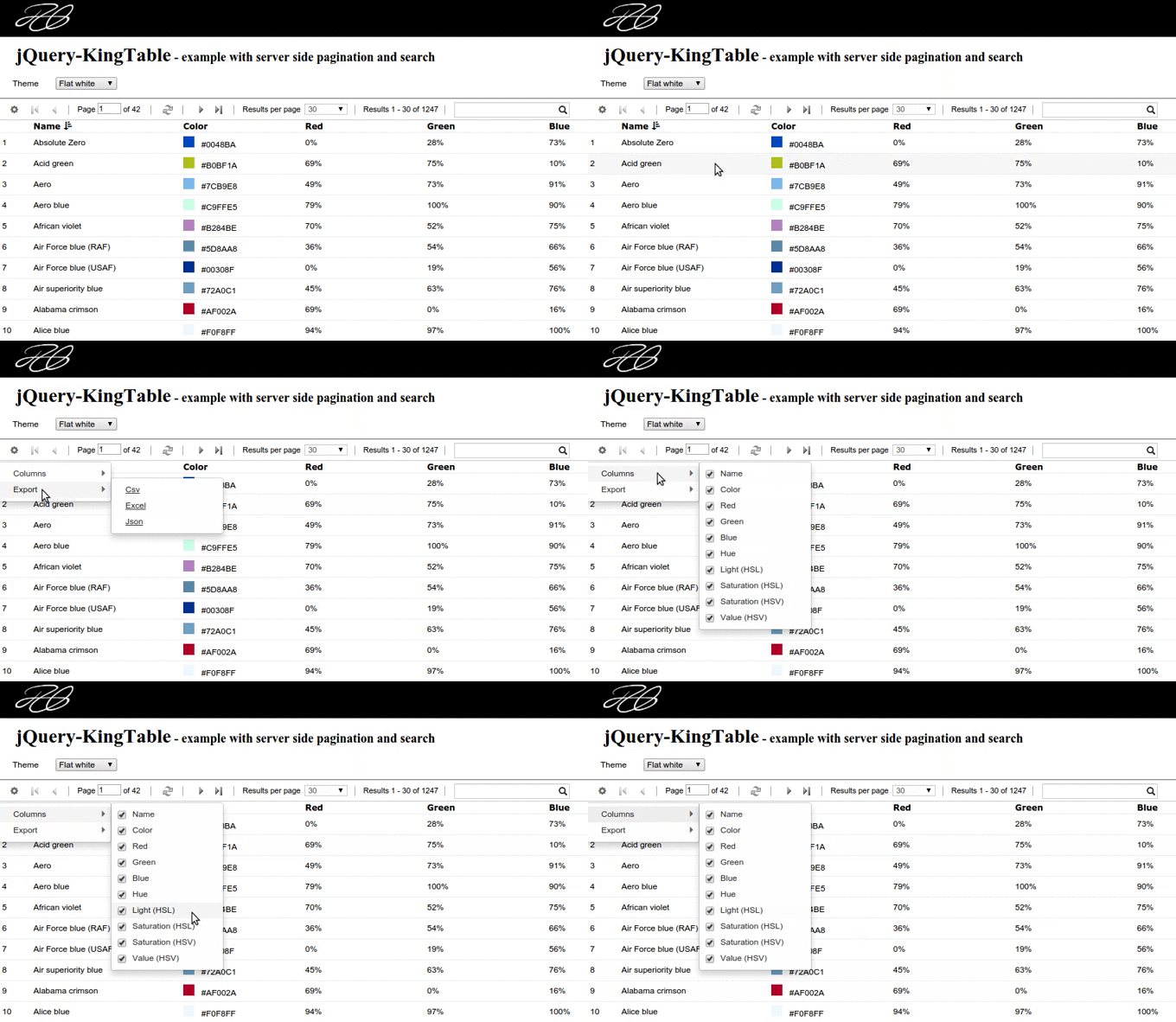
Supports client and server side pagination; client and server side search; custom filters views; automatic menu to hide
and reorder columns and support for custom tools. Client side export feature into: csv, json and xml formats.
---
# Important notice!!
The new version of the library is available here: [https://github.com/RobertoPrevato/KingTable](https://github.com/RobertoPrevato/KingTable). It is recommended to use the new version of the library, as it features an improved code base and many features over the first version of the library.
### Features of the new version
Following is a table listing the features that were added to KingTable 2.0.
| Feature | Description |
|-------------------------------------|--------------------------------------------------------------------------------------------------------------------------------------------------------------------|
| ES6 source code | ES6 source code, library is transpiled to ES5 for distribution. |
| Unit tested source code | Source code is integrated with Gulp tasks, Karma, Jasmine for unit tests. Almost 300 tests - still to grow! |
| Removed dependencies | Removed dependency from jQuery, Lodash, I.js, R.js. |
| Improved exceptions | Raised exceptions include a link to GitHub wiki with detailed instructions. |
| LRU cache | _Least Recently Used_ caching mechanism to cache the last _n_ pages by filters, to reduce number of AJAX requests. |
| Caching of filters | Filters for each table are cached using client side storage (configurable), so they are persisted upon page refresh. |
| Improved _CS_ sorting | Strings that can be sorted like numbers (like "25%", "25.40 EUR", "217°") are automatically parsed as numbers when sorting. |
| Improved _CS_ sorting | Client side sorting by multiple properties. |
| Improved _CS_ search | Client side search feature has been improved: search works in culture dependent string representations of dates and numbers and other formatted strings. |
| Improved support for event handlers | Custom event handlers receive automatically the clicked item as parameter, if applicable. |
| Improved support for custom buttons | It's now possible to configure extra fields (such as buttons) to be rendered for each item. |
| Improved support for other medias | Support for NodeJS console applications and HTML tables rendering for email bodies sent using NodeJS. |
---
## Objectives of the plugin
* Allow the implementation of administrative tables with the [smallest amount of code possible](https://github.com/RobertoPrevato/jQuery-KingTable/wiki/Minimum-effort).
* Allow for easy customization of generated HTML, to adapt to different needs: e.g. displaying pictures thumbnails, anchor tags, etc.
* Support both collections that require server side pagination, and collections that don't require server side pagination, but may still benefit from client side pagination.
## Live demo
The following demos are available online:
* [Live demo](https://robertoprevato.github.io/demos/jqkingtable/index.html)
* [Demo with complex filters](https://robertoprevato.github.io/demos/jqkingtable/complex-filters.html)
* [Demo with datetime filters and datepickers](https://robertoprevato.github.io/demos/jqkingtable/datetime-filters.html)
* [Double table: two tables displayed in the same page](https://robertoprevato.github.io/demos/jqkingtable/double.html)
[](https://github.com/RobertoPrevato/jQuery-KingTable/wiki/Table-tools)
## Documentation
Refer to the [wiki page](https://github.com/RobertoPrevato/jQuery-KingTable/wiki).
A full list of possible options is available inside the dedicated [wiki page](https://github.com/RobertoPrevato/jQuery-KingTable/wiki/Options).
## Zepto support
Despite being designed primarily as a jQuery plugin, the KingTable widget supports [zepto.js](http://zeptojs.com/).
In order to use it with zepto, the callbacks, deferred and selector plugins are required.
```html
```
## Modes
The KingTable widget implements two working modes:
* fixed (collections that do not require server side pagination)
* normal (collections that require server side pagination)
And supports both optimized and simple collections. Refer to the [dedicated wiki page](https://github.com/RobertoPrevato/jQuery-KingTable/wiki/Working-modes) for more information.
### Fixed mode
A fixed table is displaying a collection that doesn't require server side pagination, but may still benefit from client side pagination.
When working on applications, it commonly happens to deal with collections that are not meant to grow over time, and they have a small size.
For example, a table of *categories* in a e-commerce website to sell clothes, or a table of *user roles* in most applications.
In these cases, it makes sense to return whole collections to the client.
There are two ways to define a fixed KingTable:
* instantiating a KingTable with **url** from where to fetch a collection; then code the server side to return an array of items
* instantiating a KingTable passing a **data** option with an instance of array: in this case, it is assumed that the collection is fixed
```js
var table = new $.KingTable({
data: [{...},{...},{...}]
});
//or... code the server side to return an array of items
var table = new $.KingTable({
url: "/api/categories"
});
```
Fixed tables perform search and pagination on the client side.
### Normal mode
A normal table is one displaying a collection that requires server side pagination, since it is meant to grow over time.
This is true in most cases, for example tables of *products* and *customers* in a e-commerce website.
```js
var table = new $.KingTable({
url: "/api/profiles"
});
```
When receiving an AJAX response, a normal table expects to receive the following structure:
```js
{
subset: [array],// array of items that respect the given filters
total: [number] // the total count of items that respect the given filters; excluding the pagination: for example 13000
}
```
## About usability
The jQuery-KingTable widget is designed to follow "old-school" design principles
* the user should be able to immediately understand the size of the collection, so the pagination bar is designed to display the total amount of rows; of pages, and the number of results currently displayed
* keyboard navigation: the KingTable controls can be navigated using the TAB; it is possible to navigate through pages using the left, right, A and D keys
* filters are stored in the page url, so that if the user hit the refresh button, or send a url to another person, the page loads the right results
* support for browser navigation buttons
* the table logic handles ajax errors and displays a preloader while fetching data
### Inline editing feature
Currently the jQuery-KingTable widget doesn't offer, out of the box, inline editing feature.
This is intentional, since in most situations we deal with complex objects that cannot be easily edited inline.
In any case, the provided plugin makes it easy to configure HTML and event handlers to implement inline editing feature,
for example:
```js
//example of custom logic to implement inline-editing feature
$("#table-container").kingtable({
url: "/api/colors",
events: {
"click .color-row": function (e) {
//e.currentTarget is the clicked element
//implement here your logic to change the readonly template into an editable template
}
},
columns: {
color: {
template: "...
"
}
}
});
```
## About localization
For full information, refer to the [dedicated wiki page](https://github.com/RobertoPrevato/jQuery-KingTable/wiki/Implementing-localization).
The KingTable widget requires an utility to implement client side localization, which is used to display proper names of buttons (_refresh, page number, results per page, etc.).
Currently the KingTable supports these two libraries:
* [I.js](https://github.com/RobertoPrevato/I.js)
* [i18n-js](https://github.com/fnando/i18n-js)
The first should be used only if advanced features like parsing of dates; support for currencies; are not needed.
The second should be used if advanced localization features are required.
## How to integrate with your project
In order to use the jQuery-KingTable plugin, there are two options:
* download the source code, and work with the R.js modules, like in the provided index.html page
* download only the bundled source code (/dist/jquery.kingtable.js); or the minified source (/dist/jquery.kingtable.min.js)
It is also necessary to download the Open Iconic fonts and the .css code: once again it is possible to use the .less source code; or download only the compiled .css.
### How to integrate with server side code
The KingTable logic defines an interface, in order to offer pagination and search out of the box.
When performing AJAX calls to fetch data that requires server side pagination (and therefore, server side sorting and searching),
it sends the following information:
```js
{
fixed: [boolean], // whether the table requires server side pagination or not
page: [number], // page number
size: [number], // results per page
orderBy: [string], // name of the property to use for sorting
sortOrder: [string],// asc or desc
search: [string], // text search
timestamp: [number] // the timestamp of the first time the table was rendered: useful for fast growing collections
}
```
When receiving an AJAX response, it expects the following structure:
```js
{
subset: [array],// array of items that respect the given filters
total: [number] // the total count of items that respect the given filters: for example 13000
}
```
For a working example of server side implementation using Python Flask web framework, and MongoDB, see the [Flask-Three-Template repository, spa-humbular branch](https://github.com/RobertoPrevato/flask-three-template/tree/spa-humbular).
## Repository structure
* The *servers* folder contains an implementation of a development server written in Python, using the wonderful [Flask framework](http://flask.pocoo.org/)
* The *source* folder contains the client side source code, and the htmls pages returne
* The *tools* folder contains a gruntfile to build Less code into CSS; and to bundle and minify the JavaScript source code
* The *dist* folder contains the bundled source code (/dist/jquery.kingtable.js); and the minified source (/dist/jquery.kingtable.min.js)
### How to run the provided development server
A development server is required for the development of the KingTable plugin, since some features require server side pagination, sorting and filtering (since filtering and sorting affect pagination). Python Flask was chosen because it's a lightweight and convenient web framework (one of my two personal favorites).
Following are instructions on how to run a Flask development server.
In order to run the provided development server it is necessary to use Python and Flask (either Python 2.x or 3.x).
If necessary, the recommended way is to install a version of Python, which by default include its **pip** (package management system for Python), then use pip to install Flask.
Steps:
* If necessary, install Python from the [official website](https://www.python.org/downloads/)
* When in doubt, version 3.x is recommended
* Depending on the operating system, Python could be already installed or using different PATH variables: in most Linux distributions both Python 3.x and 2.x are pre-installed, Python 3.x has the PATH name python3, while Python 2.x has the PATH name python; while in Windows they are not installed by default, and Python 3.x can be launched using py -3; Python 2.x using py -2 (when they are both installed)
* Learn how to create virtual environments: this is a best practice when working with Python, since it allows to keep the base installation clean and to install dependencies when needed, on a project-basis
```bash
# creating a virtual environment in a folder called 'env', using Python 3.x in Ubuntu:
python3 -m venv env
# creating a virtual environment in a folder called 'env', using Python 3.x in Windows:
py -3 -m venv env
```
* NB: in Linux (and probably Mac?), a Python virtual environment with name _"env"_ has its interpreter files under _env/bin/_ folder; in Windows under _env\Scripts\_ folder. In following instructions, _env/bin_ is used: adapt as needed if you are using Windows
* Install Flask using the command: `env/bin/pip install Flask`
* (OPTIONAL) Activate the virtual environment using the command: `source env/bin/activate`
* Run the development server.py included in the repository:
```bash
# if you activated the virtual environment, you can run simply using:
python server.py
# if you did not activate the virtual environment, you need to call the right Python executable:
env/bin/python server.py
# (or, for Windows users):
env\Scripts\python server.py
```
## Code organization
* The source code is organized in modules, defined using the library [R.js](https://github.com/RobertoPrevato/R.js), of my creation.
* The core business logic of the KingTable is abstracted from DOM manipulation logic.
* The DOM manipulation logic can be implemented in different ways: currently the plugin offers an implementation that uses Lodash *template* function.
## Dependencies
* [jQuery](https://jquery.com/); or [zepto.js](http://zeptojs.com/)
* [Lodash](https://lodash.com/)
* [R.js](https://github.com/RobertoPrevato/R.js)
* [OPEN iconic](https://useiconic.com/open/)
* A function to implement client side localization: like the provided _i.js_, or [i18n-js](https://github.com/fnando/i18n-js)
## Development tools
The source code makes use of the following two tools, of my creation:
* [Knight, html templates packer](https://github.com/RobertoPrevato/Knight)
* [Base64, pictures to base64 bulk converter](https://github.com/RobertoPrevato/Base64)
## Themes
The KingTable includes different themes, available in the provided **.css** files inside the **dist** folder:
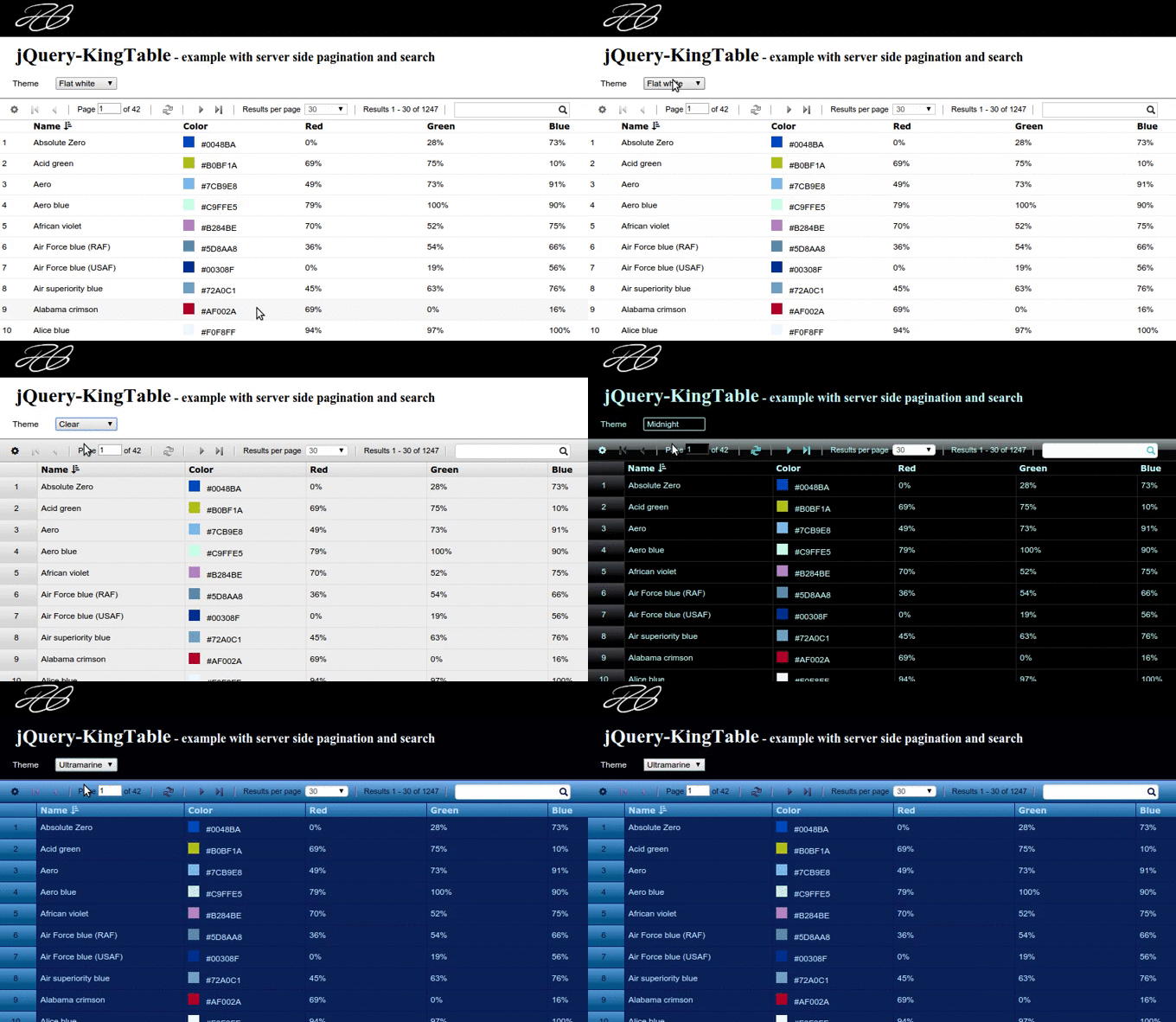
For more information about the themes, refer to the [dedicated wiki page](https://github.com/RobertoPrevato/jQuery-KingTable/wiki/Themes).