# gr-wavelearner
**Repository Path**: open-ai-sdx/gr-wavelearner
## Basic Information
- **Project Name**: gr-wavelearner
- **Description**: No description available
- **Primary Language**: C++
- **License**: GPL-3.0
- **Default Branch**: master
- **Homepage**: None
- **GVP Project**: No
## Statistics
- **Stars**: 0
- **Forks**: 0
- **Created**: 2024-07-27
- **Last Updated**: 2024-07-27
## Categories & Tags
**Categories**: Uncategorized
**Tags**: None
## README
# GR-WAVELEARNER
Incorporate Deep Learning into GNU Radio
### Author

This software is written by **Deepwave Digital, Inc.** [www.deepwavedigital.com]().
### Inquiries
- General company contact: [https://deepwavedigital.com/inquiry](https://deepwavedigital.com/inquiry/)
### Description
This out of tree (OOT) module for GNU Radio contains code to provide an interface to call
[NVIDIA's TensorRT](https://developer.nvidia.com/tensorrt) deep learning binaries from a GNU Radio
flowgraph. TensorRT allows for deep learning networks to be optimized for inference operations on an
NVIDIA graphics processing units (GPU).
For an example of how to use GR-Wavelearner, see our presentation [here](http://deepwavedigital.com/media/2019/GR-Wavelearner_Overview.pdf).
### Dependencies:
- **TensorRT** (v3.0+) [1]
- **AIR-T** - The AIR-T already includes Tensor-RT so you may skip this section.
- **NVIDIA Jetson** - If using the the NVIDIA Jetson, TensorRT is already included with
Jetpack so you may skip this section.
- **Computer with GPU card** - you have two options for this dependency:
1. Use the NVIDIA Docker - [TensorRT Release 18.08](https://docs.nvidia.com/deeplearning/sdk/tensorrt-container-release-notes/rel_18.08.html)
2. Install TensorRT and its dependenices: CUDA and cuDNN. Most of the testing with this
package has occured using the .deb packages (TensorRT 4.0 + CUDA 9.0). Any other method
of installation may work but will require you make sure the software sees all the
dependencies. This software has been tested with the following packages (installed in this order):
- [cuda-repo-ubuntu1604-9-0-local_9.0.176-1_amd64.deb](https://developer.nvidia.com/cuda-90-download-archive)
- [libcudnn7-dev_7.3.1.20-1+cuda9.0_amd64.deb](https://developer.nvidia.com/rdp/cudnn-download)
- [nv-tensorrt-repo-ubuntu1604-cuda9.0-ga-trt4.0.1.6-20180612_1-1_amd64.deb](https://developer.nvidia.com/nvidia-tensorrt-4x-download)
- Both TensorRT and gr-wavelearner use C++14. As a result, the OOT modules are
compiled with the C++14 standard flag set in CMake.
- **GNU Radio** (v3.7.9 or newer) [2]
- This OOT module was tested with gnuradio-runtime, version 3.7.9 because that is the version
available via
`$ sudo apt install gnuradio`
- **SWIG** (v3.0.8 or newer)
- SWIG does not come with GNU Radio and may not be included with your Linux distribution.
- Building this package will fail if SWIG is not installed and you will get an import error
for the inference block. The easiest way to install SWIG is:
`$ sudo apt install swig`
- **Doxygen** (Recommended, not required)
- Installed via:
`$ sudo apt install doxygen`
### Requirments:
- NVIDIA GPU that supports TensorRT v3.0 or newer or the NVIDIA Tegra TX2
### Current Blocks
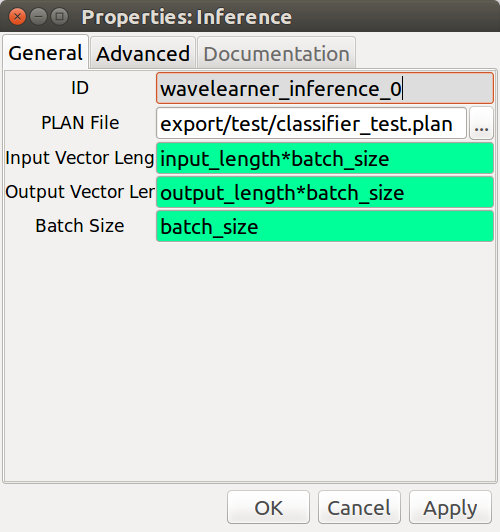
- __**Inference**__ - This C++ block uses TensorRT to perform inference. It assumes one input
and one output node for the network. It requires a TensorRT PLAN file be
provided that contains information on what operations should take place.
The block currently does not handle complex data types. This is primarily
because the vast majority of deep learning software tools (if not all)
do not support complex operations yet. This does not mean that you cannot
perform deep learning on complex data, it just means that the neural
network will treat it as real. For example, one method is to associate
the in-phase and quadrature samples within the network's convolution
kernels [3].
**NOTE:** TensorRT plan files are platform specific. This means that a .plan file created on
Jetson TX2 (like the one provided in `examples`) may not work on a GTX card. To
ensure compatability, make sure you create your .plan file on the platform in which
it will be executed.
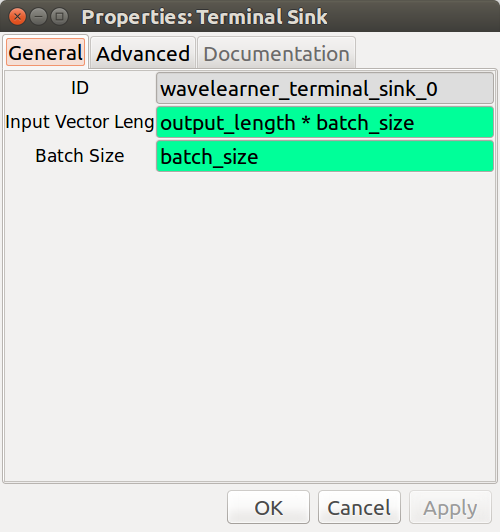
- __**Terminal Sink**__ - This Python block prints the output of a deep learning classifier
to the terminal for debugging and to help the user get up and running
quickly.
- __**cuFFT**__ - This C++ / CUDA block executes NVIDIA's cuFFT algorithm on an input data vector.
## How to Build and Install gr-wavelearner on Ubuntu
1. Install Dependencies listed above (no seriously, make sure they are installed)
- Make sure you can import gnuradio and tensorrt from the same python environment in which you are
installing gr-wavelearner
2. Clone the gr-wavelearner repo
```
$ git clone https://github.com/deepwavedigital/gr-wavelearner.git
```
3. This step may not be necessary if installing on the NVIDIA Jetson TX2.
Check to make sure LD_LIBRARY_PATH and PATH environmental variables are properly set according to
your CUDA install. This can typically be accomplished by placing the following at the end of your
`.bashrc` file:
```
# CUDA installation path
export LD_LIBRARY_PATH=/usr/local/cuda-9.0/lib64:$LD_LIBRARY_PATH
export PATH=/usr/local/cuda-9.0/bin:$PATH
```
and then run:
```
$ source ~/.bashrc
```
4. Install the OOT Module
```
$ cd gr-wavelearner
$ mkdir build
$ cd build
$ cmake ../
$ make
$ sudo make install
$ sudo ldconfig
```
5. To uninstall gr-wavelearner Blocks from GNU Radio Companion
```
cd gr-wavelearner/build
sudo make uninstall
```
## Screen Shots
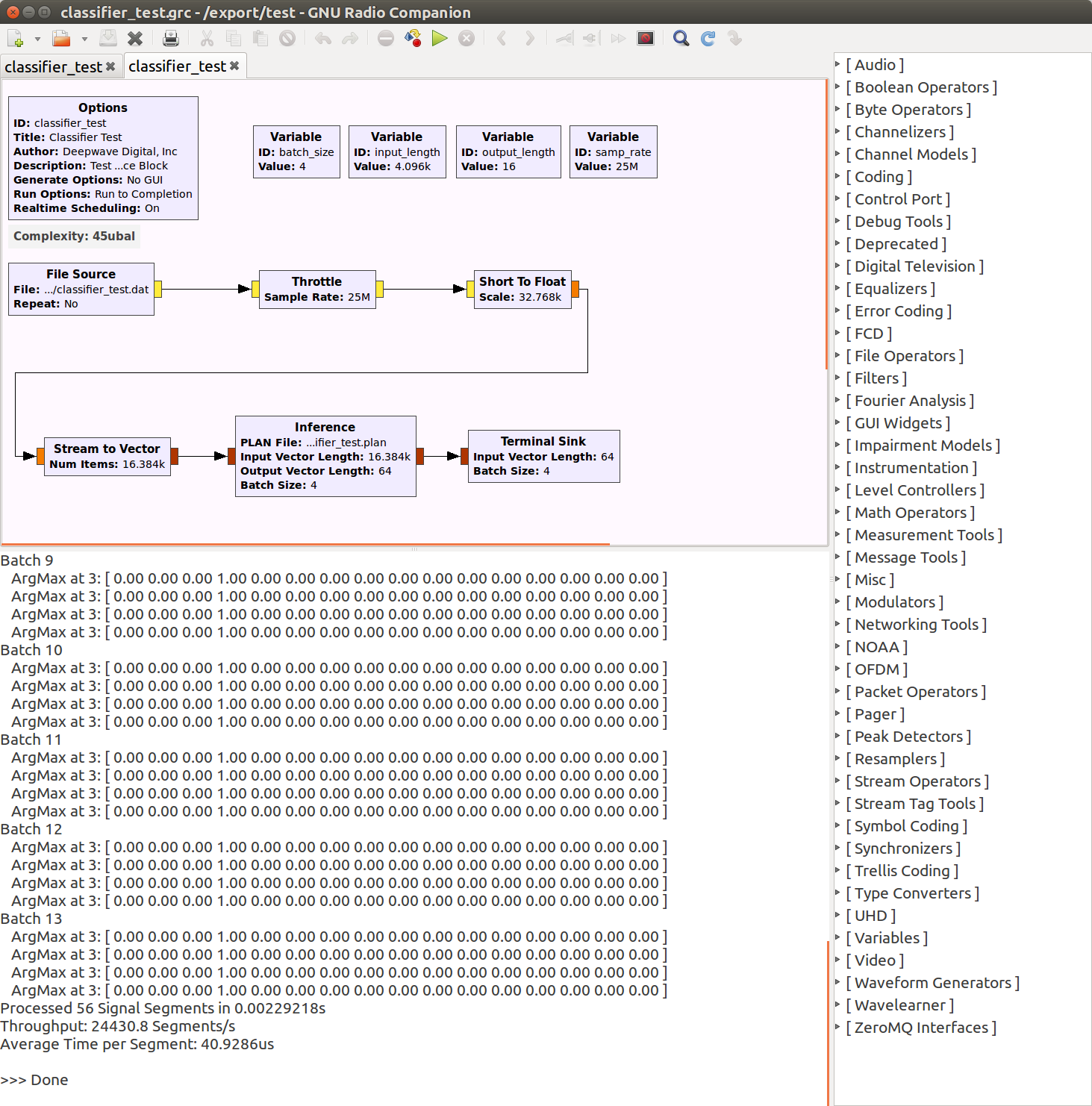
#### Example Flow Graph of Deep Learning Classifier
#### Inference Block
#### Terminal Sink Block
### General Workflow for Creating Applications
1. Train deep learning model (we suggest TensorFlow)
2. Export deep learning model to a UFF file
3. Using TensorRT, optimize the UFF file into a .plan engine file. Note that this stage must
be performed on the system in which you are deploying your network. We provide an example
of how to convert a UFF file to a PLAN file in `examples/uff2plan.py`.
4. Load .plan engine file into the `wavelearner.inference` block.
5. Update the `batch_size`, `input_length`, and `output_length` to match that of your deep
learning model.
### Troubleshooting
- The supported dependencies are listed in the table below. There is a good chance other versions
will work with gr-wavelearner, but they have not been tested. We welcome any feedback on your
successful builds.
| Software | Versions Tested | Application Notes
| :---: | :---: | :---:
| Ubuntu | 16.04 |
| Windows | 10 | Tested with TensorRT 5.0
| Jetpack | 3.0, 3.3 |
| CUDA | 9.0 |
| cuDNN | 7.2, 7.3 |
| TensorRT | 3.0, 4.0, 5.0 |
- If you are having trouble building gr-wavelearner, the first thing to check is the installed
version of the NVIDIA dependencies.
- Check installed version of **CUDA**:
`$ nvcc -V`
Should produce something like:
```
nvcc: NVIDIA (R) Cuda compiler driverCopyright (c) 2005-2017 NVIDIA Corporation
Built on Sun_Nov_19_03:10:15_CST_2017
Cuda compilation tools, release 9.0, V9.0.252
````
which would be **CUDA v9.0.252**.
- Check installed version of **cuDNN**:
`$ cat /usr/include/cudnn.h | grep "#define CUDNN_MAJOR" -A 2`
Should produce something like:
```
#define CUDNN_MAJOR 7
#define CUDNN_MINOR 2
#define CUDNN_PATCHLEVEL 1
```
which would be **cuDNN v7.2.1**
- Check installed version of **TensorRT**:
`$ dpkg -l | grep TensorRT`
Should produce something like:
```
ii graphsurgeon-tf 4.1.2-1+cuda9.0 amd64 GraphSurgeon for TensorRT package
ii libnvinfer-dev 4.1.2-1+cuda9.0 amd64 TensorRT development libraries and headers
ii libnvinfer-samples 4.1.2-1+cuda9.0 amd64 TensorRT samples and documentation
ii libnvinfer4 4.1.2-1+cuda9.0 amd64 TensorRT runtime libraries
ii python-libnvinfer 4.1.2-1+cuda9.0 amd64 Python bindings for TensorRT
ii python-libnvinfer-dev 4.1.2-1+cuda9.0 amd64 Python development package for TensorRT
ii python-libnvinfer-doc 4.1.2-1+cuda9.0 amd64 Documention and samples of python bindings for TensorRT
ii tensorrt 4.0.1.6-1+cuda9.0 amd64 Meta package of TensorRT
ii uff-converter-tf 4.1.2-1+cuda9.0 amd64 UFF converter for TensorRT package
```
which would be **TensorRT v4.0.1.6** and **NVInfer v4.1.2**
### Known Issues / Future Enhancements
- Currently the inference block's work() function only processes a single
vector each time it is called. However, there may be more data available. It
may improve performance to process all available data by either performing
inference in a loop or (assuming the TensorRT engine has a large enough
maximum batch size) combine the vectors into a larger batch.
- As of now, the input and output node dimensions are combined into a vector
length. This makes the block easier to program; however, it may be more
useful for the user to instead provide NCHW dimensions (i.e., to specify each
dimension individually). Additionally, this would allow the engine validation
step to check each dimension instead of combining everything into one vector
length. For example, in the current code, if a 1x2x2048 node is expected,
then the code will accept any shape (e.g., 4x64x16, 4096x1x1, 8x8x64, etc.)
as long as the resulting dimensions combine into a vector length of 4096.
- Currently the inference block assumes one input node and one output node. As
a result, networks with more than one input or output are not currently
supported.
- The current block assumes that the GPU to be used for inference is device #0,
which may not be correct for multiple GPU systems.
- As of now, only the device mapped memory API (aka. "zero copy" or UVA) is
used since (in previous testing) this memory API provided the best
performance on the Jetson TX2. Unified memory support should be considered
since it would be fairly easy to add (very little code would change) and also
improve performance for PCIe based cards.
- Performance metrics are always printed to the console. The user may want to
log these instead or alternatively just ignore them completely.
### Tags
Deep Learning, Artificial Intelligence, Machine Learning, TensorRT, GPU, Deepwave Digital,
AIR-T, Jetson, NVIDIA, GNU Radio
### Credits and License
GR-WAVELEARNER is designed and written by **Deepwave Digital, Inc.** [www.deepwavedigital.com]()
and is licensed under the GNU General Public License. Copyright notices at the top of source files.
### References
[1] NVIDIA TensorRT - Programmable Inference Accelerator:
[https://developer.nvidia.com/tensorrt]()
[2] GNU Radio - The Free & Open Software Radio Ecosystem:
[https://www.gnuradio.org]()
[2] Making Sense of Signals Presentation- NVIDIA GPU Technology Conference:
[http://on-demand.gputechconf.com/gtc/2018/video/S8375/]()