# HTML-Renderer
**Repository Path**: mirrors_ArthurHub/HTML-Renderer
## Basic Information
- **Project Name**: HTML-Renderer
- **Description**: Cross framework (WinForms/WPF/PDF/Metro/Mono/etc.), Multipurpose (UI Controls / Image generation / PDF generation / etc.), 100% managed (C#), High performance HTML Rendering library.
- **Primary Language**: Unknown
- **License**: BSD-3-Clause
- **Default Branch**: master
- **Homepage**: None
- **GVP Project**: No
## Statistics
- **Stars**: 0
- **Forks**: 1
- **Created**: 2022-01-06
- **Last Updated**: 2026-01-04
## Categories & Tags
**Categories**: Uncategorized
**Tags**: None
## README
# HTML Renderer
**Cross framework** (WinForms/WPF/PDF/Metro/Mono/etc.), **Multipurpose** (UI Controls / Image generation / PDF generation / etc.), **100% managed** (C#), High performance HTML Rendering library.
The library is 100% managed **C#** code without any external dependencies (no WebBrowser control, ActiveX / COM or MSHTML dll), the only requirement is **.NET Standard 2.0 / .NET 8.0 or higher**.
## Issues & Documentation
For questions and issues, use the official [GitHub repository](https://github.com/ArthurHub/HTML-Renderer).
For documentation, check out the project on the [CodePlex Archive](https://codeplexarchive.org/project/HtmlRenderer) or the [personal blog](https://theartofdev.com/tag/html-renderer/).
## Download
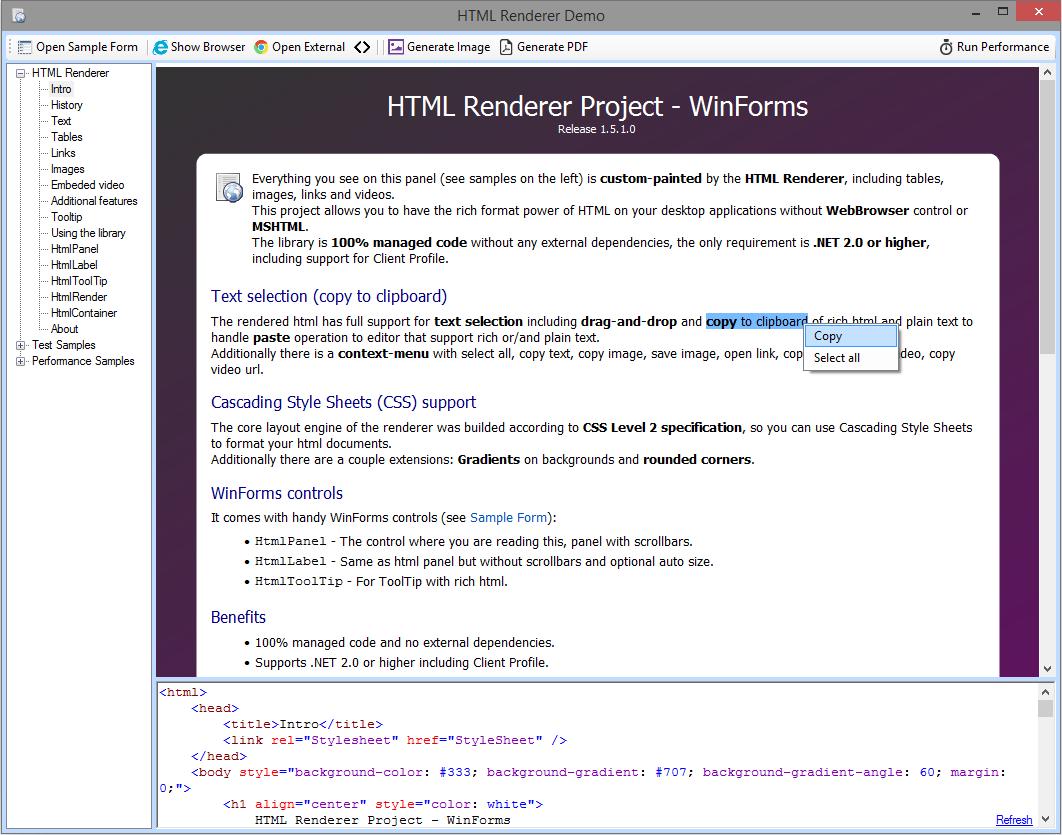
The release packages on [GitHub](https://github.com/ArthurHub/HTML-Renderer/releases) or the [CodePlex Archive](https://codeplexarchive.org/project/HtmlRenderer) also contains a Demo application to explore HML Renderer's capabilities.
The latest NuGet packages can be found on NuGet.org:
* [HtmlRenderer.WinForms](https://www.nuget.org/packages/HtmlRenderer.WinForms)
* [HtmlRenderer.WPF](https://www.nuget.org/packages/HtmlRenderer.WPF)
* [HtmlRenderer.PdfSharp](https://www.nuget.org/packages/HtmlRenderer.PdfSharp)
* [HtmlRenderer.Core](https://www.nuget.org/packages/HtmlRenderer.Core)
## Features and Benefits
* Extensive HTML 4.01 and CSS level 2 specifications support.
* Support separating CSS from HTML by loading stylesheet code separately.
* Support text selection, copy-paste and context menu.
* WinForms controls: HtmlPanel, HtmlLabel and HtmlToolTip.
* WPF controls: HtmlPanel and HtmlLabel.
* Works on Mono.
* Create images/PDFs from HTML snippets.
* Handles "real world" malformed HTML, it doesn't have to be XHTML.
* 100% managed code and no external dependencies.
* Lightweight, just two DLLs (~300K).
* High performance and low memory footprint.
* Extendable and configurable.
* Powerful [Demo application](https://codeplexarchive.org/ProjectTab/Wiki/HtmlRenderer/Documentation/Demo%20application) to explore and learn the library.
## WinForms/WPF controls
* *HtmlPanel* - The full power of HTML control build to replace WebBrowser control, accepts HTML, text selection, scrollbars, link click intercept, image load intercept and much more.
* *HtmlLabel* - As WinForms label but accepts HTML, text selection, auto-size capabilities, transparent background and more.
* *HtmlToolTip* - As WinForms ToolTip control but accepts HTML and ability to handle links (WinForms only).
## Sample application's
* Render HTML content generated by rich web editors like forums, blogs, etc.
* Render Office documents converted to HTML.
* Create WinForms UI that requires text selection with clipboard support.
* [Create images from HTML code snippets](https://codeplexarchive.org/ProjectTab/Wiki/HtmlRenderer/Documentation/Image%20generation).
* Create PDF document from HTML code snippets.