# E-commerce-warehouse
**Repository Path**: micoder/E-commerce-warehouse
## Basic Information
- **Project Name**: E-commerce-warehouse
- **Description**: 电商数仓v5
- **Primary Language**: Shell
- **License**: Not specified
- **Default Branch**: master
- **Homepage**: None
- **GVP Project**: No
## Statistics
- **Stars**: 0
- **Forks**: 1
- **Created**: 2022-08-26
- **Last Updated**: 2023-04-07
## Categories & Tags
**Categories**: Uncategorized
**Tags**: None
## README
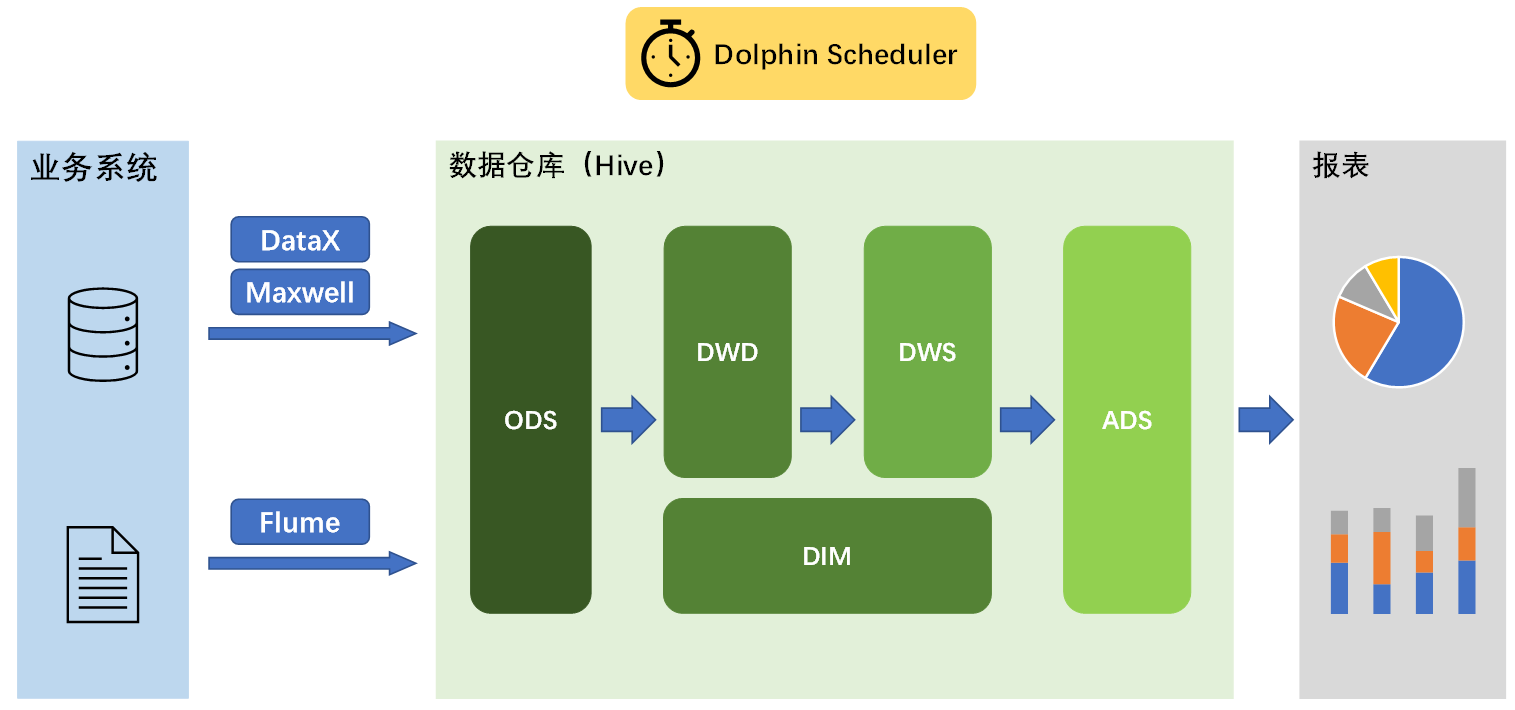
# 整体架构
## 集群服务规划
| 服务名称 | 子服务 | 服务器 dell-r720 | 服务器 dell-r730-4 | 服务器 dell-r730-5 |
|------------------|-------------------|---------------|-----------------|-----------------|
| HDFS | NameNode | ✓ | | |
| | DataNode | ✓ | ✓ | ✓ |
| | SecondaryNameNode | | | ✓ |
| YARN | Resourcemanager | | ✓ | |
| | NodeManager | ✓ | ✓ | ✓ |
| Zookeeper | Zookeeper Server | ✓ | ✓ | ✓ |
| Flume(采集) | Flume | ✓ | ✓ | |
| Kafka | Kafka | ✓ | ✓ | ✓ |
| Flume(消费) | Flume | | | ✓ |
| MySQL | MySQL | ✓ | | |
| DataX | DataX | ✓ | ✓ | ✓ |
| Maxwell | Maxwell | ✓ | | |
| Hive | - | ✓ | ✓ | ✓ |
| Spark | - | ✓ | ✓ | ✓ |
| DolphinScheduler | MasterServer | ✓ | | |
| | WorkerServer | ✓ | ✓ | ✓ |
## jpsall效果
```shell
--------- dell-r720 ----------
5696 JobHistoryServer
4965 NameNode
22533 AlertServer
22629 ApiApplicationServer
1864 NodeManager
5100 DataNode
9487 QuorumPeerMain
20273 Kafka
22289 MasterServer
22386 WorkerServer
25977 RunJar
26363 Application (flume1)
22460 LoggerServer
28287 Maxwell
--------- dell-r730-4 ----------
51072 LoggerServer
3556 DataNode
8276 NodeManager
15205 QuorumPeerMain
13530 Application
17131 Kafka
50942 WorkerServer
8078 ResourceManager
--------- dell-r730-5 ----------
40624 NodeManager
33297 Kafka
21780 QuorumPeerMain
30196 Application (flume2)
28997 WorkerServer
20840 Application (flume3)
29112 LoggerServer
38361 SecondaryNameNode
38172 DataNode
```
# 数据采集
## 用户行为日志采集
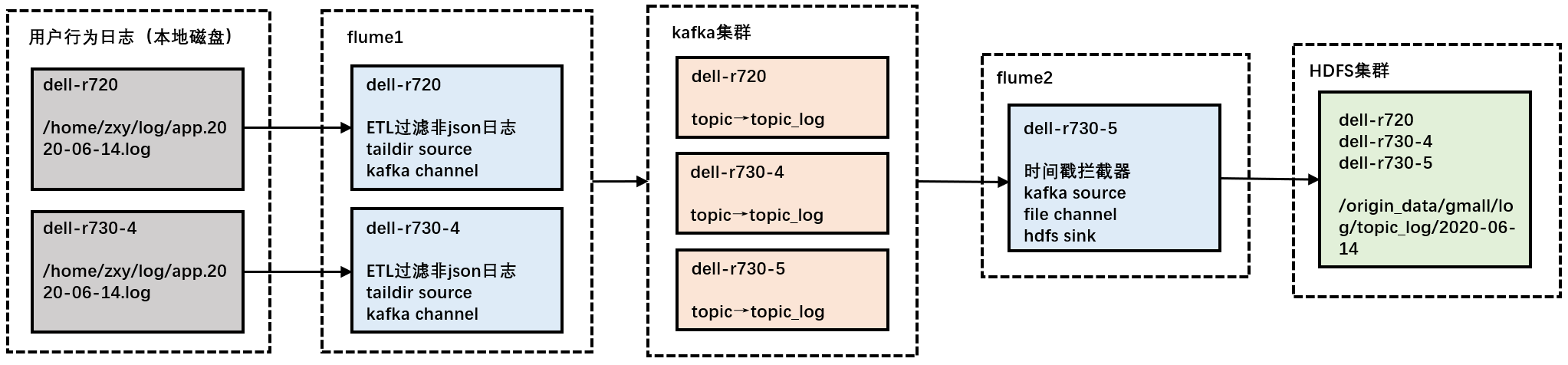
1. 数据生成:使用applog生成模拟数据到磁盘上(修改application.yml指定日期后,通过 `getlog.sh` 生成数据 )
2. 日志同步:启动zookeeper、hadoop、kafka、flume1、flume2,自动识别磁盘文件改动,同步至HDFS上
## 业务数据采集
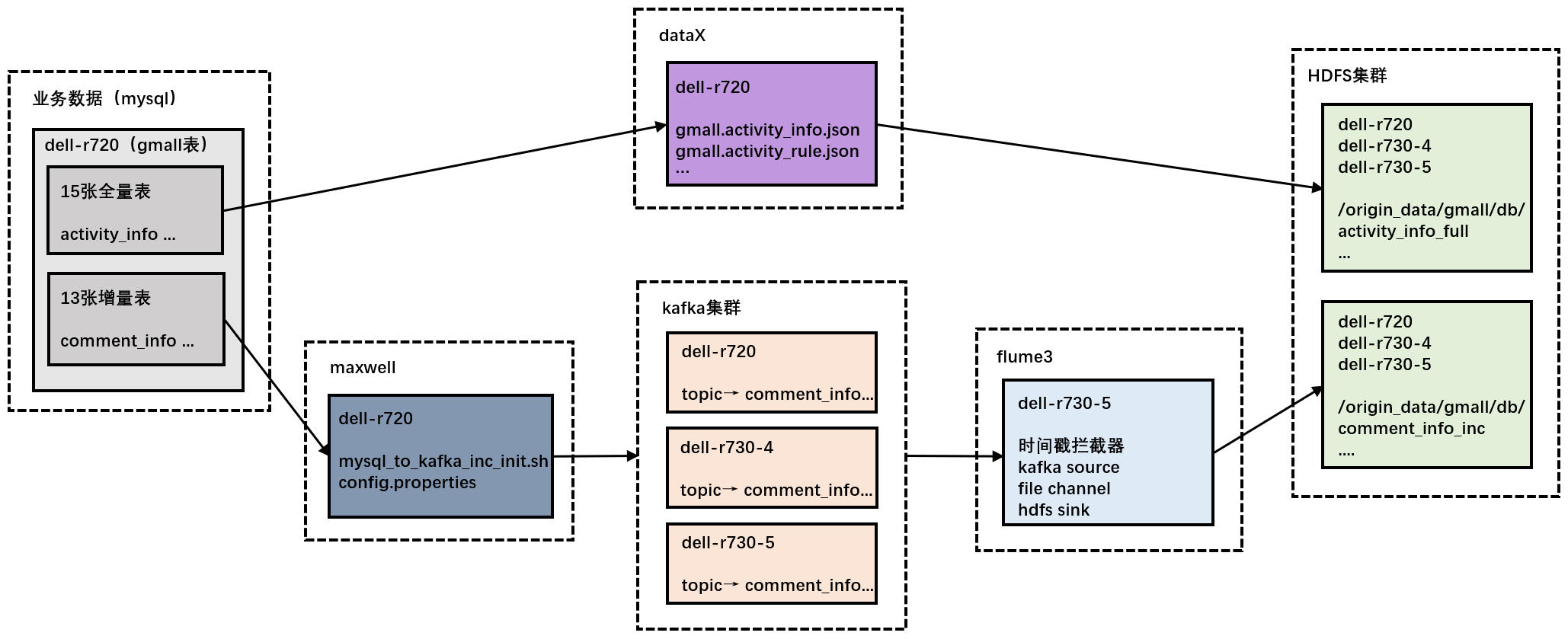
1. 数据生成:使用dblog生成模拟数据到mysql上(修改application.properties指定日期后,通过jar包生成数据 )
2. 全量表导入:启动hadoop,使用 `gen_import_config.sh` 生成dataX使用的json文件(执行一次即可),再通过 `mysql_to_hdfs_full.sh all 日期` 同步数据(注意是最新日期)
3. 增量表同步:启动mysql、zookeeper、hadoop、kafka、flume3、maxwell,使用 `mysql_to_kafka_inc_init.sh all` 同步首日数据(执行一次即可),后续如果需要生成其它日期的数据时,需要先修改maxwell配置文件里的日期并重启maxwell,再使用dblog(修改配置文件与前面一致)生成新一天的数据,模拟增量同步
# 数据仓库
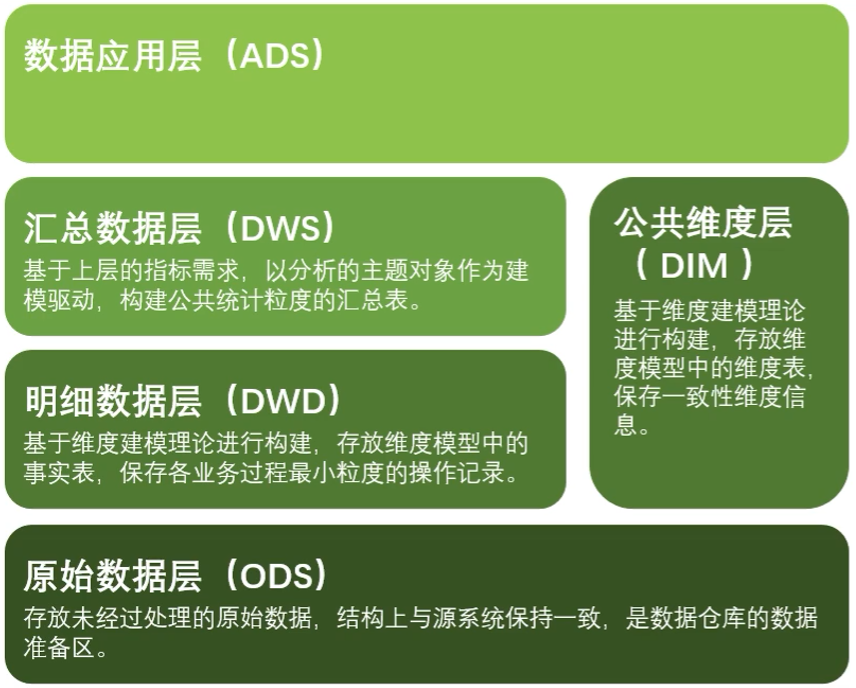
## 架构图
采用典型的维度建模
## 表
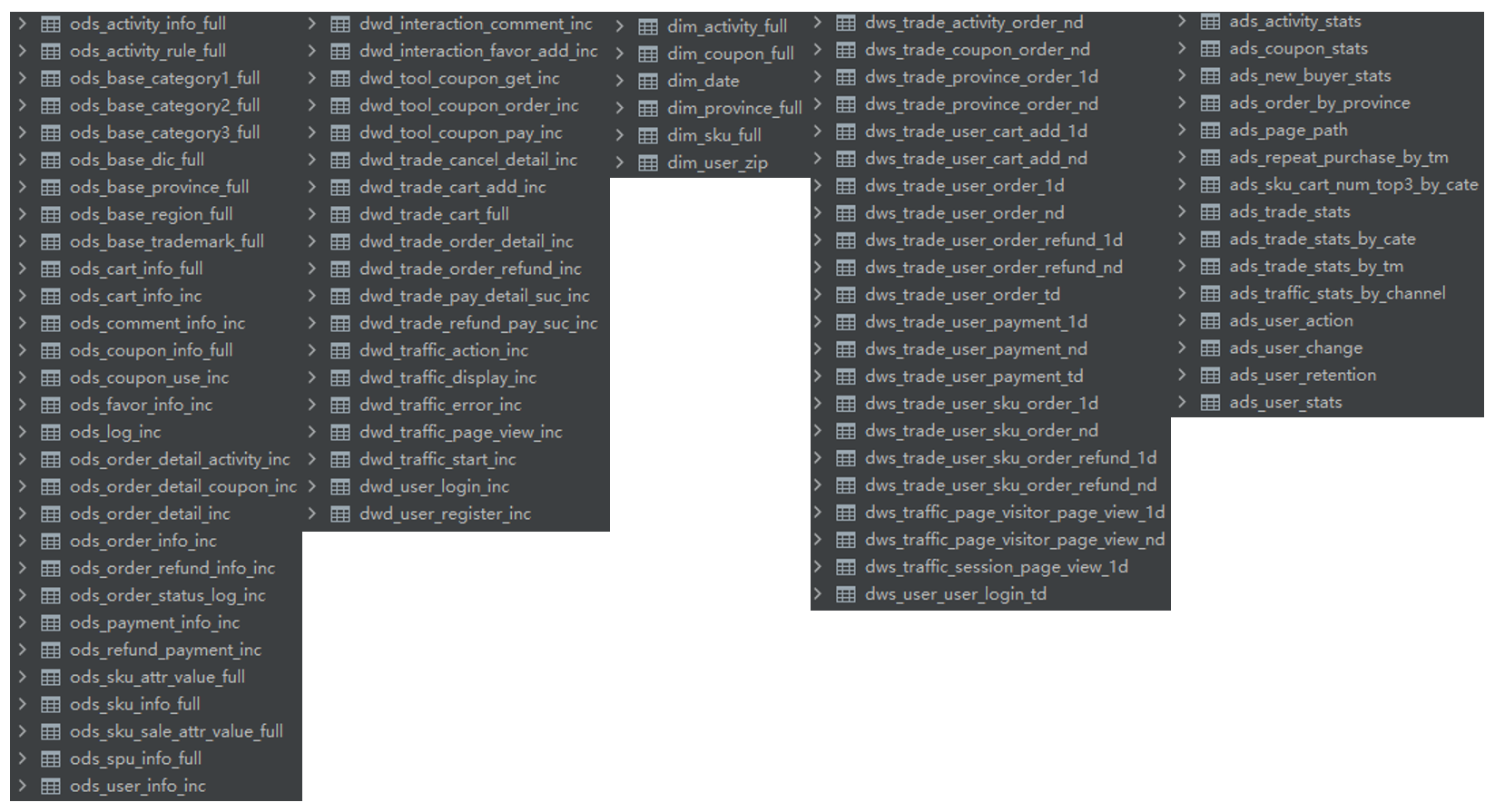
建表与数据导入,使用的查询引擎为 Hive on Spark
1. hdfs -> ods,包括行为日志(log)和业务数据(db)
2. ods -> dwd
3. ods -> dim
4. dwd -> dws,包括dws_1d、dws_nd 和 dws_td
5. dws -> ads
# 调度器
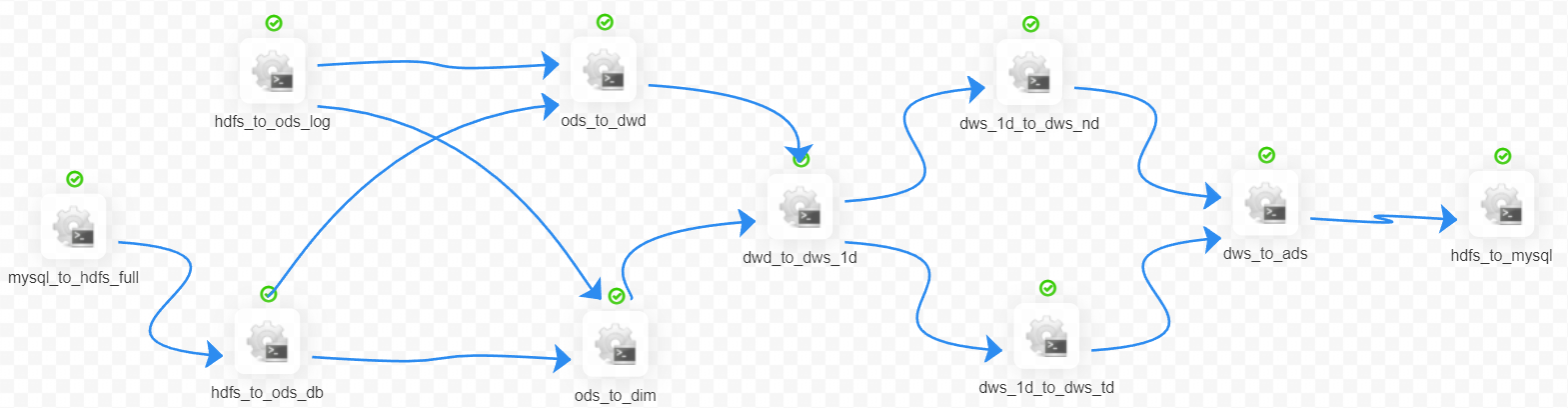
使用 dolphin scheduler 进行脚本调度
1. 头尾的 mysql <-> hdfs 脚本调用的是 dataX
2. 中间的数仓脚本调用的是 Hive on Spark