# smart-doc-maven-plugin
**Repository Path**: ljunwei/smart-doc-maven-plugin
## Basic Information
- **Project Name**: smart-doc-maven-plugin
- **Description**: smart-doc官方maven插件
- **Primary Language**: Java
- **License**: Apache-2.0
- **Default Branch**: master
- **Homepage**: None
- **GVP Project**: No
## Statistics
- **Stars**: 0
- **Forks**: 76
- **Created**: 2021-06-24
- **Last Updated**: 2021-06-24
## Categories & Tags
**Categories**: Uncategorized
**Tags**: None
## README
Smart-Doc Maven Plugin

[](https://www.apache.org/licenses/LICENSE-2.0)



[](https://github.com/shalousun/smart-doc-maven-plugin/blob/master/README_CN.md)
## Introduce
smart-doc-maven-plugin is a `maven` plugin developed by the smart-doc official team.
This plugin is available from smart-doc 1.7.9.
Using smart-doc-maven-plugin makes it easier to integrate smart-doc into your project, and integration is more lightweight.
You no longer need to write unit tests in your project to
Start smart-doc to scan source code analysis and generate API documents.
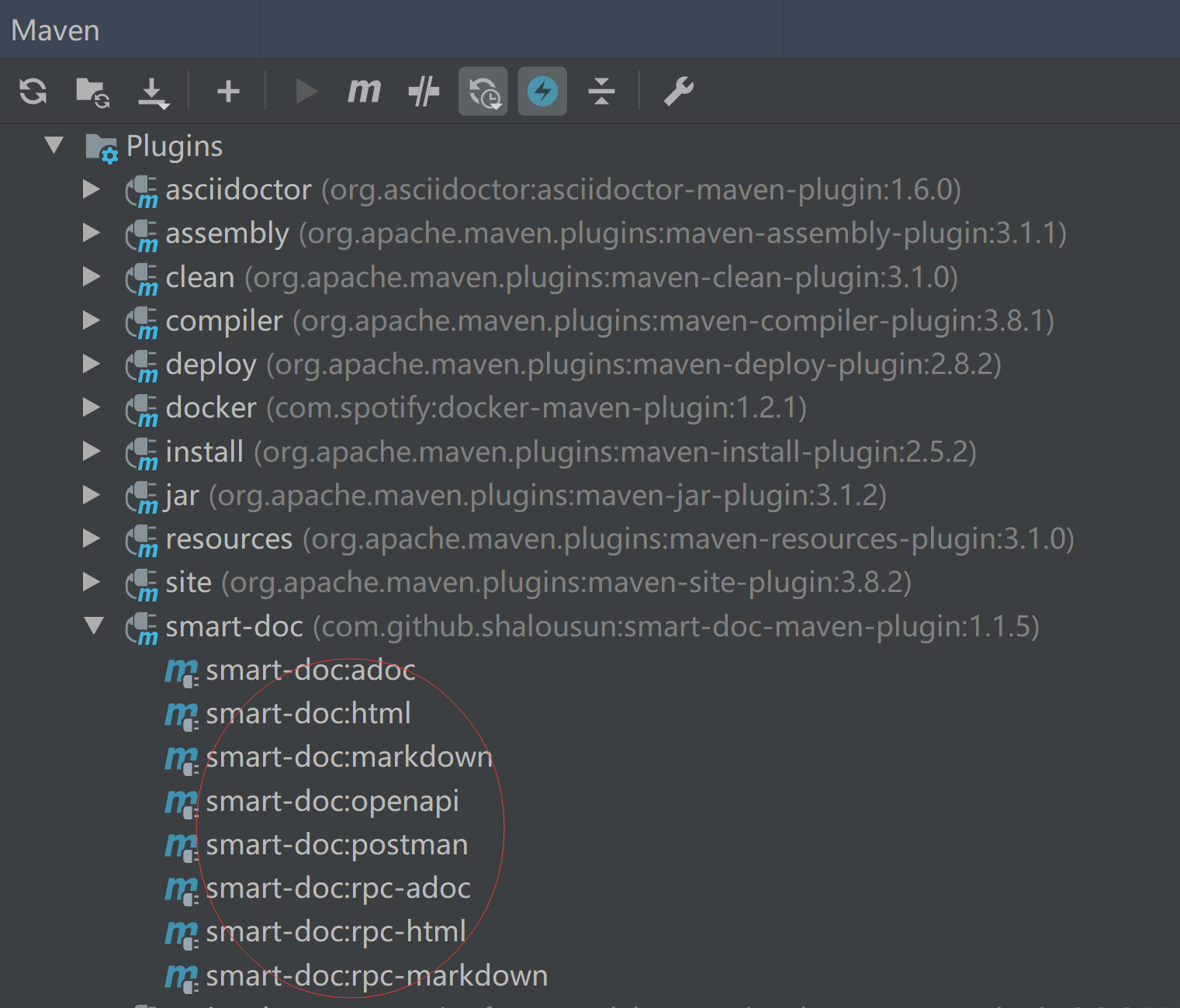
You can run the `maven` command directly or click on the preset` goal` of the smart-doc-maven-plugin in the IDE to generate API documentation.
smart-doc-maven-plugin will also make smart-doc's ability to generate API documentation more powerful.
[About smart-doc](https://github.com/shalousun/smart-doc)
## Best Practice
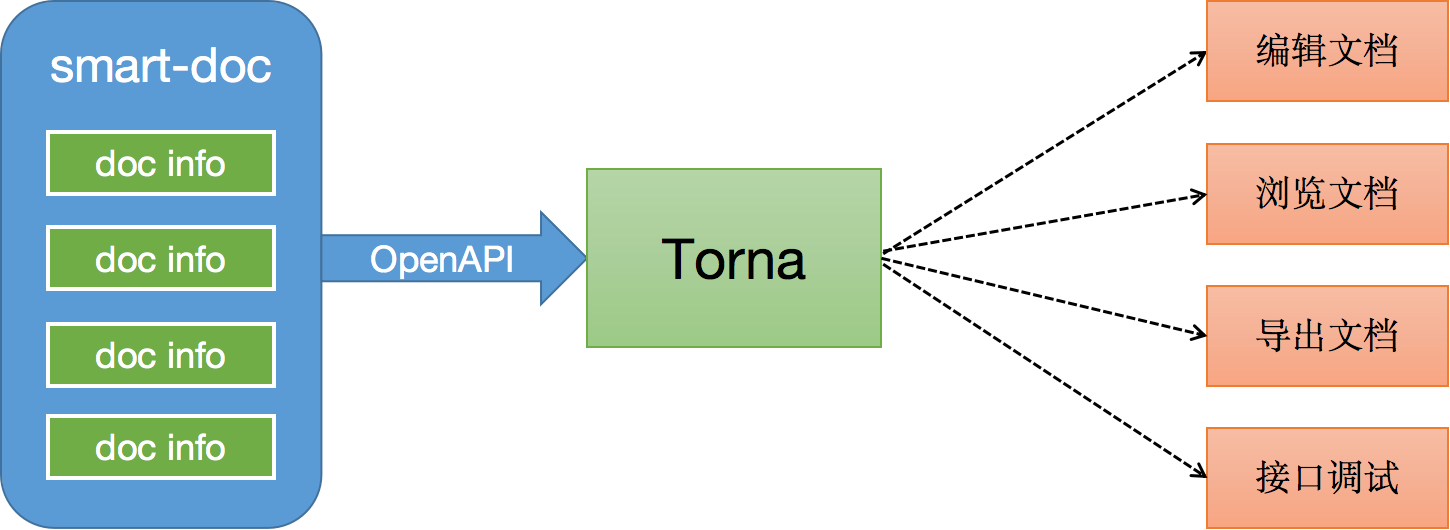
smart-doc + [Torna](http://torna.cn) form an industry-leading document generation and management solution, using smart-doc to complete Java source code analysis and extract annotations to generate API documents without intrusion, and automatically push the documents to the Torna enterprise-level interface document management platform.
## Getting started
### Add plugin
```
com.github.shalousun
smart-doc-maven-plugin
[latest version]
./src/main/resources/smart-doc.json
com.google.guava:guava
com.alibaba:fastjson
compile
html
```
### Create a json config
Create a json configuration file in your project. The smart-doc-maven-plugin plugin will use this configuration information.
For example, create `/src/main/resources/smart-doc.json` in the project.
The configuration contents are as follows.
**Minimize configuration:**
```
{
"allInOne": true, // whether to merge documents into one file, generally recommended as true
"isStrict": false,//If the strict mode is set to true, Smart-doc forces that the public method in each interface in the code has a comment.
"outPath": "/src/main/resources" //Set the api document output path.
}
```
Only three configurations items are needed to generate API documentation using smart-doc-maven-plugin. In fact, only outPath must be configured.
**Detailed configuration content:**
When you need to use smart-doc to generate more API document information, you can add detailed configuration content.
```
{
"serverUrl": "http://127.0.0.1", // Set the server address, not required
"isStrict": false, // whether to enable strict mode
"allInOne": true, // whether to merge documents into one file, generally recommended as true
"outPath": "D: // md2", // Specify the output path of the document
"coverOld": true, // Whether to overwrite old files, mainly used for mardown file overwrite
"style":"xt256", //set highlight
"createDebugPage": true,//Create a page that can be used to test your APIs like swagger
"language":"ENGLISH",//support ENGLISH and CHINESE
"packageFilters": "", // controller package filtering, multiple package names separated by commas
"md5EncryptedHtmlName": false, // only used if each controller generates an html file
"projectName": "smart-doc", // Configure your own project name
"skipTransientField": true, // Not currently implemented
"requestFieldToUnderline":true, //convert request field to underline
"responseFieldToUnderline":true,//convert response field to underline
"sortByTitle":false,//Sort by interface title, the default value is false
"showAuthor":true,// display author,default is true
"inlineEnum":true,// Set to true to display enumeration details in the parameter table
"recursionLimit":7,// Set the number of recursive executions to avoid stack overflow, the default is 7
"allInOneDocFileName":"index.html",//Customize the output document name
"requestExample":"true",//Whether to display the request example in the document, the default value is true.
"responseExample":"true",//Whether to display the response example in the document, the default is true.
"displayActualType":false,//display actual type of generic,
"urlSuffix":".do",//Support the url suffix of the old SpringMVC project,@since 2.1.0
"appKey": "xxx",// torna appKey, @since 2.0.9
"appToken": "xxx", //torna appToken,@since 2.0.9
"secret": "xx",//torna secret,@since 2.0.9
"openUrl": "torna server/api/",//torna server url,@since 2.0.9
"ignoreRequestParams":[ //The request parameter object will be discarded when generating the document.@since 1.9.2
"org.springframework.ui.ModelMap"
],
"dataDictionaries": [{// Configure the data dictionary, no need to set
"title": "Order Status", // The name of the data dictionary
"enumClassName": "com.power.doc.enums.OrderEnum", // Data dictionary enumeration class name
"codeField": "code", // The field name corresponding to the data dictionary dictionary code
"descField": "desc" // Data dictionary object description information dictionary
}],
"errorCodeDictionaries": [{// error code list, no need to set
"title": "title",
"enumClassName": "com.power.doc.enums.ErrorCodeEnum", // Error code enumeration class
"codeField": "code", // Code field name of the error code
"descField": "desc" // Field name corresponding to the error code description
}],
"revisionLogs": [{// Set document change records, no need to set
"version": "1.0", // Document version number
"revisionTime": "2020-12-31 10:30", //revision time
"status": "update", // Change operation status, generally: create, update, etc.
"remarks": "desc" // Change description
}],
"customResponseFields": [{// Customly add fields and comments. If api-doc encounters a field with the same name later, directly add a comment to the corresponding field. It is not necessary.
"name": "code", // Override the response code field
"desc": "Response code", // Override field comment of response code
"value": "00000" // Set the value of the response code
}],
"customRequestFields":[{//@since 2.1.3
"name":"code", //Override the request code field
"desc":"request code", //Override field comment of response code
"ownerClassName":"com.xxx.constant.entity.Result",
"value":"200", // Set the value of the response code
"required":true,
"ignore":false
}],
"apiObjectReplacements": [{ // Supports replacing specified objects with custom objects to complete document rendering
"className": "org.springframework.data.domain.Pageable",
"replacementClassName": "com.power.doc.model.PageRequestDto" //Use custom PageRequestDto instead of JPA Pageable for document rendering.
}],
"rpcApiDependencies":[{ // Your Apache Dubbo api interface module dependency description.
"artifactId":"SpringBoot2-Dubbo-Api",
"groupId":"com.demo",
"version":"1.0.0"
}],
"apiConstants": [{//Configure your own constant class, smart-doc automatically replaces with a specific value when parsing to a constant
"constantsClassName": "com.power.doc.constants.RequestParamConstant"
}],
"responseBodyAdvice":{ //Support ResponseBodyAdvice
"className":"com.power.common.model.CommonResult" // Standard POJO for Response
},
"requestBodyAdvice":{ //Support ResponseBodyAdvice
"className":"com.power.common.model.CommonResult" // Standard POJO for Request
},
"rpcConsumerConfig": "src/main/resources/consumer-example.conf",//dubbo consumer config example
"requestHeaders": [{// Set global request headers, no need to set
"name": "token",
"type": "string",
"desc": "desc",
"required": false,
"since": "-"
}]
}
```
**Note:** The above json configuration is completely converted into json using the smart-doc's ApiConfig.
So the project configuration can also refer to the introduction of smart-doc.
### Generated document
#### Run plugin with maven command
```
// Generate html
mvn -Dfile.encoding=UTF-8 smart-doc:html
// Generate markdown
mvn -Dfile.encoding=UTF-8 smart-doc:markdown
// Generate adoc
mvn -Dfile.encoding=UTF-8 smart-doc:adoc
// Generate postman collection
mvn -Dfile.encoding=UTF-8 smart-doc:postman
// Generate Open Api 3.0+,Since 1.1.5
mvn -Dfile.encoding=UTF-8 smart-doc:openapi
// Generate document and send to Torna
mvn -Dfile.encoding=UTF-8 smart-doc:torna-rest
// For Apache Dubbo Rpc
// Generate html
mvn -Dfile.encoding=UTF-8 smart-doc:rpc-html
// Generate markdown
mvn -Dfile.encoding=UTF-8 smart-doc:rpc-markdown
// Generate adoc
mvn -Dfile.encoding=UTF-8 smart-doc:rpc-adoc
```
**Note:** Under the window system, if you use the maven command line to perform document generation,
non-English characters may be garbled, so you need to specify `-Dfile.encoding = UTF-8` during execution.
View maven's coding
```
# mvn -version
Apache Maven 3.3.3 (7994120775791599e205a5524ec3e0dfe41d4a06; 2015-04-22T19:57:37+08:00)
Maven home: D:\ProgramFiles\maven\bin\..
Java version: 1.8.0_191, vendor: Oracle Corporation
Java home: D:\ProgramFiles\Java\jdk1.8.0_191\jre
Default locale: zh_CN, platform encoding: GBK
OS name: "windows 10", version: "10.0", arch: "amd64", family: "dos"
```
#### Run plugin in IDEA
On Use IntelliJ IDE, if you have added smart-doc-maven-plugin to the project,
you can directly find the plugin smart-doc plugin and click to generate API documentation.
### Generated document example
#### Interface header rendering

#### Request parameter example rendering

#### Response parameter example renderings

## Building
you can build with the following commands. (Java 1.8 is required to build the master branch)
```
mvn clean install -Dmaven.test.skip=true
```
## Other reference
- [Smart-doc manual](https://github.com/shalousun/smart-doc/wiki)
## Who is using
These are only part of the companies using smart-doc, for reference only. If you are using smart-doc, please [add your company here](https://github.com/shalousun/smart-doc/issues/12) to tell us your scenario to make smart-doc better.


 ## License
smart-doc-maven-plugin is under the Apache 2.0 license. See the [LICENSE](https://raw.githubusercontent.com/shalousun/smart-doc-maven-plugin/master/LICENSE) file for details.
## Contact
Email: 836575280@qq.com
## License
smart-doc-maven-plugin is under the Apache 2.0 license. See the [LICENSE](https://raw.githubusercontent.com/shalousun/smart-doc-maven-plugin/master/LICENSE) file for details.
## Contact
Email: 836575280@qq.com