overlay on the cloned root.
*
* @param {{ color?: string; blur?: number }} [options]
* color: overlay color (rgba/hex/hsl). Default: 'rgba(0,0,0,0.25)'
* blur: optional blur in px (default: 0)
*/
export function overlayFilterPlugin(options = {}) {
const color = options.color ?? 'rgba(0,0,0,0.25)';
const blur = Math.max(0, options.blur ?? 0);
return {
name: 'overlay-filter',
/**
* Add a full-coverage overlay to the cloned HTML root.
* @param {any} context
*/
async afterClone(context) {
const root = context.clone;
if (!(root instanceof HTMLElement)) return; // HTML-only
// Ensure containing block so absolute overlay anchors to the root
if (getComputedStyle(root).position === 'static') {
root.style.position = 'relative';
}
const overlay = document.createElement('div');
overlay.style.position = 'absolute';
overlay.style.left = '0';
overlay.style.top = '0';
overlay.style.right = '0';
overlay.style.bottom = '0';
overlay.style.background = color;
overlay.style.pointerEvents = 'none';
if (blur) overlay.style.filter = `blur(${blur}px)`;
root.appendChild(overlay);
}
};
}
```
**Usage:**
```js
import { snapdom } from '@zumer/snapdom';
// Global registration
snapdom.plugins([overlayFilterPlugin, { color: 'rgba(0,0,0,0.3)', blur: 2 }]);
// Per-capture
const out = await snapdom(document.querySelector('#card'), {
plugins: [[overlayFilterPlugin, { color: 'rgba(255,200,0,0.15)' }]]
});
const png = await out.toPng();
document.body.appendChild(png);
```
> The overlay is injected **only in the cloned tree**, never in your live DOM, ensuring perfect fidelity and zero flicker.
### Full Plugin Template
Use this as a starting point for custom logic or exporters.
```js
export function myPlugin(options = {}) {
return {
/** Unique name used for de-duplication/overrides */
name: 'my-plugin',
/** Early adjustments before any clone/style work. */
async beforeSnap(context) {},
/** Before subtree cloning (use sparingly if touching the live DOM). */
async beforeClone(context) {},
/** After subtree cloning (safe to modify the cloned tree). */
async afterClone(context) {},
/** Right before serialization (SVG/dataURL). */
async beforeRender(context) {},
/** After serialization; inspect context.svgString/context.dataURL if needed. */
async afterRender(context) {},
/** Before EACH export call (toPng/toSvg/toBlob/...). */
async beforeExport(context) {},
/**
* After EACH export call.
* If you return a value, it becomes the result for the next plugin (chaining).
*/
async afterExport(context, result) { return result; },
/**
* Define custom exporters (auto-added as helpers like out.toPdf()).
* Return a map { [key: string]: (ctx:any, opts:any) => Promise
}.
*/
async defineExports(context) { return {}; },
/** Runs ONCE after the FIRST export finishes (cleanup). */
async afterSnap(context) {}
};
}
```
**Quick recap:**
* Plugins can modify capture behavior (`beforeSnap`, `afterClone`, etc.).
* You can inject visuals or transformations safely into the cloned tree.
* New exporters defined in `defineExports()` automatically become helpers like `out.toPdf()`.
* All hooks can be asynchronous, run in order, and share the same `context`.
## Limitations
* External images should be CORS-accessible (use `useProxy` option for handling CORS denied)
* When WebP format is used on Safari, it will fallback to PNG rendering.
* `@font-face` CSS rule is well supported, but if need to use JS `FontFace()`, see this workaround [`#43`](https://github.com/zumerlab/snapdom/issues/43)
## Performance Benchmarks
**Setup.** Vitest benchmarks on Chromium, repo tests. Hardware may affect results.
Values are **average capture time (ms)** → lower is better.
### Simple elements
| Scenario | SnapDOM current | SnapDOM v1.9.9 | html2canvas | html-to-image |
| ------------------------ | --------------- | -------------- | ----------- | ------------- |
| Small (200×100) | **0.5 ms** | 0.8 ms | 67.7 ms | 3.1 ms |
| Modal (400×300) | **0.5 ms** | 0.8 ms | 75.5 ms | 3.6 ms |
| Page View (1200×800) | **0.5 ms** | 0.8 ms | 114.2 ms | 3.3 ms |
| Large Scroll (2000×1500) | **0.5 ms** | 0.8 ms | 186.3 ms | 3.2 ms |
| Very Large (4000×2000) | **0.5 ms** | 0.9 ms | 425.9 ms | 3.3 ms |
### Complex elements
| Scenario | SnapDOM current | SnapDOM v1.9.9 | html2canvas | html-to-image |
| ------------------------ | --------------- | -------------- | ----------- | ------------- |
| Small (200×100) | **1.6 ms** | 3.3 ms | 68.0 ms | 14.3 ms |
| Modal (400×300) | **2.9 ms** | 6.8 ms | 87.5 ms | 34.8 ms |
| Page View (1200×800) | **17.5 ms** | 50.2 ms | 178.0 ms | 429.0 ms |
| Large Scroll (2000×1500) | **54.0 ms** | 201.8 ms | 735.2 ms | 984.2 ms |
| Very Large (4000×2000) | **171.4 ms** | 453.7 ms | 1,800.4 ms | 2,611.9 ms |
### Run the benchmarks
```sh
git clone https://github.com/zumerlab/snapdom.git
cd snapdom
npm install
npm run test:benchmark
```
## Roadmap
Planned improvements for future versions of SnapDOM:
* [X] **Implement plugin system**
SnapDOM will support external plugins to extend or override internal behavior (e.g. custom node transformers, exporters, or filters).
* [ ] **Refactor to modular architecture**
Internal logic will be split into smaller, focused modules to improve maintainability and code reuse.
* [X] **Decouple internal logic from global options**
Functions will be redesigned to avoid relying directly on `options`. A centralized capture context will improve clarity, autonomy, and testability. See [`next` branch](https://github.com/zumerlab/snapdom/tree/main)
* [X] **Expose cache control**
Users will be able to manually clear image and font caches or configure their own caching strategies.
* [X] **Auto font preloading**
Required fonts will be automatically detected and preloaded before capture, reducing the need for manual `preCache()` calls.
* [X] **Document plugin development**
A full guide will be provided for creating and registering custom SnapDOM plugins.
* [ ] **Make export utilities tree-shakeable**
Export functions like `toPng`, `toJpg`, `toBlob`, etc. will be restructured into independent modules to support tree shaking and minimal builds.
Have ideas or feature requests?
Feel free to share suggestions or feedback in [GitHub Discussions](https://github.com/zumerlab/snapdom/discussions).
## Development
To contribute or build snapDOM locally:
```sh
# Clone the repository
git clone https://github.com/zumerlab/snapdom.git
cd snapdom
# Switch to dev branch
git checkout dev
# Install dependencies
npm install
# Compile the library (ESM, CJS, and minified versions)
npm run compile
# Install playwright browsers (necessary for running tests)
npx playwright install
# Run tests
npm test
# Run Benchmarks
npm run test:benchmark
```
The main entry point is in `src/`, and output bundles are generated in the `dist/` folder.
For detailed contribution guidelines, please see [CONTRIBUTING](https://github.com/zumerlab/snapdom/blob/main/CONTRIBUTING.md).
## Contributors


## Sponsors
Special thanks to [@megaphonecolin](https://github.com/megaphonecolin), [@sdraper69](https://github.com/sdraper69), [@reynaldichernando](https://github.com/reynaldichernando) and [@gamma-app](https://github.com/gamma-app), for supporting this project!
If you'd like to support this project too, you can [become a sponsor](https://github.com/sponsors/tinchox5).
## Star History
[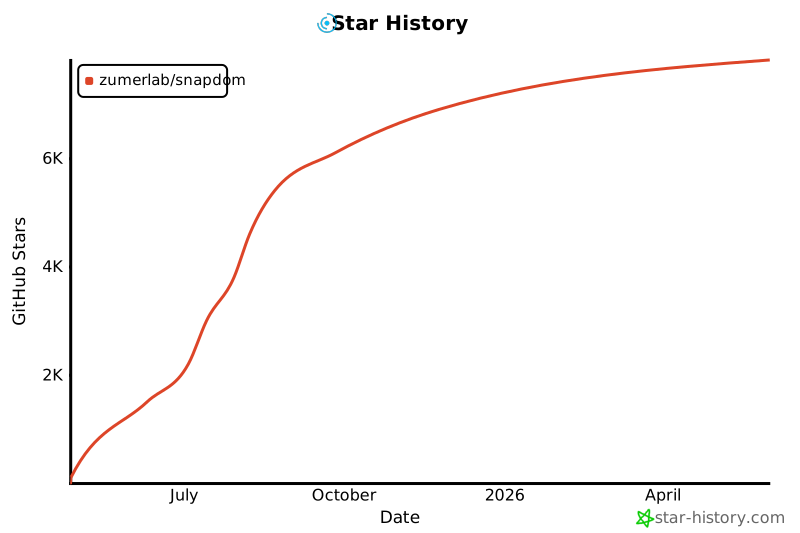](https://www.star-history.com/#zumerlab/snapdom&Date)
## License
MIT © Zumerlab