# easyapi-json-editor
**Repository Path**: easyapi/easyapi-json-editor
## Basic Information
- **Project Name**: easyapi-json-editor
- **Description**: EasyAPI JSON编辑器
- **Primary Language**: Unknown
- **License**: Not specified
- **Default Branch**: master
- **Homepage**: None
- **GVP Project**: No
## Statistics
- **Stars**: 0
- **Forks**: 1
- **Created**: 2021-09-07
- **Last Updated**: 2021-12-12
## Categories & Tags
**Categories**: Uncategorized
**Tags**: None
## README
# EasyAPI JSON 编辑器
## 组件命名
easyapi-json-editor
## 组件描述
EasyAPI JSON 编辑器组件,参考市面上标准的 JSON 编辑器风格,另外还包括数据类型(字段类型),数据注释(字段描述),示例值。
当 JSON 数据传入(覆盖性传入),保持原来填写的注释与类型内容,在原来基础上继续完善,例如有新增的字段。
## 组件效果图
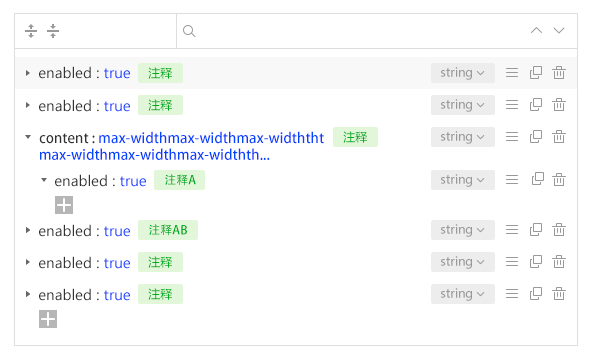
> 本组件重点是可以在编辑器上面直接设置数据注释(字段描述)和数据类型(字段类型)
## 数据格式
传入数据格式与输出数据格式一致
> JSON 示例如下:
```json
{
"name": "blog",
"type": "object",
"description": "博客",
"sample": "",
"sequence": 1,
"childs": [
{
"name": "title",
"type": "string",
"description": "标题",
"sample": "我和我的祖国",
"sequence": 1
}
]
}
```
## 方法说明
_1、getJSONEditorData 获取 JSON 编辑器数据_
_2、importJSON 导入标准 JSON 数据_
> 使用 JSON 的 Value 作为示例值,并自动处理数据类型
_3、exportJSON 导出标准 JSON 数据_
> 使用示例值作为 JSON 的 Value
## 更多
_数据类型(字段类型)_
## Example
```
```
> string, number, boolean, integer, float, double, object, array
## Example
```
```
## 目录结构
```
├── dist 打包后产物
├── example 运行用例
├── src 源码
│ ├── ArrayView.vue 数组模块
│ ├── ItemAddForm.vue 新建输入框
│ ├── JsonEditor.vue JSON编辑外层
│ ├── JsonView.vue object模块
│ ├── assets 资源
│ │ ├── font 字体
│ │ └── styles 样式
│ └── index.js
├── webpack.base.js webpack配置基础
├── webpack.build.js webpack配置prod
└── webpack.config.js webpack配置dev
```