# cloudgo
**Repository Path**: barytes/cloudgo
## Basic Information
- **Project Name**: cloudgo
- **Description**: No description available
- **Primary Language**: Go
- **License**: MulanPSL-1.0
- **Default Branch**: master
- **Homepage**: None
- **GVP Project**: No
## Statistics
- **Stars**: 0
- **Forks**: 0
- **Created**: 2020-11-25
- **Last Updated**: 2020-12-19
## Categories & Tags
**Categories**: Uncategorized
**Tags**: None
## README
# cloudgo
本项目仅为一个go web开发的演示项目,完成了以下三个功能:
1. 静态文件访问
2. 简单的 js 访问
3. 表单提交
## 安装
通过 go get 命令安装:
```
$ go get gitee.com/barytes/cloudgo
```
或直接将仓库克隆至 `GOPATH/src/`路径下安装:
```
$ git clone https://gitee.com/barytes/cloudgo.git $GOPATH/src/gitee.com/barytes/initoy/
```
## 使用演示
进入 `cloudgo`文件夹,运行 `main.go`
```
go run main.go
```
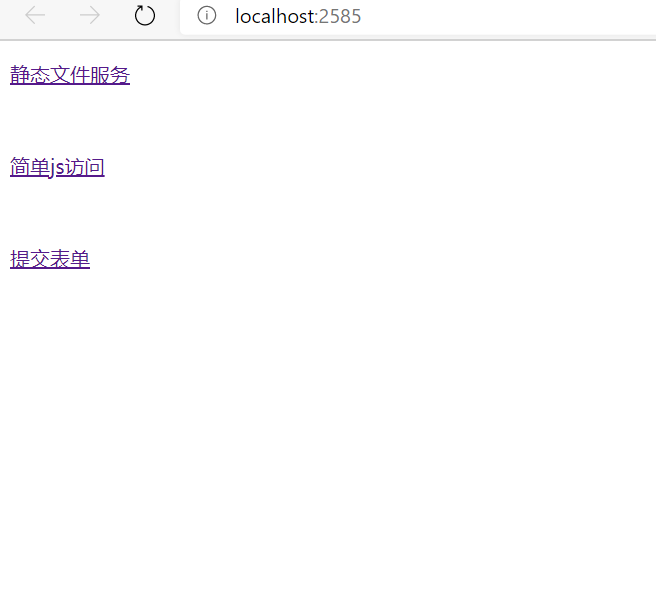
默认端口为 2585,在浏览器输入地址 `http://localhost:2585`,可见如下简单的网页界面:
### 静态文件服务
点击第一个链接:静态文件服务,跳转至`localhost:2585/static`,可以查看服务器`assets/staticFiles`路径下的两个文件
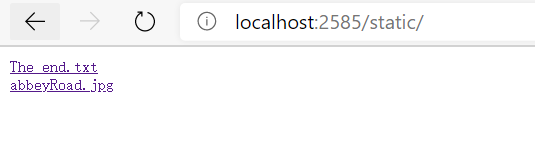
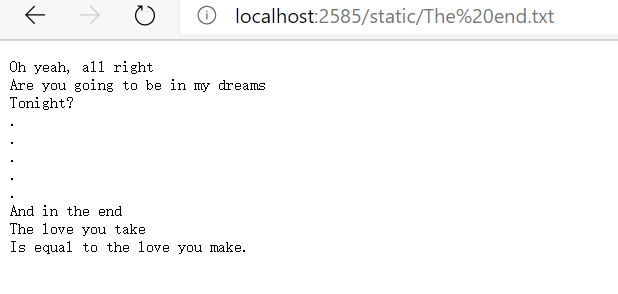
1. The end.txt
2. abbeyRoad.jpg

### 简单 JS 访问
点击第二个链接,跳转至 `localhost:2585/json`

该网页内容由服务器`assets/jsonFiles/javascript`路径下的`hello.js`控制。而该 js 文件接收由 URL `localhost:2585/api/test`提供的json对象。点击”原始JSON对象“链接,跳转至`localhost:2585/api/test`查看提供的原始json对象。

### 表单提交
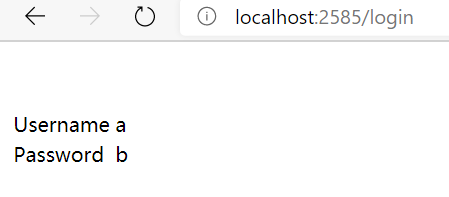
点击第三个链接,跳转至`localhost:2585/login`。

填写两个输入框,并点击登录
## 测试
### curl测试
#### 1. 主页面
```
(base) [root@VM-0-12-centos gowork]# curl -v http://localhost:2585
* Trying ::1:2585...
* Connected to localhost (::1) port 2585 (#0)
> GET / HTTP/1.1
> Host: localhost:2585
> User-Agent: curl/7.71.1
> Accept: */*
>
* Mark bundle as not supporting multiuse
< HTTP/1.1 200 OK
< Accept-Ranges: bytes
< Content-Length: 271
< Content-Type: text/html; charset=utf-8
< Last-Modified: Fri, 27 Nov 2020 05:58:11 GMT
< Date: Fri, 27 Nov 2020 06:58:12 GMT
<
CloudGo
静态文件服务
简单js访问
提交表单
* Connection #0 to host localhost left intact
(base) [root@VM-0-12-centos gowork]#
```
#### 2. 静态文件服务
```
(base) [root@VM-0-12-centos gowork]# curl -v http://localhost:2585/static
* Trying ::1:2585...
* Connected to localhost (::1) port 2585 (#0)
> GET /static HTTP/1.1
> Host: localhost:2585
> User-Agent: curl/7.71.1
> Accept: */*
>
* Mark bundle as not supporting multiuse
< HTTP/1.1 200 OK
< Content-Type: text/html; charset=utf-8
< Last-Modified: Fri, 27 Nov 2020 06:05:14 GMT
< Date: Fri, 27 Nov 2020 06:59:10 GMT
< Content-Length: 95
<
The end.txt
abbeyRoad.jpg
* Connection #0 to host localhost left intact
```
#### 3. 简单JS访问
```
(base) [root@VM-0-12-centos gowork]# curl -v http://localhost:2585/json/
* Trying ::1:2585...
* Connected to localhost (::1) port 2585 (#0)
> GET /json/ HTTP/1.1
> Host: localhost:2585
> User-Agent: curl/7.71.1
> Accept: */*
>
* Mark bundle as not supporting multiuse
< HTTP/1.1 200 OK
< Accept-Ranges: bytes
< Content-Length: 382
< Content-Type: text/html; charset=utf-8
< Last-Modified: Fri, 27 Nov 2020 06:01:32 GMT
< Date: Fri, 27 Nov 2020 07:00:55 GMT
<
ID :
Content :
原始JSON对象
* Connection #0 to host localhost left intact
(base) [root@VM-0-12-centos gowork]#
```
api/test:
```
(base) [root@VM-0-12-centos gowork]# curl -v http://localhost:2585/api/test
* Trying ::1:2585...
* Connected to localhost (::1) port 2585 (#0)
> GET /api/test HTTP/1.1
> Host: localhost:2585
> User-Agent: curl/7.71.1
> Accept: */*
>
* Mark bundle as not supporting multiuse
< HTTP/1.1 200 OK
< Content-Type: application/json; charset=UTF-8
< Date: Fri, 27 Nov 2020 07:02:17 GMT
< Content-Length: 53
<
{
"id": "8675309",
"content": "Hello from Go!"
}
* Connection #0 to host localhost left intact
```
#### 4. 表单提交
```
(base) [root@VM-0-12-centos gowork]# curl -v http://localhost:2585/login
* Trying ::1:2585...
* Connected to localhost (::1) port 2585 (#0)
> GET /login HTTP/1.1
> Host: localhost:2585
> User-Agent: curl/7.71.1
> Accept: */*
>
* Mark bundle as not supporting multiuse
< HTTP/1.1 200 OK
< Date: Fri, 27 Nov 2020 07:05:35 GMT
< Content-Length: 247
< Content-Type: text/html; charset=utf-8
<
* Connection #0 to host localhost left intact
(base) [root@VM-0-12-centos gowork]#
```
### AB测试
使用 `ab`命令对服务器进行压力测试,其中主要使用了 `-c`和`-n`参数:
```
-n:在测试会话中所执行的请求个数
-c:一次产生的请求个数
```
在进行性能测试过程中有几个重要的指标:
1、吞吐率(Requests per second)
吞吐率是对服务器并发处理能力的量化描述,单位为 reqs/s,指某个并发用户数下单位时间内处 理的请求数。
计算公式:$总请求数/完成所有请求时间$
2、并发连接数(The number of concurrent connections)
某个时刻服务器所接受的请求数目。
3、并发用户数(Concurrency Level)
并发链接数除以单个用户可能同时产生的链接数。
4、用户平均请求等待时间(Time per request)
即$总请求数/并发用户数$
5、服务器平均请求等待时间(Time per request:across all concurrent requests)
即 $完成所有请求时间/总请求数$,也即吞吐率的倒数
#### 1. 主页面
```
(base) [root@VM-0-12-centos gowork]# ab -c 100 -n 1000 http://localhost:2585/
This is ApacheBench, Version 2.3 <$Revision: 1430300 $>
Copyright 1996 Adam Twiss, Zeus Technology Ltd, http://www.zeustech.net/
Licensed to The Apache Software Foundation, http://www.apache.org/
Benchmarking localhost (be patient)
Completed 100 requests
Completed 200 requests
Completed 300 requests
Completed 400 requests
Completed 500 requests
Completed 600 requests
Completed 700 requests
Completed 800 requests
Completed 900 requests
Completed 1000 requests
Finished 1000 requests
Server Software:
Server Hostname: localhost
Server Port: 2585
Document Path: /
Document Length: 271 bytes
Concurrency Level: 100
Time taken for tests: 0.124 seconds
Complete requests: 1000
Failed requests: 0
Write errors: 0
Total transferred: 456000 bytes
HTML transferred: 271000 bytes
Requests per second: 8036.84 [#/sec] (mean)
Time per request: 12.443 [ms] (mean)
Time per request: 0.124 [ms] (mean, across all concurrent requests)
Transfer rate: 3578.91 [Kbytes/sec] received
Connection Times (ms)
min mean[+/-sd] median max
Connect: 0 1 0.4 1 2
Processing: 2 11 3.6 10 29
Waiting: 1 10 3.7 9 29
Total: 2 12 3.5 11 30
Percentage of the requests served within a certain time (ms)
50% 11
66% 12
75% 13
80% 13
90% 16
95% 21
98% 23
99% 27
100% 30 (longest request)
```
#### 2. 静态文件访问
```
(base) [root@VM-0-12-centos gowork]# ab -c 100 -n 1000 http://localhost:2585/static
This is ApacheBench, Version 2.3 <$Revision: 1430300 $>
Copyright 1996 Adam Twiss, Zeus Technology Ltd, http://www.zeustech.net/
Licensed to The Apache Software Foundation, http://www.apache.org/
Benchmarking localhost (be patient)
Completed 100 requests
Completed 200 requests
Completed 300 requests
Completed 400 requests
Completed 500 requests
Completed 600 requests
Completed 700 requests
Completed 800 requests
Completed 900 requests
Completed 1000 requests
Finished 1000 requests
Server Software:
Server Hostname: localhost
Server Port: 2585
Document Path: /static
Document Length: 95 bytes
Concurrency Level: 100
Time taken for tests: 0.138 seconds
Complete requests: 1000
Failed requests: 0
Write errors: 0
Total transferred: 257000 bytes
HTML transferred: 95000 bytes
Requests per second: 7263.75 [#/sec] (mean)
Time per request: 13.767 [ms] (mean)
Time per request: 0.138 [ms] (mean, across all concurrent requests)
Transfer rate: 1823.03 [Kbytes/sec] received
Connection Times (ms)
min mean[+/-sd] median max
Connect: 0 1 0.3 1 2
Processing: 2 12 4.0 11 23
Waiting: 1 12 4.2 10 22
Total: 2 13 3.8 12 23
Percentage of the requests served within a certain time (ms)
50% 12
66% 13
75% 13
80% 13
90% 20
95% 22
98% 22
99% 22
100% 23 (longest request)
```
#### 3. 简单JS访问
```
(base) [root@VM-0-12-centos gowork]# ab -c 100 -n 1000 http://localhost:2585/json
This is ApacheBench, Version 2.3 <$Revision: 1430300 $>
Copyright 1996 Adam Twiss, Zeus Technology Ltd, http://www.zeustech.net/
Licensed to The Apache Software Foundation, http://www.apache.org/
Benchmarking localhost (be patient)
Completed 100 requests
Completed 200 requests
Completed 300 requests
Completed 400 requests
Completed 500 requests
Completed 600 requests
Completed 700 requests
Completed 800 requests
Completed 900 requests
Completed 1000 requests
Finished 1000 requests
Server Software:
Server Hostname: localhost
Server Port: 2585
Document Path: /json
Document Length: 19 bytes
Concurrency Level: 100
Time taken for tests: 0.105 seconds
Complete requests: 1000
Failed requests: 0
Write errors: 0
Non-2xx responses: 1000
Total transferred: 176000 bytes
HTML transferred: 19000 bytes
Requests per second: 9501.10 [#/sec] (mean)
Time per request: 10.525 [ms] (mean)
Time per request: 0.105 [ms] (mean, across all concurrent requests)
Transfer rate: 1633.00 [Kbytes/sec] received
Connection Times (ms)
min mean[+/-sd] median max
Connect: 0 1 0.4 1 2
Processing: 2 9 2.9 8 17
Waiting: 1 8 3.1 7 17
Total: 2 10 2.7 9 18
Percentage of the requests served within a certain time (ms)
50% 9
66% 10
75% 10
80% 11
90% 15
95% 16
98% 18
99% 18
100% 18 (longest request)
```
#### 4. 表单提交
```
(base) [root@VM-0-12-centos gowork]# ab -c 100 -n 1000 http://localhost:2585/login
This is ApacheBench, Version 2.3 <$Revision: 1430300 $>
Copyright 1996 Adam Twiss, Zeus Technology Ltd, http://www.zeustech.net/
Licensed to The Apache Software Foundation, http://www.apache.org/
Benchmarking localhost (be patient)
Completed 100 requests
Completed 200 requests
Completed 300 requests
Completed 400 requests
Completed 500 requests
Completed 600 requests
Completed 700 requests
Completed 800 requests
Completed 900 requests
Completed 1000 requests
Finished 1000 requests
Server Software:
Server Hostname: localhost
Server Port: 2585
Document Path: /login
Document Length: 247 bytes
Concurrency Level: 100
Time taken for tests: 0.136 seconds
Complete requests: 1000
Failed requests: 0
Write errors: 0
Total transferred: 364000 bytes
HTML transferred: 247000 bytes
Requests per second: 7346.62 [#/sec] (mean)
Time per request: 13.612 [ms] (mean)
Time per request: 0.136 [ms] (mean, across all concurrent requests)
Transfer rate: 2611.49 [Kbytes/sec] received
Connection Times (ms)
min mean[+/-sd] median max
Connect: 0 1 0.5 1 3
Processing: 4 12 4.6 11 27
Waiting: 2 11 4.8 9 26
Total: 4 13 4.4 12 27
Percentage of the requests served within a certain time (ms)
50% 12
66% 13
75% 15
80% 15
90% 19
95% 21
98% 27
99% 27
```
## 实现说明
项目使用了`urfave/negroni`搭建服务器,并使用`gorilla/mux`提供路由。
项目在`server.go`的`NewServer`函数中创建服务器,在`initRoutes`函数中初始化路由。
### 1. 静态文件服务
在`assets/staticFiles`路径下放置需要展示的静态文件。
然后`initRoutes`函数的如下语句提供静态文件访问:
```go
mx.PathPrefix("/static").Handler(http.StripPrefix("/static",http.FileServer(http.Dir(webRoot+"/assets/staticFiles"))))
```
### 2. 简单 JS 访问
在`assets/jsonFiles`路径下放置`index.html`,定义class`greeting-id`和`greeting-content`。
```html
ID :
Content :
原始JSON对象
```
在`assets/jsonFiles/javascript`路径下的`hello.js`控制其`greeting-id`和`greeting-content`字段由 url `localhost:2585/api/test`提供的json对象决定。
```javascript
$(document).ready(function() {
$.ajax({
url: "/api/test"
}).then(function(data) {
$('.greeting-id').append(data.id);
$('.greeting-content').append(data.content);
});
});
```
在 `server.go` 中提供一个 Handler `jsonHandler`,在访问`api/test` 时返回一个给定的json对象。该对象由`unrolled/render`自带的JSON模板提供。
```go
func jsonHandler(formatter *render.Render) http.HandlerFunc{
return func(w http.ResponseWriter, req *http.Request){
formatter.JSON(w, http.StatusOK, struct {
ID string `json:"id"`
Content string `json:"content"`
}{ID: "8675309", Content: "Hello from Go!"})
}
}
```
使用如下语句设定URL `api/test` 的路由
```go
mx.HandleFunc("/api/test",jsonHandler(formatter)).Methods("GET")
```
随后设置 URL `/json/`提供静态文件服务,以显示`jsonFiles/index.html`
```go
mx.PathPrefix("/json/").Handler(http.StripPrefix("/json/",http.FileServer(http.Dir(webRoot+"/assets/jsonFiles"))))
```
### 3. 表单提交
首先在`assets/loginFiles`中放置一个html模板`login.gtpl`
```html
```
在`cloudgo`路径下建立文件夹`templates`,并放置`index.html`
```html
| Username |
{{.Un}} |
| Password |
{{.Pw}} |
```
提供一个Handler `loginHandler`用于实现访问`/login`的表单功能
```go
func loginHandler(formatter *render.Render) http.HandlerFunc{
ret := func(w http.ResponseWriter, r *http.Request){
if r.Method == "GET" {
t, _ := template.ParseFiles("assets/loginFiles/login.gtpl")
log.Println(t.Execute(w, nil))
} else {
r.ParseForm()
formatter.HTML(w, http.StatusOK, "index", struct {
Un string `json:"username"`
Pw string `json:"password"`
}{Un: r.Form["username"][0], Pw: r.Form["password"][0]})
}
}
return ret
}
```
当 http 请求方法为 GET 时,使用`text/template`库的`ParseFiles`函数加载模板`login.gtpl`,显示一个输入用户名和密码的网页。
当 http 请求方法为 POST 时,表明用户已经提交表单。则使用`ParseForm()`函数获取填写的字段,并使用`render`替代`templates/index.html`中的模板字段`{{.Un}}`和`{{.Pw}}`。
设定路由:
```go
mx.HandleFunc("/login", loginHandler(formatter))
``` 