# oinone-pamirs
**Repository Path**: answer-miniprogram/oinone-pamirs
## Basic Information
- **Project Name**: oinone-pamirs
- **Description**: Oinone 是企业级产品化引擎,以低代码和无代码驱动的标准化研发与敏捷交付一体化的研发框架。解决研发效率与成本问题,解决产品标准化与规模化交付问题。借鉴Odoo的工程化理念,并在无代码能力上显著增强,即面向专业研发,又能面向公民研发。
[低代码、无代码一体化] [面向软件公司] [被集成原则] [国产化适配][信创工程]
- **Primary Language**: Java
- **License**: AGPL-3.0
- **Default Branch**: feature/6.2.0
- **Homepage**: https://oinone.top
- **GVP Project**: No
## Statistics
- **Stars**: 0
- **Forks**: 174
- **Created**: 2025-06-27
- **Last Updated**: 2025-06-27
## Categories & Tags
**Categories**: Uncategorized
**Tags**: None
## README
### 1. Repository
Welcome to the Oinone Pamirs Repository, Oinone Pamirs is the back-end repository! Join and help us improve the Enterprise-grade Productization Engine.
Oinone is an enterprise-class productization engine that combines standardized R&D and agile delivery. Drawing from Odoo's engineering philosophy while significantly enhancing no-code capabilities, for both professional developers and citizen developers.
The "O" symbolizes open source while phonetically resonating with "All in one," symbolizing: One-stop solutions, agile responsiveness, continuous innovation.
### 2. Learn More
- To learn more about Oinone,please visit【[🍀 Website](https://www.oinone.top) | [🍀 Gitee-中文](https://gitee.com/oinone) | [🍀 Github-EN](https://github.com/Oinone)】.
- 【[⚡ 后端框架-中文](https://gitee.com/oinone/oinone-pamirs) | [⚡ 前端框架-中文](https://gitee.com/oinone/oinone-kunlun) | [⚡ Back-end Framework](https://github.com/oinone/oinone-pamirs) | [⚡ Front-end Framework](https://github.com/oinone/oinone-kunlun)】
### 3. Demo
| Demo | Related Videos |
|----------------------------------------------------------------------------------------|-----------------------------------------------------------------------------------------------------------------------------------------------------------------------------------------------------------------------------------------------------------------------------------------------------------------------------------------------------------------------------------------------------------------------------------------------------------------------------------------------------------------------------------------------------------------------------------------------------------------------------------------------------------------------------------------------------------------------------------------------------------------------------------------------------------|
| [⚡ Direct to the Demo](https://demo.oinone.top)
☕ Account:admin
☕ Password:admin | [🎬 1. [Oinone] #Productization Demonstration# Work with Back-end And No-code](https://www.bilibili.com/video/BV1eDMizYEts/?vd_source=ee004011d0afa992f50d15c8738450b3)
[🎬 2. [Oinone] #Productization Demonstration# Work with Front-end Framework](https://www.bilibili.com/video/BV1DoMizbECt/?vd_source=ee004011d0afa992f50d15c8738450b3)
[🎬 3. [Oinone] #Customization# Work with Back-end Framework](https://www.bilibili.com/video/BV1RDMizYELg/?vd_source=ee004011d0afa992f50d15c8738450b3)
[🎬 4. [Oinone] #Customization# Front-end Interaction](https://www.bilibili.com/video/BV1eDMizYED1/?vd_source=ee004011d0afa992f50d15c8738450b3)
[🎬 5. [Oinone] #Customization# No-code mode](https://www.bilibili.com/video/BV1eDMizYEdF/?vd_source=ee004011d0afa992f50d15c8738450b3) |
### 4. Exclusive Benefits 🎁
| QR Code | Steps |
|-----|--------------------------------------------------------------------------------------------------------------------------------------------------------------------------------------------------------------------------------------------------------------------------------------------------------------|
|
| 1. ⭐ Star this project
2. Scan the QR code on the left to add the assistant
3. Send a screenshot (proof of starring) to the assistant
4. The assistant will invite the Star user to the exclusive communication group
5. Limited-time application for the enterprise edition trial authorization |
### 5. Quickstart
- [Installation or Upgrade](https://guide.oinone.top/en/InstallOrUpgrade/)
- [Development Environments](https://guide.oinone.top/en/InstallOrUpgrade/Dev-ENV/)
- [Community Edition - Source Code Installation](https://guide.oinone.top/en/InstallOrUpgrade/CommunityEdition/source-code-installation.html)
- [Enterprise Edition - Docker-full Installation](https://guide.oinone.top/en/InstallOrUpgrade/EnterpriseEdition/docker-full-installation.html)
- [Enterprise Edition - Docker-mini Installation](https://guide.oinone.top/en/InstallOrUpgrade/EnterpriseEdition/docker-mini-installation.html)
- [Enterprise Edition - Package Installation](https://guide.oinone.top/en/InstallOrUpgrade/EnterpriseEdition/docker-full-installation.html)
- [Tutorials](https://guide.oinone.top/en/DevManual/Tutorials/)
- [Setup Guide](https://guide.oinone.top/en/DevManual/Tutorials/setup-guide.html)
- [Chapter 1 - Architecture Overview](https://guide.oinone.top/en/DevManual/Tutorials/Back-endFramework/chapter1-architecture-overview.html)
- [Chapter 2 - A New Application](https://guide.oinone.top/en/DevManual/Tutorials/Back-endFramework/chapter2-a-new-application.html)
- [Chapter 3 - Models And Basic Fields](https://guide.oinone.top/en/DevManual/Tutorials/Back-endFramework/chapter3-models-and-basic-fields.html)
- [Chapter 4 - A Brief Introduction To Security](https://guide.oinone.top/en/DevManual/Tutorials/Back-endFramework/chapter4-a-brief-introduction-to-security.html)
- [Chapter 5 - Finally, Some UI To Play With](https://guide.oinone.top/en/DevManual/Tutorials/Back-endFramework/chapter5-Finally_%20some-UI-to-play-with.html)
- [Chapter 6 - Basic Views](https://guide.oinone.top/en/DevManual/Tutorials/Back-endFramework/chapter6-basic-views.html)
- [Chapter 7 - Relations Between Models](https://guide.oinone.top/en/DevManual/Tutorials/Back-endFramework/chapter7-relations-between-models.html)
- [Chapter 8 - Field Interlinkage](https://guide.oinone.top/en/DevManual/Tutorials/Back-endFramework/chapter8-field-interlinkage.html)
- [Chapter 9 - Ready For Some Action](https://guide.oinone.top/en/DevManual/Tutorials/Back-endFramework/chapter9-ready-for-some-action.html)
- [Chapter 10 - Constraints](https://guide.oinone.top/en/DevManual/Tutorials/Back-endFramework/chapter10-constraints.html)
- [Chapter 11 - Add The Sprinkles](https://guide.oinone.top/en/DevManual/Tutorials/Back-endFramework/chapter11-add-the-sprinkles.html)
- [Chapter 12 - Inheritance](https://guide.oinone.top/en/DevManual/Tutorials/Back-endFramework/chapter12-inheritance.html)
- [Chapter 13 - Interact With Other Modules](https://guide.oinone.top/en/DevManual/Tutorials/Back-endFramework/chapter13-interact-with-other-modules.html)
- [Chapter 14 - Customized Features](https://guide.oinone.top/en/DevManual/Tutorials/Back-endFramework/chapter14-customized-features.html)
- [Debug Tools](https://guide.oinone.top/en/DevManual/Tutorials/debug-tools.html)
### 6. Project Overview
| Package | Content |
|-----------------------------|--------------------------------|
| 📦 pamirs-k2 | 🌟 Metadata Core |
| 📦 pamirs-framework | 🌟 Framework-Core Package |
| 📦 pamirs-framework-commons | 🌟 Framework-Commons Package |
| 📦 pamirs-framework-adaptor | 🌟 Framework-Extension Package |
| 📦 pamirs-spi | 🌟 SPI Package |
| 📦 pamirs-boot | 🌟 Startup Package |
| 📦 pamirs-core | 🌟 Common Features Package |
| 📦 pamirs-middleware | 🌟 Middleware-Core Package |
### 7. Documentation
- [📗 Installation Or Upgrade](https://guide.oinone.top/en/InstallOrUpgrade)
- [📗 User Manual](https://guide.oinone.top/en/UserManual)
- [📗 DEV Manual](https://guide.oinone.top/en/DevManual)
- [📗 White Paper](https://www.oinone.top/whitePaper)
- [📗 R&D Paradigm](https://guide.oinone.top/en/DevManual/R_DParadigm)
- [📗 Common Solutions](https://guide.oinone.top/en/DevManual/CommonSolutions)
- [📗 FAQ](https://guide.oinone.top/en/DevManual/FAQ)
### 8. Development Notice
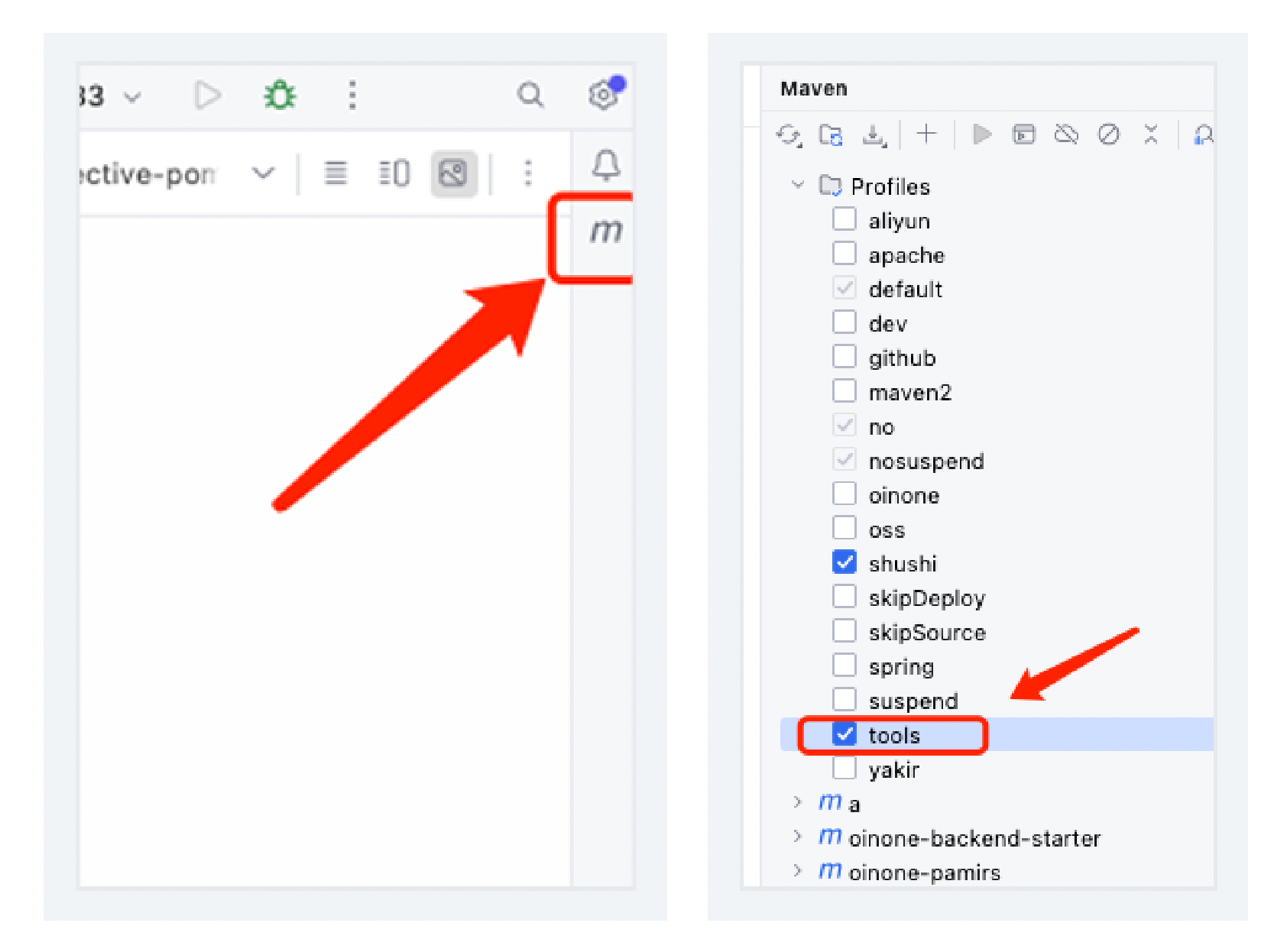
After importing the project into IntelliJ IDEA, make sure to activate the profile. Open the `Maven` toolbar and activate the `tools` profile.
 ### 9. Product Ecosystem
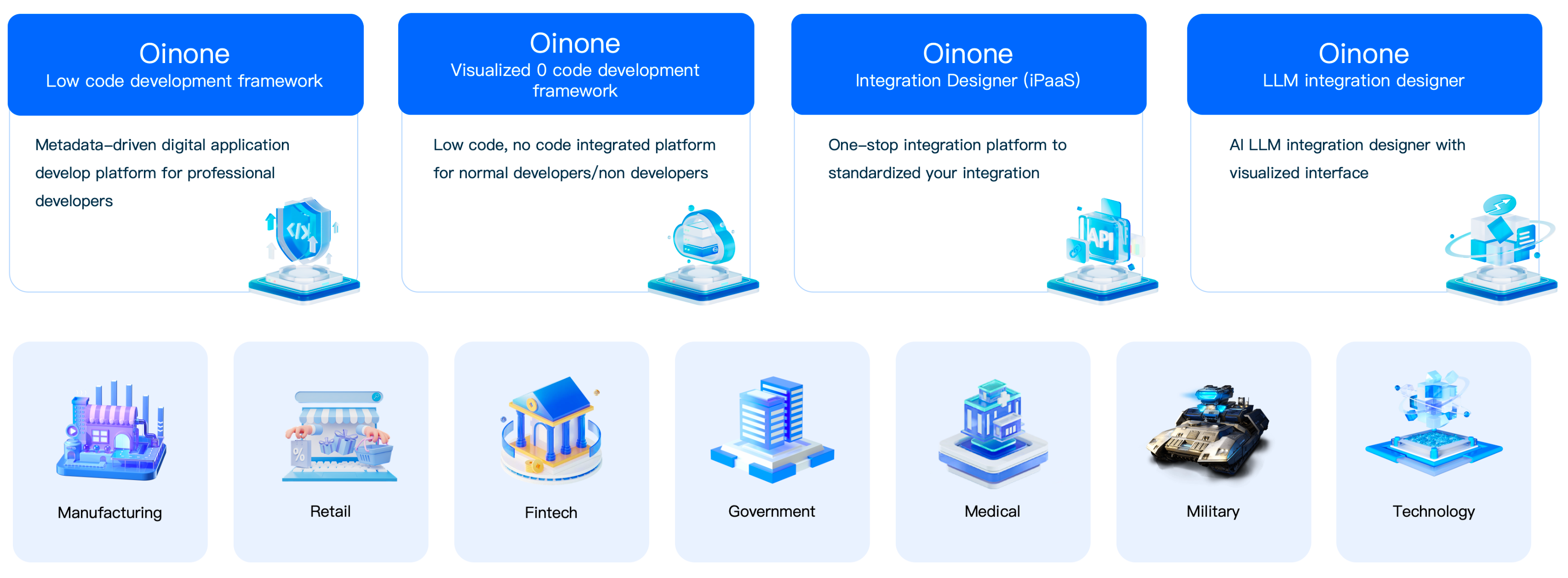
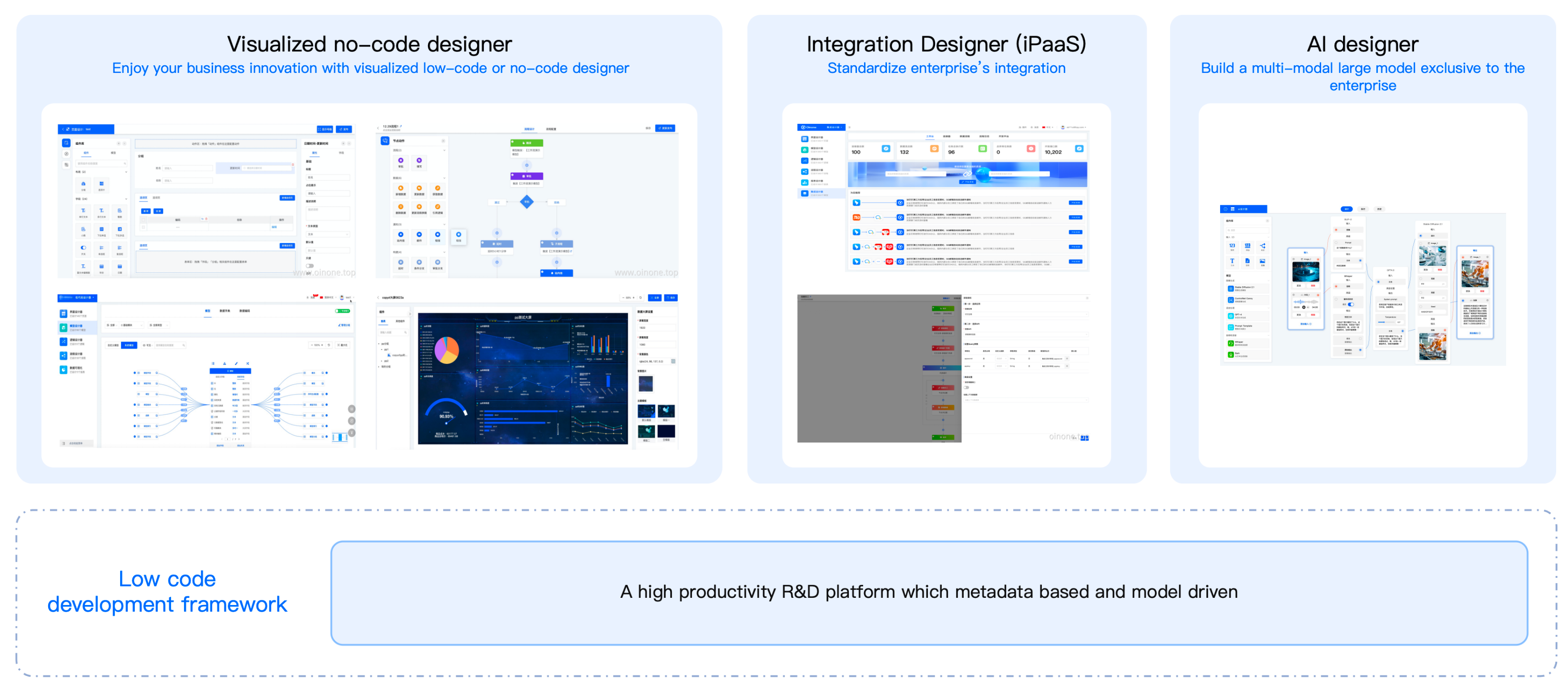
Comprehensive coverage of product development and implementation needs.
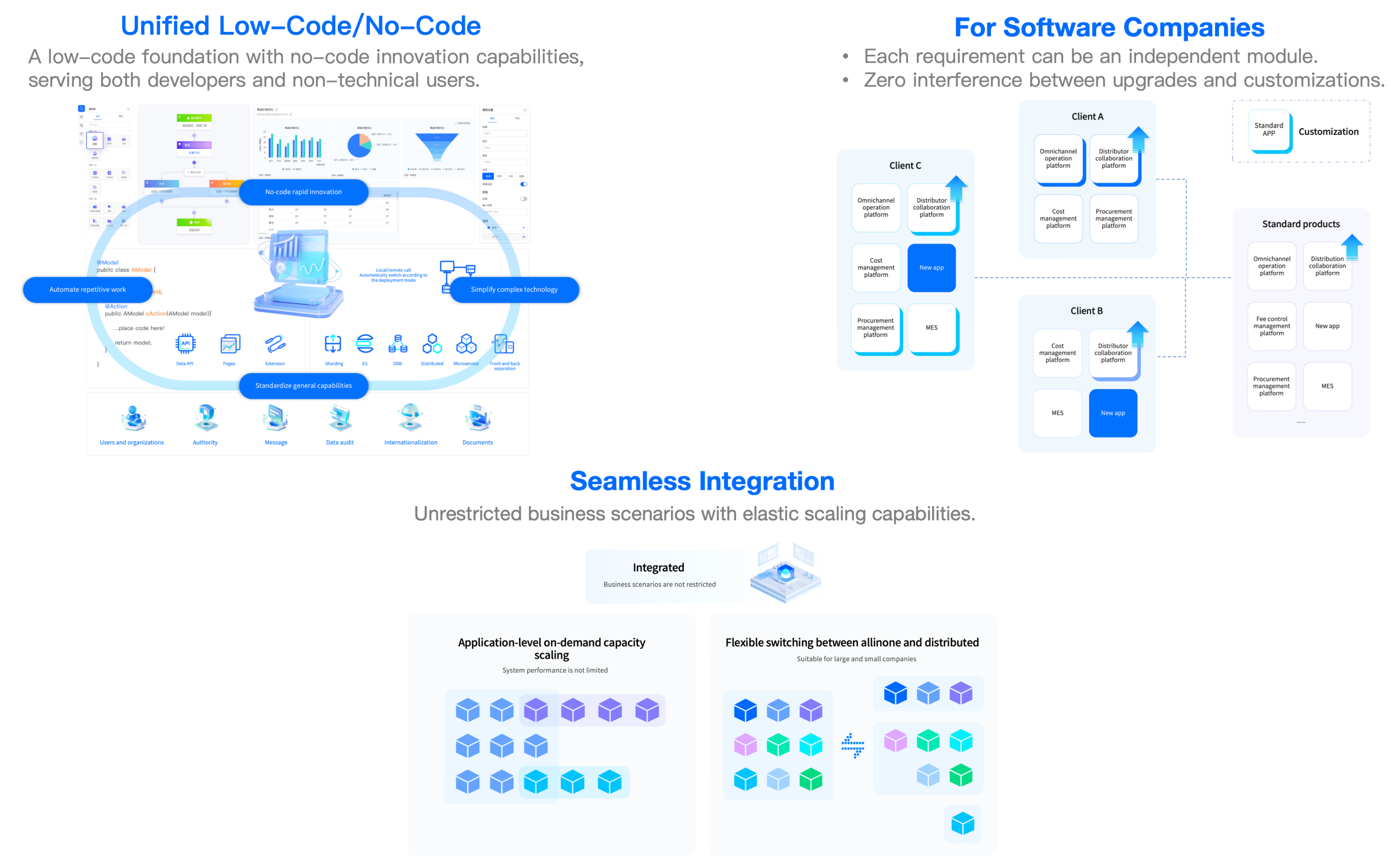
### 10. Key Features
### 11. License
- Oinone Pamirs repository is licensed under AGPL-3.0.
- [Third Party Open Source Software and License Notice](https://guide.oinone.top/en/Third-Party-Open-Source-Software-And-License-Notice.html).
### 12. Community Participation
- Join the community: Go to [⚡Oinone Community](https://doc.oinone.top)❤️
- [How to contribute](https://guide.oinone.top/en/Contribute)
### 13. Contact Us
- Website:https://www.oinone.top
- Email:oinone@shushi.pro
### 9. Product Ecosystem
Comprehensive coverage of product development and implementation needs.


### 10. Key Features

### 11. License
- Oinone Pamirs repository is licensed under AGPL-3.0.
- [Third Party Open Source Software and License Notice](https://guide.oinone.top/en/Third-Party-Open-Source-Software-And-License-Notice.html).
### 12. Community Participation
- Join the community: Go to [⚡Oinone Community](https://doc.oinone.top)❤️
- [How to contribute](https://guide.oinone.top/en/Contribute)
### 13. Contact Us
- Website:https://www.oinone.top
- Email:oinone@shushi.pro