# cloudbase-agent-ui
**Repository Path**: TencentCloudBase/cloudbase-agent-ui
## Basic Information
- **Project Name**: cloudbase-agent-ui
- **Description**: 腾讯云开发 Agent UI ,微信小程序 AI 对话组件
docs.cloudbase.net/ai/quickstart
- **Primary Language**: Unknown
- **License**: MIT
- **Default Branch**: main
- **Homepage**: None
- **GVP Project**: No
## Statistics
- **Stars**: 29
- **Forks**: 7
- **Created**: 2025-03-14
- **Last Updated**: 2026-01-14
## Categories & Tags
**Categories**: Uncategorized
**Tags**: None
## README
# TencentCloudBase Agent UI 🤖
[](https://developers.weixin.qq.com/miniprogram/dev/framework/)
[](https://makeapullrequest.com)
[](https://github.com/TencentCloudBase/cloudbase-agent-ui/blob/main/LICENSE)
[](https://github.com/TencentCloudBase/cloudbase-agent-ui)
cloudbase-agent-ui 是由腾讯云开发团队推出的 AI 智能对话 UI 组件,配置简单开箱即用,助力微信小程序开发者快速集成大模型能力,打造企业级LLM应用。
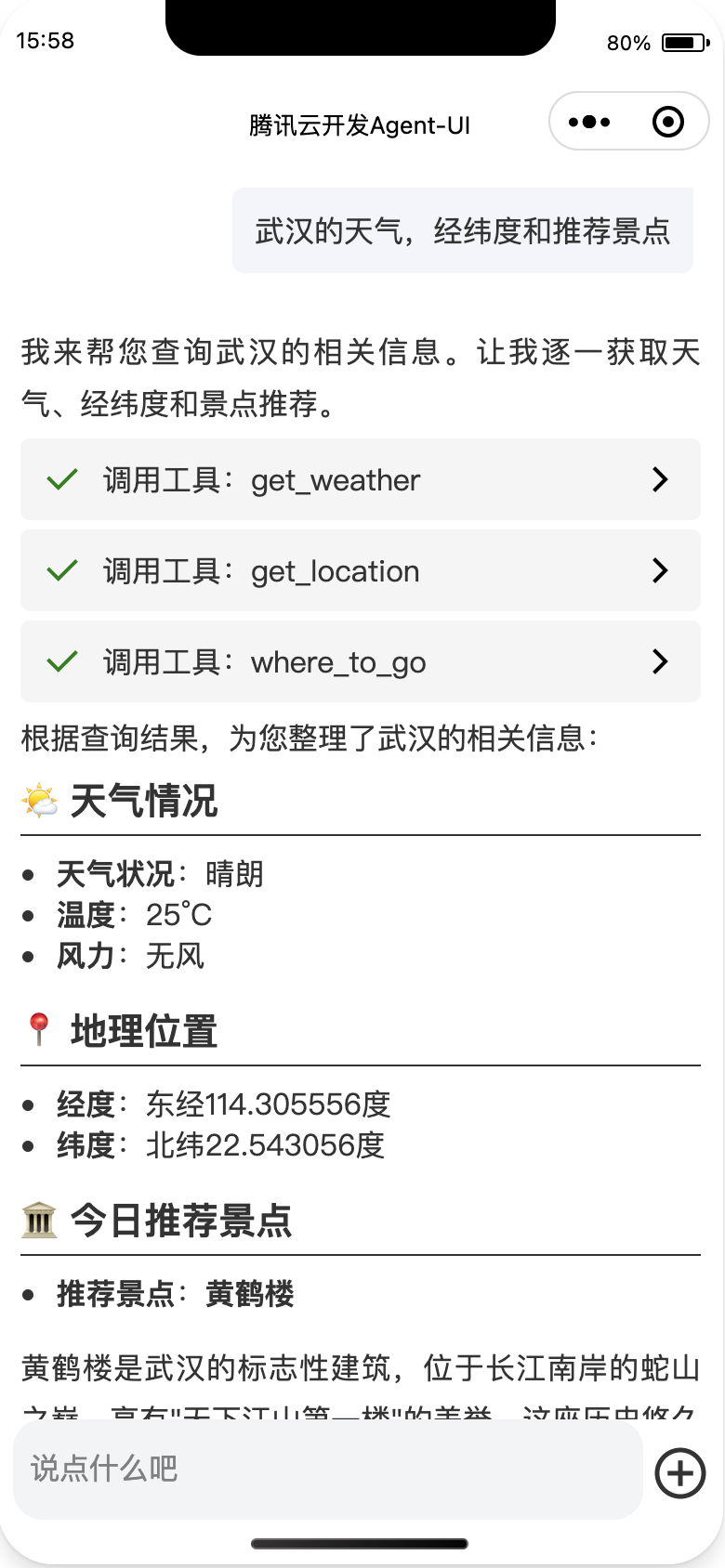
Agent UI 演示效果图
 ## 🌟 特性亮点
- **双模式支持** `Agent模式` 与 `大模型直连` 自由选择对话策略
- **企业级功能集成** 流式输出/多轮会话 开箱即用
- **多模型支持** 深度兼容 DeepSeek、Hunyuan 等主流大模型,支持自定义模型接入
- **配置即开发** 通过配置快速接入组件能力,无需处理复杂通信逻辑
## 📦 使用指南
### 组件集成
#### 1. 开通环境
Agent UI 微信小程序组件依赖**微信云开发**服务,需先开通云开发环境
##### 1.1 开通微信云开发
开通方式,点击开发者工具顶部“云开发” 进行开通
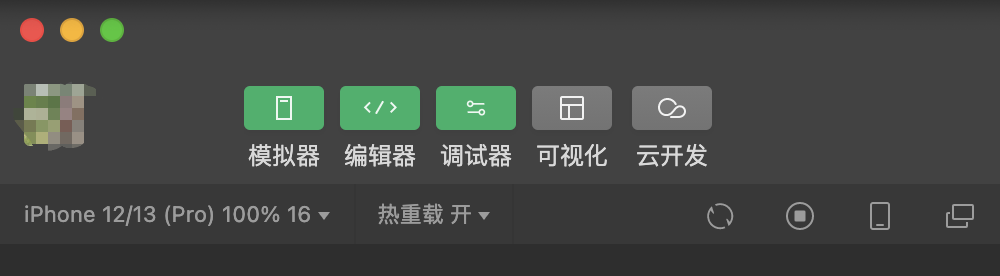
如已开通微信云开发服务,请跳转至[云开发平台](https://tcb.cloud.tencent.com/dev)创建AI服务。
##### 1.2、创建AI服务
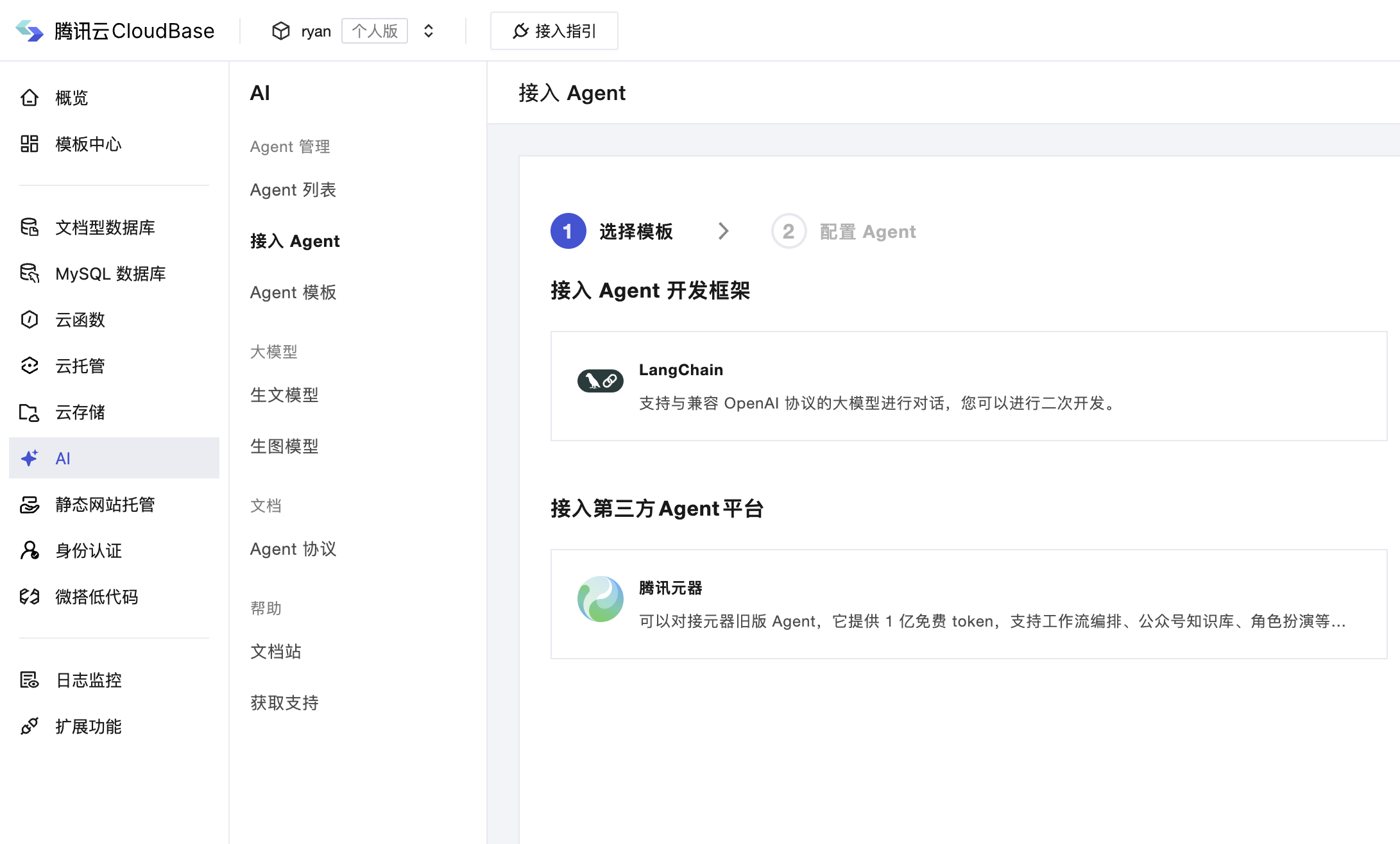
> 注意:配置型 agent 已逐步废弃,新 agent 服务请使用框架型 agent 。
- 方式一:使用 agent 框架创建智能体服务
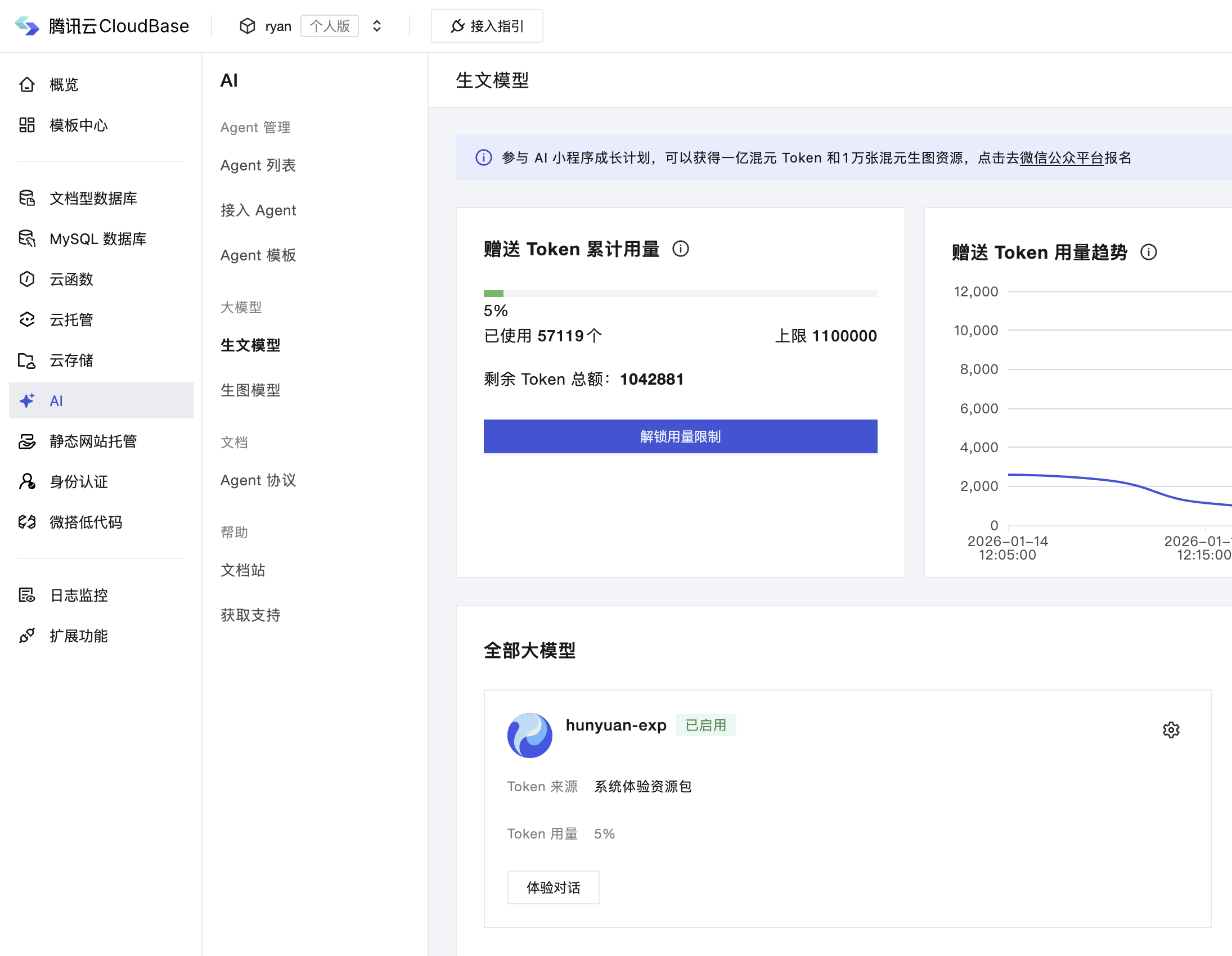
- 方式二:接入大模型
#### 2. 获取组件
可通过以下两种方式获取组件包代码
1. **克隆仓库到本地,提取其中components/agent-ui 目录使用**
2. **下载GitHub Release 包 agent-ui.zip,直接使用**
#### 3. 微信小程序项目引入组件
1. **配置云开发环境ID**
打开 miniprogram/app.js 文件,配置云开发环境ID。
```javascript
App({
onLaunch: function () {
if (!wx.cloud) {
console.error("请使用 2.2.3 或以上的基础库以使用云能力");
} else {
wx.cloud.init({
env: "your envId", // 环境id
traceUser: true,
});
}
this.globalData = {};
},
});
```
2. **拷贝源码组件,将 agent-ui 组件放入用户项目 components 目录中**
3. **组件所属页面 .json配置文件中注册组件**
```json
{
"usingComponents": {
"agent-ui":"/components/agent-ui/index"
},
}
```
4. **组件所属页面 .wxml 文件中引用组件**
```xml
```
5. **组件所属页面 .js 文件中编写配置**
```javascript
Page({
data: {
chatMode: "bot", // bot 表示使用agent,model 表示使用大模型,两种选一种配置即可
agentConfig: {
botId: "bot-e7d1e736", // agent id
tools: [
{
name: "get_weather",
description: "获取指定城市的天气",
parameters: {
type: "object",
properties: { city: { type: "string" } },
required: ["city"],
},
// 同步函数示例
handler: (params) => {
const { city } = params;
return `城市${city}的天气是晴朗的,温度是25摄氏度,无风`;
}
},
{
name: "get_location",
description: "获取指定城市的经纬度",
parameters: {
type: "object",
properties: { city: { type: "string" } },
required: ["city"],
},
// 异步函数示例
handler: async (params) => {
const { city } = params;
// 模拟网络延迟
return new Promise((resolve) => {
setTimeout(() => {
resolve(`城市${city}的位置是东经114.305556度,北纬22.543056度`);
}, 2000);
});
},
},
],
},
modelConfig: {
modelProvider: "hunyuan-open", // 大模型服务厂商
quickResponseModel: "hunyuan-lite", // 大模型名称
logo: "", // model 头像
welcomeMsg: "欢迎语", // model 欢迎语
},
}
})
```
## 🏗 项目结构
```bash
📦 cloudbase-agent-ui
├── 📂 components # 组件集合
│ └── agent-ui # 你要使用的小程序 Agent UI 组件(拷贝这个替换旧版本)
├── 📂 docs # 文档
└── 📂 apps # 应用列表
│ └── miniprogram-agent-ui # 集成 agent-ui 组件的示例应用,可直接导入微信开发者工具体验
├── CHANGELOG.md # 版本变更记录(语义化版本规范)
├── LICENSE # 开源协议
├── package.json # 版本管理
└── .github/ # GitHub自动化配置
├── workflows/
│ └── release-main.yml # 自动打包发布
└── ISSUE_TEMPLATE/ # Issue模板
```
## ⚙️ 配置详解
### 配置属性表
| 参数 | 类型 | 必填 | 说明 |
| ----------------- | ------------------------ | ---- | ------------------------------------------------------------------------------------------------------ |
| `chatMode` | `String` | 是 | 组件对接的AI类型,值为 'bot' 或者 'model',为 'bot' 时,对接 agent 能力;为 'model' 时,对接大模型能力 |
| `agentConfig` | [AgentConfig](#Agentconfig) | 是 | Agent 调用配置 |
| `modelConfig` | [ModelConfig](#Modelconfig) | 是 | Model 调用配置 |
#### AgentConfig
| 参数 | 类型 | 必填 | 说明 |
| -------------------------- | ----------- | ---- | --------------------------------------------- |
| `botId` | `String` | 否 | Agent的唯一标识ID,当 chatMode = 'bot' 时必填 |
| `tools` | `Array` | 否 | 自定义工具列表(框架型 agent 生效) |
#### ModelConfig
| 参数 | 类型 | 必填 | 说明 |
| ---------------------- | ---------- | ---- | ---- |
| `modelProvider` | `String` | 是 | 大模型服务商,当 chatMode = 'model' 时,必填,值为 'hunyuan-open' 或 'deepseek' |
| `quickResponseModel` | `String` | 是 | 具体使用的模型,当 chatMode = 'model' 时,必填;modelProvider 为 deepseek 时,支持 deepseek-r1/deepseek-v3;modelProvider 为 hunyuan-exp(混元体验版)/hunyuan-open(混元正式版,使用需先[配置API Key](https://tcb.cloud.tencent.com/dev?envId=luke-agent-dev-7g1nc8tqc2ab76af#/ai?tab=ai-model&model=hunyuan-open))时,quickResponseModel 可配置为 hunyuan-lite |
| `logo` | `String` | 否 | 页面 logo,当 chatMode = 'model' 时生效,选填 |
| `welcomeMsg` | `String` | 否 | 欢迎语,当 chatMode = 'model' 时生效,选填 |
## 🔗 组件使用限制
> **上传文件限制**
> 大小限制:单文件不超过10M
> 数量限制:单次最多支持 5 个文件
> 文件类型:pdf、txt、doc、docx、ppt、pptx、xls、xlsx、csv
> **上传图片限制**
> 大小限制:单文件不超过30M
> 数量限制:单次最多支持 1 个文件
> **request合法域名配置**:微信小程序 Agent-UI 组件支持 上传文件&多会话 需要添加云开发域名到request合法域名列表,云开发域名为:https://{your-envid}.api.tcloudbasegateway.com, 可前往[微信公众平台](https://mp.weixin.qq.com)配置request合法域名
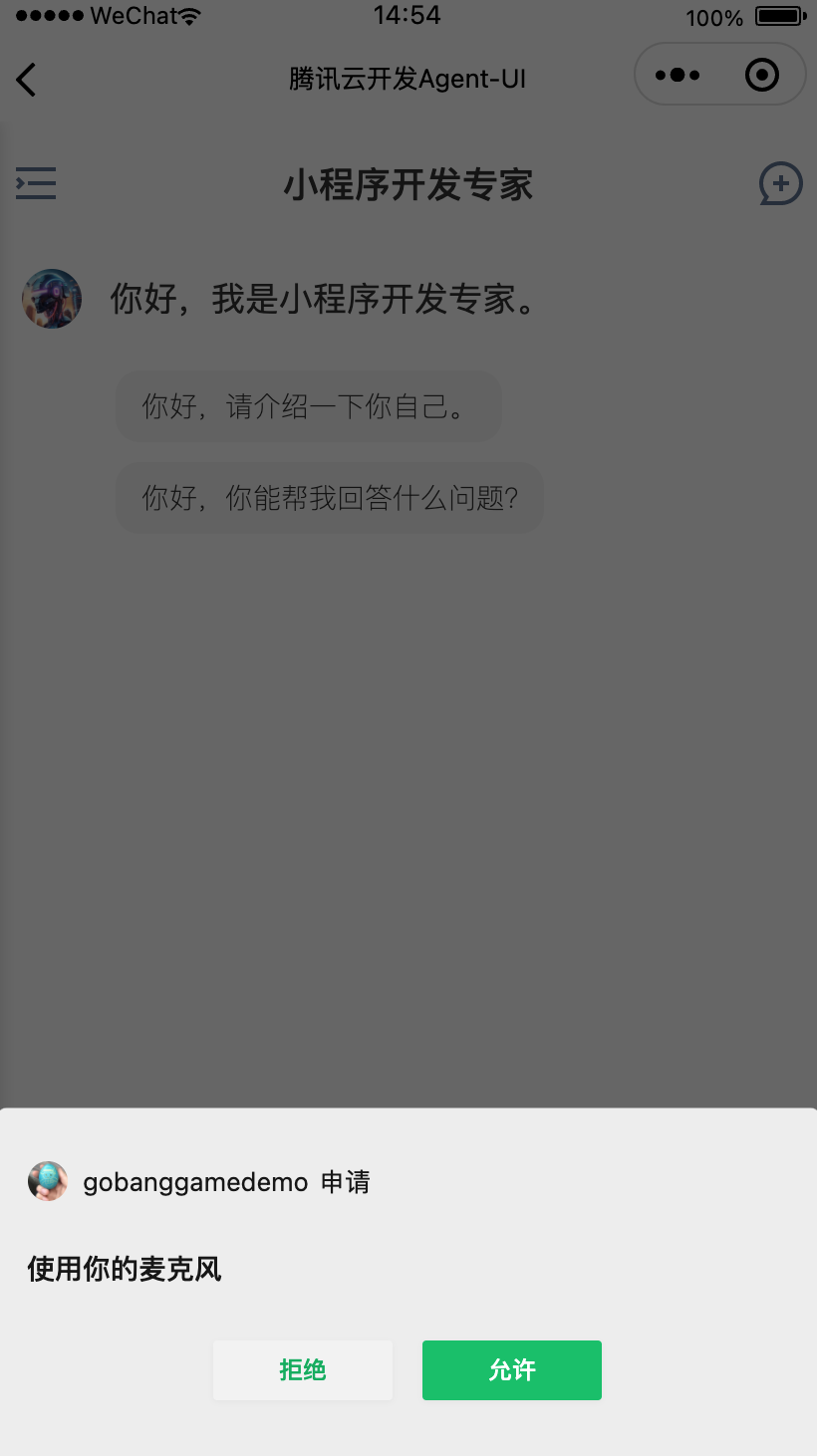
> **语音**
> 若未授予小程序使用麦克风权限,组件会进行权限申请,请同意授予
## 🌟 特性亮点
- **双模式支持** `Agent模式` 与 `大模型直连` 自由选择对话策略
- **企业级功能集成** 流式输出/多轮会话 开箱即用
- **多模型支持** 深度兼容 DeepSeek、Hunyuan 等主流大模型,支持自定义模型接入
- **配置即开发** 通过配置快速接入组件能力,无需处理复杂通信逻辑
## 📦 使用指南
### 组件集成
#### 1. 开通环境
Agent UI 微信小程序组件依赖**微信云开发**服务,需先开通云开发环境
##### 1.1 开通微信云开发
开通方式,点击开发者工具顶部“云开发” 进行开通

如已开通微信云开发服务,请跳转至[云开发平台](https://tcb.cloud.tencent.com/dev)创建AI服务。
##### 1.2、创建AI服务
> 注意:配置型 agent 已逐步废弃,新 agent 服务请使用框架型 agent 。
- 方式一:使用 agent 框架创建智能体服务

- 方式二:接入大模型

#### 2. 获取组件
可通过以下两种方式获取组件包代码
1. **克隆仓库到本地,提取其中components/agent-ui 目录使用**
2. **下载GitHub Release 包 agent-ui.zip,直接使用**
#### 3. 微信小程序项目引入组件
1. **配置云开发环境ID**
打开 miniprogram/app.js 文件,配置云开发环境ID。
```javascript
App({
onLaunch: function () {
if (!wx.cloud) {
console.error("请使用 2.2.3 或以上的基础库以使用云能力");
} else {
wx.cloud.init({
env: "your envId", // 环境id
traceUser: true,
});
}
this.globalData = {};
},
});
```
2. **拷贝源码组件,将 agent-ui 组件放入用户项目 components 目录中**
3. **组件所属页面 .json配置文件中注册组件**
```json
{
"usingComponents": {
"agent-ui":"/components/agent-ui/index"
},
}
```
4. **组件所属页面 .wxml 文件中引用组件**
```xml
```
5. **组件所属页面 .js 文件中编写配置**
```javascript
Page({
data: {
chatMode: "bot", // bot 表示使用agent,model 表示使用大模型,两种选一种配置即可
agentConfig: {
botId: "bot-e7d1e736", // agent id
tools: [
{
name: "get_weather",
description: "获取指定城市的天气",
parameters: {
type: "object",
properties: { city: { type: "string" } },
required: ["city"],
},
// 同步函数示例
handler: (params) => {
const { city } = params;
return `城市${city}的天气是晴朗的,温度是25摄氏度,无风`;
}
},
{
name: "get_location",
description: "获取指定城市的经纬度",
parameters: {
type: "object",
properties: { city: { type: "string" } },
required: ["city"],
},
// 异步函数示例
handler: async (params) => {
const { city } = params;
// 模拟网络延迟
return new Promise((resolve) => {
setTimeout(() => {
resolve(`城市${city}的位置是东经114.305556度,北纬22.543056度`);
}, 2000);
});
},
},
],
},
modelConfig: {
modelProvider: "hunyuan-open", // 大模型服务厂商
quickResponseModel: "hunyuan-lite", // 大模型名称
logo: "", // model 头像
welcomeMsg: "欢迎语", // model 欢迎语
},
}
})
```
## 🏗 项目结构
```bash
📦 cloudbase-agent-ui
├── 📂 components # 组件集合
│ └── agent-ui # 你要使用的小程序 Agent UI 组件(拷贝这个替换旧版本)
├── 📂 docs # 文档
└── 📂 apps # 应用列表
│ └── miniprogram-agent-ui # 集成 agent-ui 组件的示例应用,可直接导入微信开发者工具体验
├── CHANGELOG.md # 版本变更记录(语义化版本规范)
├── LICENSE # 开源协议
├── package.json # 版本管理
└── .github/ # GitHub自动化配置
├── workflows/
│ └── release-main.yml # 自动打包发布
└── ISSUE_TEMPLATE/ # Issue模板
```
## ⚙️ 配置详解
### 配置属性表
| 参数 | 类型 | 必填 | 说明 |
| ----------------- | ------------------------ | ---- | ------------------------------------------------------------------------------------------------------ |
| `chatMode` | `String` | 是 | 组件对接的AI类型,值为 'bot' 或者 'model',为 'bot' 时,对接 agent 能力;为 'model' 时,对接大模型能力 |
| `agentConfig` | [AgentConfig](#Agentconfig) | 是 | Agent 调用配置 |
| `modelConfig` | [ModelConfig](#Modelconfig) | 是 | Model 调用配置 |
#### AgentConfig
| 参数 | 类型 | 必填 | 说明 |
| -------------------------- | ----------- | ---- | --------------------------------------------- |
| `botId` | `String` | 否 | Agent的唯一标识ID,当 chatMode = 'bot' 时必填 |
| `tools` | `Array` | 否 | 自定义工具列表(框架型 agent 生效) |
#### ModelConfig
| 参数 | 类型 | 必填 | 说明 |
| ---------------------- | ---------- | ---- | ---- |
| `modelProvider` | `String` | 是 | 大模型服务商,当 chatMode = 'model' 时,必填,值为 'hunyuan-open' 或 'deepseek' |
| `quickResponseModel` | `String` | 是 | 具体使用的模型,当 chatMode = 'model' 时,必填;modelProvider 为 deepseek 时,支持 deepseek-r1/deepseek-v3;modelProvider 为 hunyuan-exp(混元体验版)/hunyuan-open(混元正式版,使用需先[配置API Key](https://tcb.cloud.tencent.com/dev?envId=luke-agent-dev-7g1nc8tqc2ab76af#/ai?tab=ai-model&model=hunyuan-open))时,quickResponseModel 可配置为 hunyuan-lite |
| `logo` | `String` | 否 | 页面 logo,当 chatMode = 'model' 时生效,选填 |
| `welcomeMsg` | `String` | 否 | 欢迎语,当 chatMode = 'model' 时生效,选填 |
## 🔗 组件使用限制
> **上传文件限制**
> 大小限制:单文件不超过10M
> 数量限制:单次最多支持 5 个文件
> 文件类型:pdf、txt、doc、docx、ppt、pptx、xls、xlsx、csv
> **上传图片限制**
> 大小限制:单文件不超过30M
> 数量限制:单次最多支持 1 个文件
> **request合法域名配置**:微信小程序 Agent-UI 组件支持 上传文件&多会话 需要添加云开发域名到request合法域名列表,云开发域名为:https://{your-envid}.api.tcloudbasegateway.com, 可前往[微信公众平台](https://mp.weixin.qq.com)配置request合法域名
> **语音**
> 若未授予小程序使用麦克风权限,组件会进行权限申请,请同意授予
 ## 🔧 组件配置示例
- **对接 DeepSeek 大模型**
1. 前往 miniprogram/app.js 文件配置云开发环境 ID
```javascript
wx.cloud.init({
env: "你的环境ID",
traceUser: true,
});
```
2. 修改组件配置,在引用 agent-ui 组件的页面配置 (也可参考apps/miniprogram-agent-ui项目 chatBot 页面配置案例)
```javascript
Page({
//...
data: {
chatMode: 'model',
modelConfig: {
modelProvider: "deepseek",
quickResponseModel: "deepseek-v3.2",
logo: "",
welcomeMsg: ""
}
}
//...
})
```
- **对接 Hunyuan 大模型**
1. 前往 miniprogram/app.js 文件配置云开发环境 ID
```javascript
wx.cloud.init({
env: "你的环境ID",
traceUser: true,
});
```
2. 修改组件配置,在引用 agent-ui 组件的页面配置 (也可参考apps/miniprogram-agent-ui项目 chatBot 页面配置案例)
```javascript
Page({
//...
data: {
chatMode: 'model',
modelConfig: {
modelProvider: "hunyuan-exp",
quickResponseModel: "hunyuan-turbos-latest",
logo: "",
welcomeMsg: ""
}
}
//...
})
```
- **对接 腾讯云开发 Agent**
1. 前往 miniprogram/app.js 文件配置云开发环境 ID
```javascript
wx.cloud.init({
env: "你的环境ID",
traceUser: true,
});
```
2. 修改组件配置,在引用 agent-ui 组件的页面配置 (也可参考apps/miniprogram-agent-ui项目 chatBot 页面配置案例)
```javascript
Page({
//...
data: {
chatMode: "bot", // bot 表示使用agent,model 表示使用大模型
showBotAvatar: true, // 是否在对话框左侧显示头像
agentConfig: {
botId: "agent-xxx-xxx", // agent id
tools: [
{
name: "get_weather",
description: "获取指定城市的天气",
parameters: {
type: "object",
properties: { city: { type: "string" } },
required: ["city"],
},
handler: (params) => {
const { city } = params;
return `城市${city}的天气是晴朗的,温度是25摄氏度,无风`;
}
},
],
}
}
//...
})
```
## 🔧 工具配置示例
工具只支持框架型 agent 。
agent 框架支持前端工具和服务端工具,本示例展示了如何在 agent 中配置前端工具和服务端工具。
### 前端工具配置示例:
在使用小程序组件时,需要在组件配置中添加 `tools` 字段,字段值为一个数组,数组中每个元素为一个工具配置对象。
```javascript
agentConfig: {
botId: "agent-xxx-2g7292zw414326dd",
tools: [
{
name: "get_weather",
description: "获取指定城市的天气",
parameters: {
type: "object",
properties: { city: { type: "string" } },
required: ["city"],
},
// 同步函数示例
handler: (params) => {
const { city } = params;
return `城市${city}的天气是晴朗的,温度是25摄氏度,无风`;
}
},
{
name: "get_location",
description: "获取指定城市的经纬度",
parameters: {
type: "object",
properties: { city: { type: "string" } },
required: ["city"],
},
// 异步函数示例
handler: async (params) => {
const { city } = params;
// 模拟网络延迟
return new Promise((resolve) => {
setTimeout(() => {
resolve(`城市${city}的位置是东经114.305556度,北纬22.543056度`);
}, 2000);
});
},
},
],
},
```
name: 工具名称
description: 工具的功能描述
parameters: 工具参数,格式为 JSON Schema 风格
handler: 工具处理函数,参数为parameters约定的格式,返回值为工具调用结果。
### 后端工具配置示例:
使用 LangChain 模版初始化项目
在 src/agent.js 中添加工具配置
```javascript
import { clientTools } from "@cloudbase/agent-adapter-langchain";
import { MemorySaver } from "@langchain/langgraph";
import { ChatOpenAI } from "@langchain/openai";
import { createAgent as createLangchainAgent } from "langchain";
import { tool } from "@langchain/core/tools";
import { z } from "zod";
const weatherTool = tool(
async ({ city }) => {
return JSON.stringify({
city,
recommended: "黄鹤楼",
});
},
{
name: "where_to_go",
description: "获取当前城市今日景点推荐",
schema: z.object({
city: z.string().describe("城市名称"),
}),
}
);
const checkpointer = new MemorySaver();
export function createAgent() {
// Configure model
const model = new ChatOpenAI({
model: process.env.OPENAI_MODEL,
apiKey: process.env.OPENAI_API_KEY,
configuration: {
baseURL: process.env.OPENAI_BASE_URL,
},
});
// Create agent
return createLangchainAgent({
model,
checkpointer,
middleware: [clientTools()],
systemPrompt: "你是一位旅游博主,回答旅游相关问题",
tools: [weatherTool]
});
}
```
tool 函数用于创建服务端工具,
第一个参数为工具处理函数,函数参数为工具参数,返回值为工具调用结果。
第二个参数为工具配置对象,包含工具名称、功能描述、参数格式等。
name: 工具名称
description: 工具的功能描述
parameters: 工具参数,格式为 JSON Schema 风格
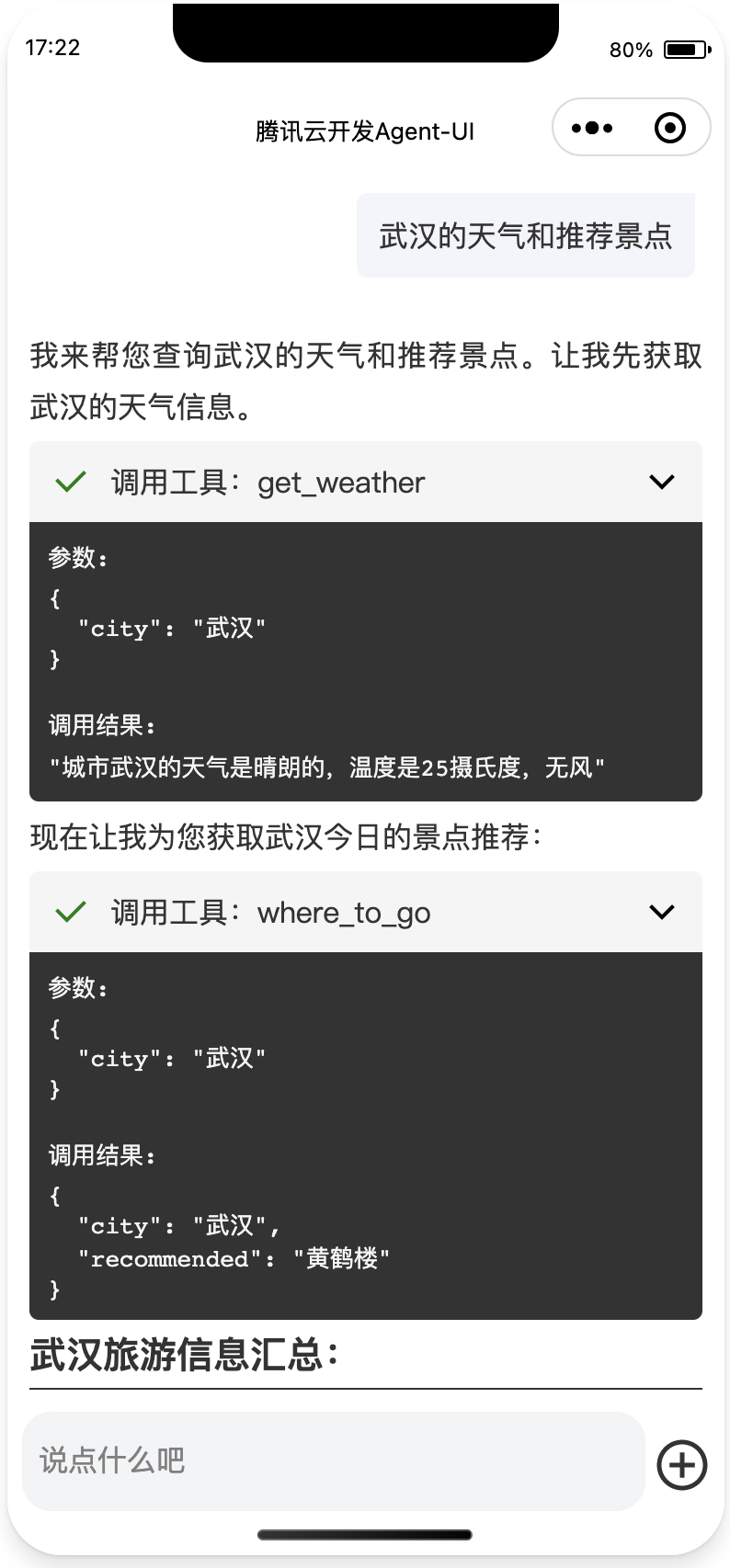
### 工具调用结果
agent 会自动收集配置的前端工具和服务端工具,前端工具会在前端调用完成后将结果自动发送给后端,后端工具会在调用时自动执行。
以上工具的执行结果如下:
## 🔧 组件配置示例
- **对接 DeepSeek 大模型**
1. 前往 miniprogram/app.js 文件配置云开发环境 ID
```javascript
wx.cloud.init({
env: "你的环境ID",
traceUser: true,
});
```
2. 修改组件配置,在引用 agent-ui 组件的页面配置 (也可参考apps/miniprogram-agent-ui项目 chatBot 页面配置案例)
```javascript
Page({
//...
data: {
chatMode: 'model',
modelConfig: {
modelProvider: "deepseek",
quickResponseModel: "deepseek-v3.2",
logo: "",
welcomeMsg: ""
}
}
//...
})
```
- **对接 Hunyuan 大模型**
1. 前往 miniprogram/app.js 文件配置云开发环境 ID
```javascript
wx.cloud.init({
env: "你的环境ID",
traceUser: true,
});
```
2. 修改组件配置,在引用 agent-ui 组件的页面配置 (也可参考apps/miniprogram-agent-ui项目 chatBot 页面配置案例)
```javascript
Page({
//...
data: {
chatMode: 'model',
modelConfig: {
modelProvider: "hunyuan-exp",
quickResponseModel: "hunyuan-turbos-latest",
logo: "",
welcomeMsg: ""
}
}
//...
})
```
- **对接 腾讯云开发 Agent**
1. 前往 miniprogram/app.js 文件配置云开发环境 ID
```javascript
wx.cloud.init({
env: "你的环境ID",
traceUser: true,
});
```
2. 修改组件配置,在引用 agent-ui 组件的页面配置 (也可参考apps/miniprogram-agent-ui项目 chatBot 页面配置案例)
```javascript
Page({
//...
data: {
chatMode: "bot", // bot 表示使用agent,model 表示使用大模型
showBotAvatar: true, // 是否在对话框左侧显示头像
agentConfig: {
botId: "agent-xxx-xxx", // agent id
tools: [
{
name: "get_weather",
description: "获取指定城市的天气",
parameters: {
type: "object",
properties: { city: { type: "string" } },
required: ["city"],
},
handler: (params) => {
const { city } = params;
return `城市${city}的天气是晴朗的,温度是25摄氏度,无风`;
}
},
],
}
}
//...
})
```
## 🔧 工具配置示例
工具只支持框架型 agent 。
agent 框架支持前端工具和服务端工具,本示例展示了如何在 agent 中配置前端工具和服务端工具。
### 前端工具配置示例:
在使用小程序组件时,需要在组件配置中添加 `tools` 字段,字段值为一个数组,数组中每个元素为一个工具配置对象。
```javascript
agentConfig: {
botId: "agent-xxx-2g7292zw414326dd",
tools: [
{
name: "get_weather",
description: "获取指定城市的天气",
parameters: {
type: "object",
properties: { city: { type: "string" } },
required: ["city"],
},
// 同步函数示例
handler: (params) => {
const { city } = params;
return `城市${city}的天气是晴朗的,温度是25摄氏度,无风`;
}
},
{
name: "get_location",
description: "获取指定城市的经纬度",
parameters: {
type: "object",
properties: { city: { type: "string" } },
required: ["city"],
},
// 异步函数示例
handler: async (params) => {
const { city } = params;
// 模拟网络延迟
return new Promise((resolve) => {
setTimeout(() => {
resolve(`城市${city}的位置是东经114.305556度,北纬22.543056度`);
}, 2000);
});
},
},
],
},
```
name: 工具名称
description: 工具的功能描述
parameters: 工具参数,格式为 JSON Schema 风格
handler: 工具处理函数,参数为parameters约定的格式,返回值为工具调用结果。
### 后端工具配置示例:
使用 LangChain 模版初始化项目
在 src/agent.js 中添加工具配置
```javascript
import { clientTools } from "@cloudbase/agent-adapter-langchain";
import { MemorySaver } from "@langchain/langgraph";
import { ChatOpenAI } from "@langchain/openai";
import { createAgent as createLangchainAgent } from "langchain";
import { tool } from "@langchain/core/tools";
import { z } from "zod";
const weatherTool = tool(
async ({ city }) => {
return JSON.stringify({
city,
recommended: "黄鹤楼",
});
},
{
name: "where_to_go",
description: "获取当前城市今日景点推荐",
schema: z.object({
city: z.string().describe("城市名称"),
}),
}
);
const checkpointer = new MemorySaver();
export function createAgent() {
// Configure model
const model = new ChatOpenAI({
model: process.env.OPENAI_MODEL,
apiKey: process.env.OPENAI_API_KEY,
configuration: {
baseURL: process.env.OPENAI_BASE_URL,
},
});
// Create agent
return createLangchainAgent({
model,
checkpointer,
middleware: [clientTools()],
systemPrompt: "你是一位旅游博主,回答旅游相关问题",
tools: [weatherTool]
});
}
```
tool 函数用于创建服务端工具,
第一个参数为工具处理函数,函数参数为工具参数,返回值为工具调用结果。
第二个参数为工具配置对象,包含工具名称、功能描述、参数格式等。
name: 工具名称
description: 工具的功能描述
parameters: 工具参数,格式为 JSON Schema 风格
### 工具调用结果
agent 会自动收集配置的前端工具和服务端工具,前端工具会在前端调用完成后将结果自动发送给后端,后端工具会在调用时自动执行。
以上工具的执行结果如下:
 ## 🚀 开发路线
### ✅ 已完成功能
- ✅ 大模型调用配置化 (DeepSeek/Hunyuan)
- ✅ Agent调用配置化 (云开发平台配置)
- ✅ 流式输出
- ✅ 支持环境共享下使用
### 📅 未来计划
- 支持会话清理
- 支持 Artifact
- UI 高度配置化,提供页面结构配置化控制,CSS变量配置,完美融入品牌风格
- 文生图
- 文生视频
- 图生视频
- 待补充...
## 🌍 社区支持
遇到问题?欢迎通过以下方式联系我们:
- [Github Issues](https://github.com/TencentCloudBase/cloudbase-agent-ui/issues)
- 微信开发者群 (扫码加小助手微信拉群)
## 🤝 贡献指南
我们欢迎所有形式的贡献!
## 👥 贡献者墙
https://contrib.rocks/image?repo=TencentCloudBase/cloudbase-agent-ui
## 🚀 开发路线
### ✅ 已完成功能
- ✅ 大模型调用配置化 (DeepSeek/Hunyuan)
- ✅ Agent调用配置化 (云开发平台配置)
- ✅ 流式输出
- ✅ 支持环境共享下使用
### 📅 未来计划
- 支持会话清理
- 支持 Artifact
- UI 高度配置化,提供页面结构配置化控制,CSS变量配置,完美融入品牌风格
- 文生图
- 文生视频
- 图生视频
- 待补充...
## 🌍 社区支持
遇到问题?欢迎通过以下方式联系我们:
- [Github Issues](https://github.com/TencentCloudBase/cloudbase-agent-ui/issues)
- 微信开发者群 (扫码加小助手微信拉群)
## 🤝 贡献指南
我们欢迎所有形式的贡献!
## 👥 贡献者墙
https://contrib.rocks/image?repo=TencentCloudBase/cloudbase-agent-ui
