# CloudBase-AI-ToolKit **Repository Path**: TencentCloudBase/CloudBase-AI-ToolKit ## Basic Information - **Project Name**: CloudBase-AI-ToolKit - **Description**: ๐Ÿช ็”จ AI IDE ไธ€้”ฎ็”Ÿๆˆใ€้ƒจ็ฝฒๅ’Œๆ‰˜็ฎกไฝ ็š„ๅ…จๆ ˆ Web ๅบ”็”จไธŽๅฐ็จ‹ๅบใ€ๆ•ฐๆฎๅบ“ๅ’ŒๅŽ็ซฏๆœๅŠก๏ผŒๆ— ้œ€่ฟ็ปด๏ผŒๆž้€ŸไธŠ็บฟไฝ ็š„ๅˆ›ๆ„ ๐Ÿ’ซ - **Primary Language**: TypeScript - **License**: MIT - **Default Branch**: main - **Homepage**: https://docs.cloudbase.net/ai/cloudbase-ai-toolkit/ - **GVP Project**: No ## Statistics - **Stars**: 3 - **Forks**: 0 - **Created**: 2025-05-28 - **Last Updated**: 2026-02-06 ## Categories & Tags **Categories**: Uncategorized **Tags**: None ## README
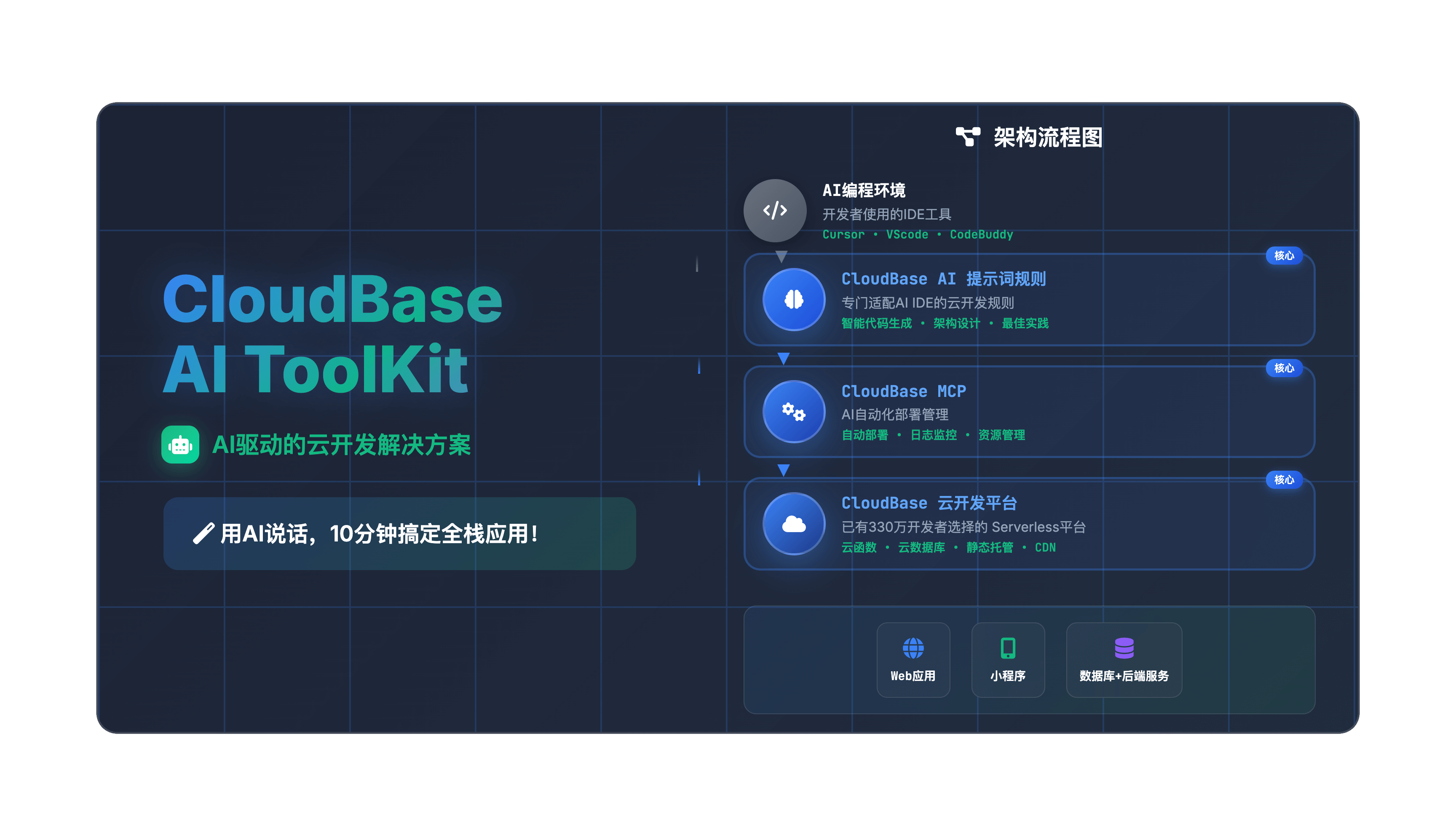
![](https://7463-tcb-advanced-a656fc-1257967285.tcb.qcloud.la/mcp/banner-en%20(1).png) # ๐ŸŒŸ CloudBase AI ToolKit **๐Ÿช Generate, deploy, and host your full-stack Web applications, mini-programs, databases, and backend services with AI IDE in one clickโ€”no DevOps required, launch your ideas at lightning speed ๐Ÿ’ซ** **๐ŸŒ Languages:** [ไธญๆ–‡](README.md) | **English** [![License: MIT](https://img.shields.io/badge/License-MIT-yellow.svg)](https://opensource.org/licenses/MIT) [![npm version](https://badge.fury.io/js/%40cloudbase%2Fcloudbase-mcp.svg)](https://www.npmjs.com/package/@cloudbase/cloudbase-mcp) [![NPM Downloads](https://img.shields.io/npm/dw/%40cloudbase%2Fcloudbase-mcp)](https://www.npmjs.com/package/@cloudbase/cloudbase-mcp) [![GitHub stars](https://img.shields.io/github/stars/TencentCloudBase/CloudBase-AI-ToolKit?style=social&v=1)](https://github.com/TencentCloudBase/CloudBase-AI-ToolKit/stargazers) [![GitHub forks](https://img.shields.io/github/forks/TencentCloudBase/CloudBase-AI-ToolKit?style=social&v=1)](https://github.com/TencentCloudBase/CloudBase-AI-ToolKit/network/members) [![GitHub issues](https://img.shields.io/github/issues/TencentCloudBase/CloudBase-AI-ToolKit)](https://github.com/TencentCloudBase/CloudBase-AI-ToolKit/issues) [![GitHub pull requests](https://img.shields.io/github/issues-pr/TencentCloudBase/CloudBase-AI-ToolKit)](https://github.com/TencentCloudBase/CloudBase-AI-ToolKit/pulls) [![GitHub last commit](https://img.shields.io/github/last-commit/TencentCloudBase/CloudBase-AI-ToolKit)](https://github.com/TencentCloudBase/CloudBase-AI-ToolKit/commits) [![GitHub contributors](https://img.shields.io/github/contributors/TencentCloudBase/CloudBase-AI-ToolKit)](https://github.com/TencentCloudBase/CloudBase-AI-ToolKit/graphs/contributors) [![CNB Mirror](https://img.shields.io/badge/CNB-CloudBase--AI--ToolKit-blue?logo=data:image/svg+xml;base64,PHN2ZyB3aWR0aD0iMTIiIGhlaWdodD0iMTIiIHZpZXdCb3g9IjAgMCAxMiAxMiIgZmlsbD0ibm9uZSIgeG1sbnM9Imh0dHA6Ly93d3cudzMub3JnLzIwMDAvc3ZnIj48cmVjdCB3aWR0aD0iMTIiIGhlaWdodD0iMTIiIHJ4PSIyIiBmaWxsPSIjM0I4MkY2Ii8+PHBhdGggZD0iTTUgM0g3VjVINSIgc3Ryb2tlPSJ3aGl0ZSIgc3Ryb2tlLXdpZHRoPSIxLjUiLz48cGF0aCBkPSJNNSA3SDdWOUg1IiBzdHJva2U9IndoaXRlIiBzdHJva2Utd2lkdGg9IjEuNSIvPjwvc3ZnPg==)](https://cnb.cool/tencent/cloud/cloudbase/CloudBase-AI-ToolKit) [![Ask DeepWiki](https://deepwiki.com/badge.svg)](https://deepwiki.com/TencentCloudBase/CloudBase-AI-ToolKit) When coding in AI programming tools like **Cursor/VSCode GitHub Copilot/WindSurf/CodeBuddy/Augment Code/Claude Code**, it automatically helps you generate deployable full-stack applications + mini-programs and publish them to Tencent CloudBase with one-click. ๐Ÿ“š [Quick Start](https://docs.cloudbase.net/ai/cloudbase-ai-toolkit/getting-started) | ๐Ÿ› ๏ธ [IDE Setup](https://docs.cloudbase.net/ai/cloudbase-ai-toolkit/ide-setup/) | ๐ŸŽจ [Project Templates](https://docs.cloudbase.net/ai/cloudbase-ai-toolkit/templates) | ๐Ÿ“– [Development Guide](https://docs.cloudbase.net/ai/cloudbase-ai-toolkit/development) | ๐ŸŽฎ [Use Cases](https://docs.cloudbase.net/ai/cloudbase-ai-toolkit/examples) | ๐ŸŽ“ [Tutorials](https://docs.cloudbase.net/ai/cloudbase-ai-toolkit/tutorials) | ๐Ÿ”ง [MCP Tools](https://docs.cloudbase.net/ai/cloudbase-ai-toolkit/mcp-tools) | โ“ [FAQ](https://docs.cloudbase.net/ai/cloudbase-ai-toolkit/faq) **๐Ÿ“น Complete Video Demo โฌ‡๏ธ** Video Demo | ๐Ÿš€ **Core Capabilities** | ๐Ÿ› ๏ธ **Supported Platforms** | |---|---| | ๐Ÿค– **AI-Powered Development**: AI auto-generates code and architecture







โ˜๏ธ **Cloud Integration**: One-click access to database, cloud functions, static hosting
โšก **Rapid Deployment**: Full-stack apps online in minutes | **Web Apps**: Modern frontend + static hosting
**WeChat Mini-Programs**: Cloud-native mini-program solutions
**Backend Services**: Cloud database + serverless functions + cloud hosting |
## โœจ Key Features - **๐Ÿค– AI-Native** - Rule library designed for AI programming tools, generates code following CloudBase best practices - **๐Ÿš€ One-Click Deploy** - MCP automated deployment to Tencent CloudBase platform, Serverless architecture without server management - **๐Ÿ“ฑ Full-Stack Apps** - Web + Mini-programs + Database + Backend integration, supports multiple app types and backend hosting - **๐Ÿ”ง Smart Debugging** - AI automatically reviews logs and fixes issues, reducing operational costs - **โšก Lightning Fast** - Domestic CDN acceleration, faster access than overseas platforms - **๐Ÿ“š Knowledge Retrieval** - Built-in intelligent vector search for CloudBase and WeChat Mini-Program professional knowledge bases ## ๐Ÿš€ Quick Start ### 0. Prerequisites
Install AI Development Tools Such as [Cursor](https://www.cursor.com/) | [WindSurf](https://windsurf.com/editor) | [CodeBuddy](https://copilot.tencent.com/) etc. Click to see [list of supported AI development tools](#2-configure-your-ai-ide)
Set Up CloudBase Environment Visit [Tencent CloudBase Console](https://tcb.cloud.tencent.com/dev) to create an environment. New users can start for free.
Install Node.js v18 or Higher Make sure Node.js v18 or higher is installed on your computer. You can download and install the latest version from [Node.js official website](https://nodejs.org/).
Optional: Set npm Registry To improve dependency download speed, it's recommended to set npm registry to Tencent mirror. You can run the following command in **terminal**: ```bash npm config set registry https://mirrors.cloud.tencent.com/npm/ ``` This speeds up dependency downloads, especially in mainland China.
Optional: Clear npx Cache Due to a caching bug in npx itself, it may cause CloudBase AI ToolKit installation issues. You can try clearing the npx cache. Run the following command in **terminal**: ``` npx -y clear-npx-cache ```
### 1. Quick Initialize or Enhance Your Project We've prepared project templates with built-in CloudBase best practices and AI IDE rules. Two recommended approaches: #### ๐Ÿš€ For New Projects Choose a suitable template and initialize with one click: - **WeChat Mini-Program + CloudBase Template** [Download Package](https://static.cloudbase.net/cloudbase-examples/miniprogram-cloudbase-miniprogram-template.zip?v=2025053001) ๏ฝœ [Source Code](https://github.com/TencentCloudBase/awesome-cloudbase-examples/tree/master/miniprogram/cloudbase-miniprogram-template) - **React Web App + CloudBase Template** [Download Package](https://static.cloudbase.net/cloudbase-examples/web-cloudbase-react-template.zip?v=2025053001) ๏ฝœ [Source Code](https://github.com/TencentCloudBase/awesome-cloudbase-examples/tree/master/web/cloudbase-react-template) - **Vue Web App + CloudBase Template** [Download Package](https://static.cloudbase.net/cloudbase-examples/web-cloudbase-vue-template.zip?v=2025053001) ๏ฝœ [Source Code](https://github.com/TencentCloudBase/awesome-cloudbase-examples/tree/master/web/cloudbase-vue-template) - **UniApp Cross-Platform + CloudBase Template** [Download Package](https://static.cloudbase.net/cloudbase-examples/universal-cloudbase-uniapp-template.zip?v=2025053001) ๏ฝœ [Source Code](https://github.com/TencentCloudBase/awesome-cloudbase-examples/tree/master/universal/cloudbase-uniapp-template) - **AI Rules Universal CloudBase Template**: Language and framework agnostic, includes CloudBase AI rules and MCP, suitable for any CloudBase project [Download Package](https://static.cloudbase.net/cloudbase-examples/web-cloudbase-project.zip) ๏ฝœ [Source Code](https://github.com/TencentCloudBase/awesome-cloudbase-examples/tree/master/web/cloudbase-project) #### ๐Ÿ› ๏ธ Enhance Existing Projects If you already have a project, after configuring MCP, simply tell the AI "Download CloudBase AI rules in the current project" to instantly download and configure AI editor rules in your project directoryโ€”no manual operations needed. ### 2. Configure Your AI IDE > [!TIP] > Tip: If you're using a template project, all configurations are pre-configured. Please follow the guide to check and enable tools. If not starting from a template, you need to manually add the corresponding configurations according to the specific instructions: The following tools all support CloudBase AI ToolKit. Choose the appropriate tool and configure according to instructions: | Tool | Platform | |------|----------| | [Cursor](https://cursor.com/) | Standalone IDE| | [WindSurf](https://windsurf.com/editor) | Standalone IDE, VSCode, JetBrains plugin | | [CodeBuddy](https://copilot.tencent.com/) | VS Code, JetBrains, WeChat DevTools plugin | | [CLINE](https://cline.so/) | VS Code plugin | | [GitHub Copilot](https://github.com/features/copilot) | VS Code plugin | | [Trae](https://www.trae.ai/) | Standalone IDE | | [Tongyi Lingma](https://tongyi.aliyun.com/lingma) | Standalone IDE, VS Code, JetBrains plugin | | [RooCode](https://roocode.com/) | VS Code plugin | | [Baidu Comate](https://comate.baidu.com/) | VS Code, JetBrains plugin| | [Augment Code](https://www.augmentcode.com/) | VS Code, JetBrains plugin | | [Claude Code](https://www.anthropic.com/claude-code) | Command line tool |
๐Ÿ”ง Cursor Configuration #### Step 1: Use AI Rules Template includes `.cursor/rules/` directory, AI will automatically recognize CloudBase best practices. If not starting from template, you can ask AI to help download CloudBase rules. #### Step 2: Configure MCP > [!TIP] > If the tool count remains 0 after installation, please refer to [FAQ](https://docs.cloudbase.net/ai/cloudbase-ai-toolkit/faq#mcp-displays-0-tools-what-to-do) If using template project, MCP configuration is pre-configured. Please click the popup window at the bottom left to enable MCP. If not starting from template, click the button below to install in Cursor: [![Install MCP Server](https://cursor.com/deeplink/mcp-install-dark.svg)](https://cursor.com/install-mcp?name=CloudBase&config=eyJjb21tYW5kIjoibnB4IEBjbG91ZGJhc2UvY2xvdWRiYXNlLW1jcEBsYXRlc3QiLCJkaXNhYmxlZCI6ZmFsc2V9) Or manually add configuration to `.cursor/mcp.json`: ```json { "mcpServers": { "cloudbase-mcp": { "command": "npx", "args": ["-y", "@cloudbase/cloudbase-mcp@latest"] } } } ``` Then click the โš™๏ธ icon in the top-right corner of Cursor client, go to "MCP" settings, find cloudbase and enable it. #### Step 3: Switch to Agent Mode Use Agent mode in the chat window for code generation and automation.
๐ŸŒŠ Codeium/WindSurf Configuration #### Step 1: Use AI Rules Template's `.windsurf/` directory contains configurations optimized for WindSurf. If not starting from template, you can ask AI to help download CloudBase rules. #### Step 2: Configure MCP > [!TIP] > If the tool count remains 0 after installation, please refer to [FAQ](https://docs.cloudbase.net/ai/cloudbase-ai-toolkit/faq#mcp-displays-0-tools-what-to-do) If using template project, MCP configuration is pre-configured. If not starting from template, add in WindSurf's Plugins configuration: ```json { "mcpServers": { "cloudbase-mcp": { "command": "npx", "args": ["-y", "@cloudbase/cloudbase-mcp@latest"] } } } ``` #### Step 3: Switch to Write Mode Switch to Write mode in chat for intelligent generation.
๐Ÿ‘ฅ CodeBuddy Configuration #### Step 1: Use AI Rules Template includes `.rules/` directory, CodeBuddy will automatically recognize CloudBase best practices. If not starting from template, you can ask AI to help download CloudBase rules. #### Step 2: Configure MCP > [!TIP] > If the tool count remains 0 after installation, please refer to [FAQ](https://docs.cloudbase.net/ai/cloudbase-ai-toolkit/faq#mcp-displays-0-tools-what-to-do) 1. You can click the MCP button in the top-right corner of CodeBuddy, search for CloudBase in the MCP marketplace, and click install. 2. Or manually add: click the MCP button in the top-right corner of CodeBuddy, click add on the right, and add CloudBase MCP in the MCP configuration: ```json { "mcpServers": { "cloudbase": { "command": "npx", "args": ["-y", "@cloudbase/cloudbase-mcp@latest"] } } } ``` #### Step 3: Switch to Craft Agent Switch to Craft mode in the chat window. It's recommended to disable the confirm plan feature in the right settings for a smoother experience.
๐Ÿค– CLINE Configuration #### Step 1: Use AI Rules Template includes `.clinerules/` directory, AI will automatically recognize CloudBase best practices. If not starting from template, you can ask AI to help download CloudBase rules. #### Step 2: Configure MCP > [!TIP] > If the tool count remains 0 after installation, please refer to [FAQ](https://docs.cloudbase.net/ai/cloudbase-ai-toolkit/faq#mcp-displays-0-tools-what-to-do) If using template project, MCP configuration is pre-configured. If not starting from template, add in MCP Server configuration: ```json { "mcpServers": { "cloudbase": { "autoApprove": [], "timeout": 60, "command": "npx", "args": [ "@cloudbase/cloudbase-mcp@latest" ], "transportType": "stdio", "disabled": false } } } ``` #### Step 3: Use AI Chat It's recommended to use models that support code generation and function calls.
๐Ÿ™ GitHub Copilot Configuration #### Step 1: Use AI Rules Template's `.github/` directory contains Copilot optimized configurations. If not starting from template, you can ask AI to help download CloudBase rules. #### Step 2: Configure MCP > [!TIP] > If the tool count remains 0 after installation, please refer to [FAQ](https://docs.cloudbase.net/ai/cloudbase-ai-toolkit/faq#mcp-displays-0-tools-what-to-do) If using template project, MCP configuration is pre-configured. If not starting from template, add in `.vscode/mcp.json`: ```json { "servers": { "cloudbase": { "command": "npx", "args": [ "@cloudbase/cloudbase-mcp@latest" ] } } } ``` #### Step 3: Switch to Agent Mode Switch to Agent mode in the bottom-left corner of the chat window.
๐ŸŽฏ Trae Configuration This guide supports both Trae international and Trae CN versions. It's recommended to test with Claude/DeepSeek V3 0324 models. #### Step 1: Use AI Rules Template's `.trae/rules` directory contains CloudBase rule configurations for Trae. If not starting from template, you can ask AI to help download CloudBase rules. #### Step 2: Configure MCP > [!TIP] > If the tool count remains 0 after installation, please refer to [FAQ](https://docs.cloudbase.net/ai/cloudbase-ai-toolkit/faq#mcp-displays-0-tools-what-to-do) Add in Trae's MCP configuration: ```json { "mcpServers": { "cloudbase-mcp": { "command": "npx", "args": ["-y", "@cloudbase/cloudbase-mcp@latest"] } } } ``` #### Step 3: Use Builder with MCP Chat Select Builder with MCP in the agent for chat.
๐Ÿงฉ Tongyi Lingma Configuration #### Step 1: Use AI Rules Template includes `.lingma/` directory, Tongyi Lingma will automatically recognize CloudBase best practices. If not starting from template, you can ask AI to help download CloudBase rules. #### Step 2: Configure MCP > [!TIP] > If the tool count remains 0 after installation, please refer to [FAQ](https://docs.cloudbase.net/ai/cloudbase-ai-toolkit/faq#mcp-displays-0-tools-what-to-do) If using template project, MCP configuration is pre-configured. If not starting from template, add in MCP configuration: ```json { "mcpServers": { "cloudbase-mcp": { "command": "npx", "args": ["-y", "@cloudbase/cloudbase-mcp@latest"] } } } ``` #### Step 3: Switch to Agent Mode Switch to agent mode in the bottom-left corner of the chat window.
๐Ÿค– RooCode Configuration #### Step 1: Use AI Rules Template includes `.roo/rules` directory, RooCode will automatically recognize CloudBase best practices. If not starting from template, you can ask AI to help download CloudBase rules. #### Step 2: Configure MCP > [!TIP] > If the tool count remains 0 after installation, please refer to [FAQ](https://docs.cloudbase.net/ai/cloudbase-ai-toolkit/faq#mcp-displays-0-tools-what-to-do) If using template project, MCP configuration is pre-configured. If not starting from template, add in MCP configuration: ```json { "mcpServers": { "cloudbase": { "command": "npx", "args": [ "@cloudbase/cloudbase-mcp@latest" ], "disabled": false } } } ``` #### Step 3: Use AI Chat Use the chat window for code generation and automation.
๐Ÿค– Baidu Comate Configuration #### Step 1: Use AI Rules Template includes `.comate/rules` directory, Baidu Comate will automatically recognize CloudBase best practices. If not starting from template, you can ask AI to help download CloudBase rules. #### Step 2: Configure MCP > [!TIP] > If the tool count remains 0 after installation, please refer to [FAQ](https://docs.cloudbase.net/ai/cloudbase-ai-toolkit/faq#mcp-displays-0-tools-what-to-do) If using template project, MCP configuration is pre-configured. If not starting from template, add in MCP configuration: ```json { "mcpServers": { "cloudbase": { "command": "npx", "args": [ "@cloudbase/cloudbase-mcp@latest" ], "disabled": false } } } ``` #### Step 3: Use Agent Mode Use Agent mode in the chat window for intelligent code generation and automation.
๐Ÿš€ Augment Code Configuration #### Step 1: Use AI Rules Template includes `.augment-guidelines` file, Augment Code will automatically recognize CloudBase best practices. If not starting from template, you can ask AI to help download CloudBase rules. #### Step 2: Configure MCP If using template project, MCP configuration is pre-configured (built into `.vscode/settings.json`). If not starting from template, add CloudBase MCP in Augment's MCP configuration, [refer to documentation](https://docs.augmentcode.com/setup-augment/mcp): ```json { "augment.advanced": { "mcpServers": { "cloudbase": { "command": "npx", "args": [ "@cloudbase/cloudbase-mcp@latest" ] } } } } ``` #### Step 3: Use Agent Mode Use Agent mode in the chat window for intelligent code generation and automation.
๐Ÿค– Claude Code Configuration #### Step 1: Use AI Rules Template includes `CLAUDE.md` file, Claude Code will automatically recognize CloudBase best practices. If not starting from template, you can ask AI to help download CloudBase rules. #### Step 2: Configure MCP > [!TIP] > If the tool count remains 0 after installation, please refer to [FAQ](https://docs.cloudbase.net/ai/cloudbase-ai-toolkit/faq#mcp-displays-0-tools-what-to-do) If using template project, MCP configuration is pre-configured. If not starting from template, create `.mcp.json` file in project root: ```json { "mcpServers": { "cloudbase": { "command": "npx", "args": [ "-y", "@cloudbase/cloudbase-mcp@latest" ] } } } ``` #### Step 3: Use AI Chat Chat directly with AI in Claude Code for intelligent code generation and automation.
๐Ÿ”น Gemini CLI Configuration #### Step 1: Install Gemini CLI Make sure Node.js 18+ is installed, then install Gemini CLI globally: ```bash npm install -g @google/gemini-cli ``` Or run directly: ```bash npx @google/gemini-cli ``` On first run, log in with your personal Google account to get free quota (60 requests per minute, 1000 requests per day). #### Step 2: Configure MCP > [!TIP] > If the tool count remains 0 after installation, please refer to [FAQ](https://docs.cloudbase.net/ai/cloudbase-ai-toolkit/faq#mcp-displays-0-tools-what-to-do) If using template project, MCP configuration is pre-configured. If not starting from template, create `.gemini/settings.json` file in user home directory (`~`) or project directory: ```json { "mcpServers": { "cloudbase-mcp": { "command": "npx", "args": ["-y", "@cloudbase/cloudbase-mcp@latest"] } } } ``` #### Step 3: Enable AI Rules Template project root already includes `GEMINI.md` file with CloudBase development rules. If it's an existing project, tell the AI in Gemini CLI: ``` Download CloudBase AI rules in current project ``` #### Step 4: Start Development Launch Gemini CLI: ```bash gemini ``` Then tell the AI: ``` Login to CloudBase ``` **Common Commands:** - `/tools` - View available tools - `/mcp` - View MCP server status - `/memory show` - View current rules - `!command` - Execute Shell command
๐Ÿ”„ Update CloudBase AI ToolKit **Update AI Rules** If you want to update to the latest CloudBase AI rules in an existing project, simply tell the AI: ``` Download CloudBase AI rules ``` AI will automatically download and update the latest rule configurations to your project directory. **Update MCP Tools** When new versions of MCP tools are released, you can update through: 1. **Auto Update (Recommended)**: In your AI development tool's MCP list, find cloudbase-mcp and re-enable or refresh the MCP list to automatically install the latest version 2. **Manual Update**: If auto update doesn't work, you can disable and re-enable cloudbase-mcp, or restart your AI IDE Since the MCP configuration uses the `@latest` tag, it usually automatically gets the latest version.
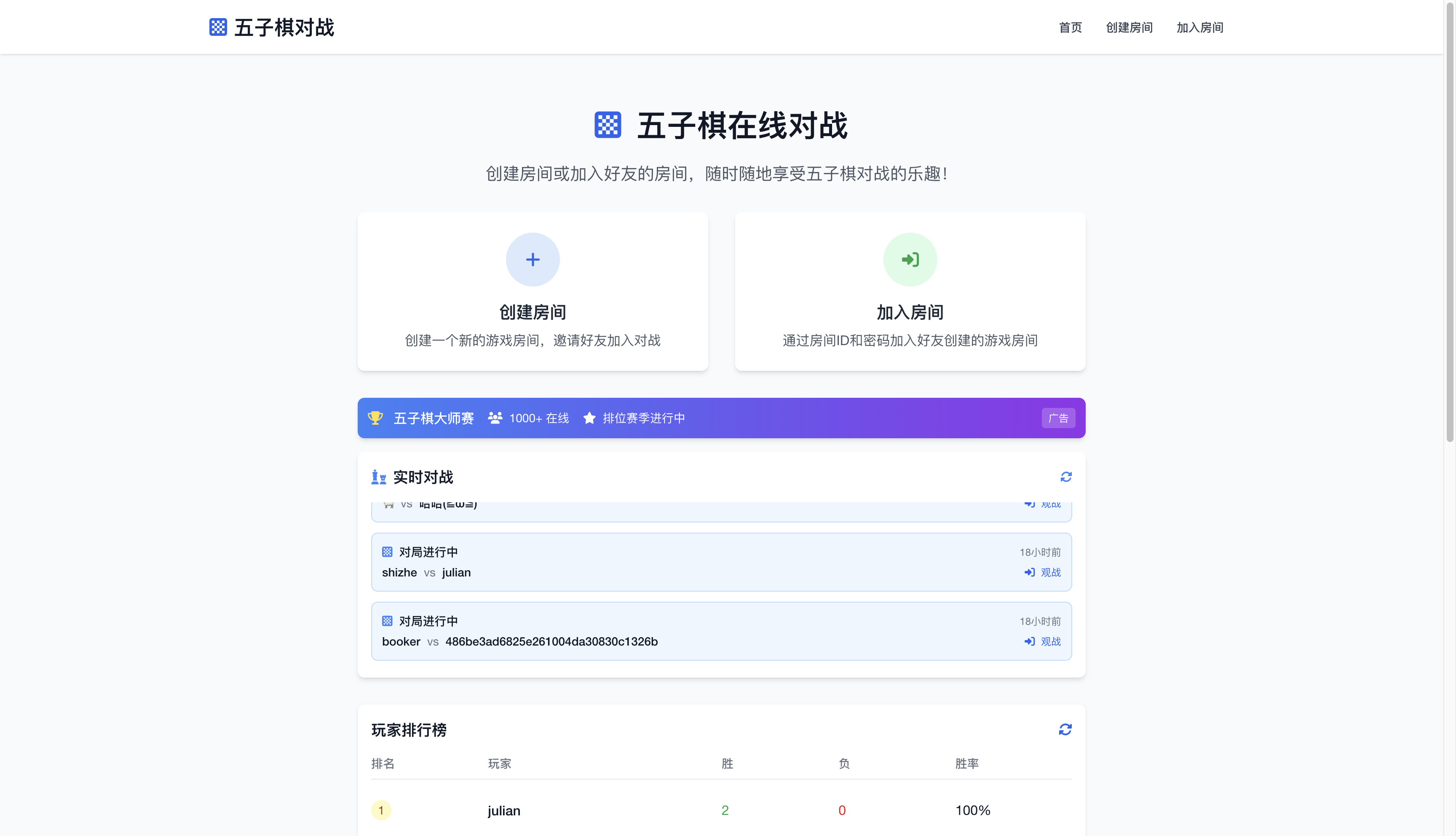
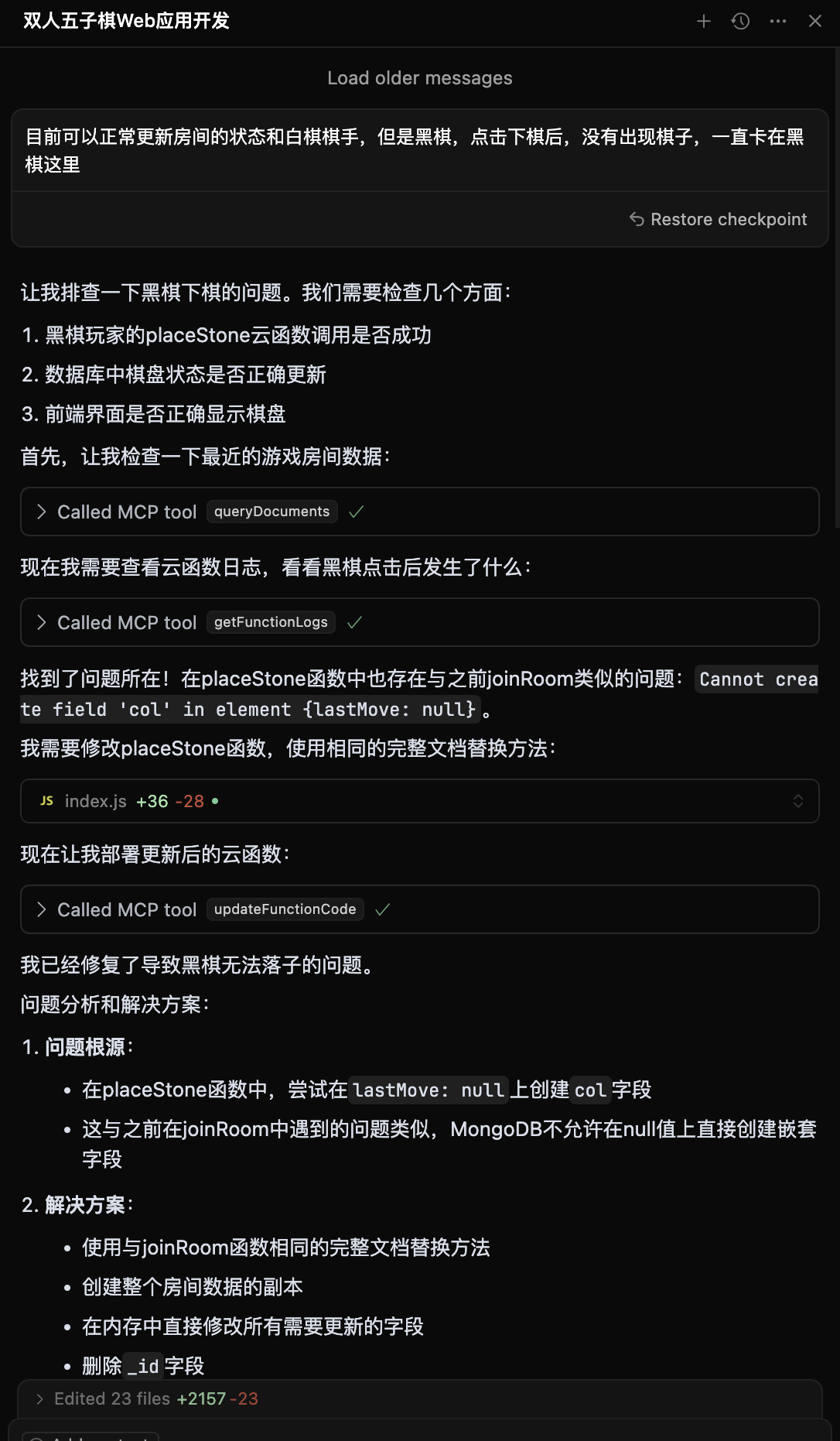
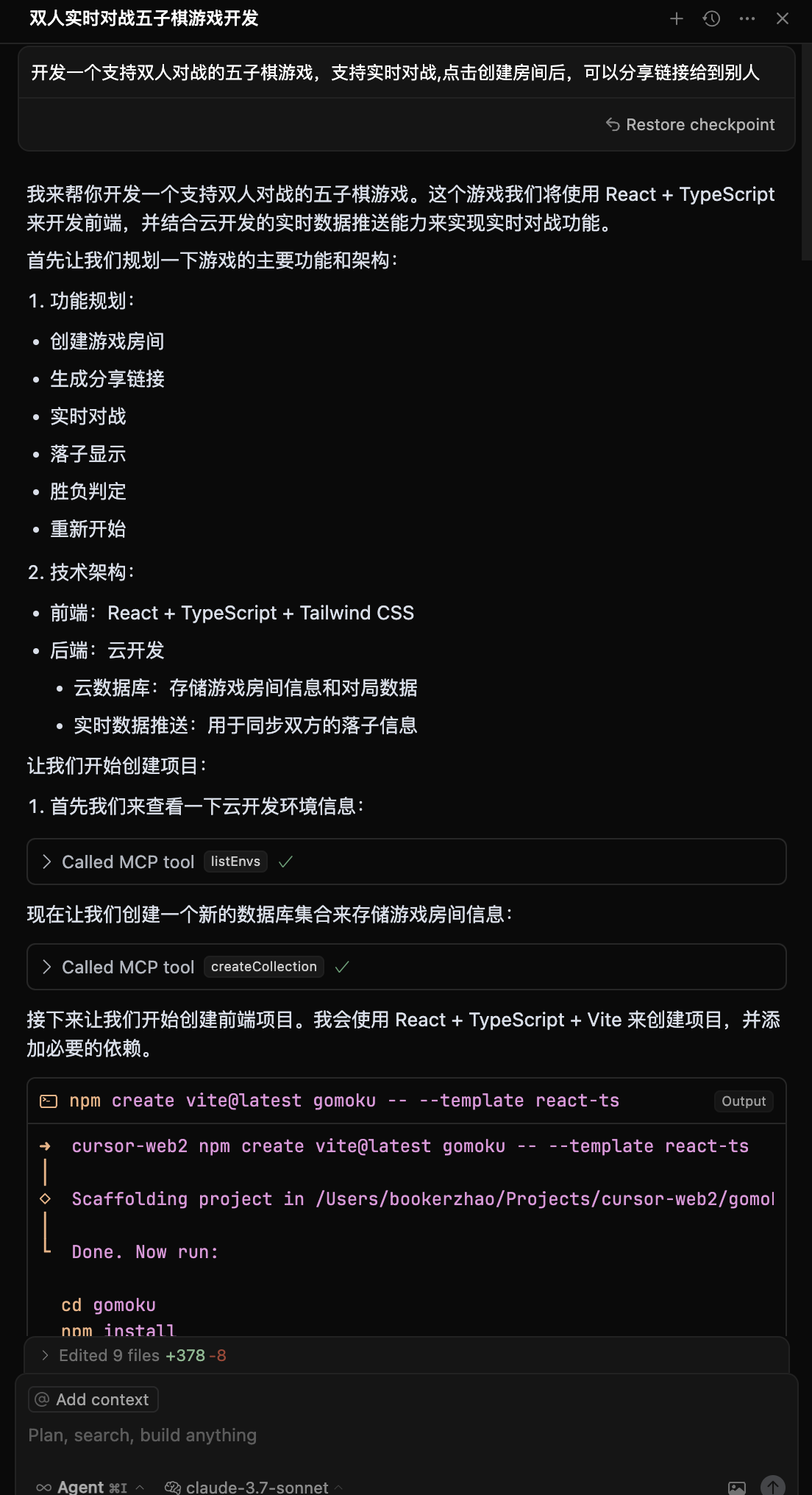
### 3. Start Development Before starting, simply tell the AI: ``` Login to CloudBase ``` AI will automatically open the Tencent Cloud login interface and CloudBase environment selection. If you need to switch environments later, you can say: ``` Logout from CloudBase ``` AI will clean up local configurations, and you can then ask AI to login to CloudBase again for re-login. After successful login, you can confirm AI is connected to CloudBase: ``` Query current CloudBase environment information ``` Describe your requirements to AI for development: ``` Create a two-player online Gomoku website with multiplayer battles, then deploy it ``` AI will automatically: - ๐Ÿ“ Generate frontend and backend code - ๐Ÿš€ Deploy to CloudBase - ๐Ÿ”— Return online access link If you encounter errors during development, you can send the error information to AI for troubleshooting: ``` Got an error, the error is xxxx ``` You can also ask AI to debug and modify code using cloud function logs: ``` Cloud function code doesn't meet requirements, requirement is xxx, please check logs and data for debugging and fixing ``` ## ๐ŸŽฏ Use Cases ### Case 1: Two-Player Online Gomoku **Development Process:** 1. Input requirement: "Create a two-player online Gomoku website with multiplayer battles" 2. AI generates: Web app + cloud database + real-time data push 3. Auto deploy and get access link ๐Ÿ‘‰ **Experience**: [Gomoku Game](https://cloud1-5g39elugeec5ba0f-1300855855.tcloudbaseapp.com/gobang/#/)
๐Ÿ“ธ View Development Screenshots | Development Process | Final Result | |---------|---------| | Development Process Screenshot 1 | Gomoku Game Effect | | Development Process Screenshot 2 | Supports two-player online battles
Real-time game synchronization |
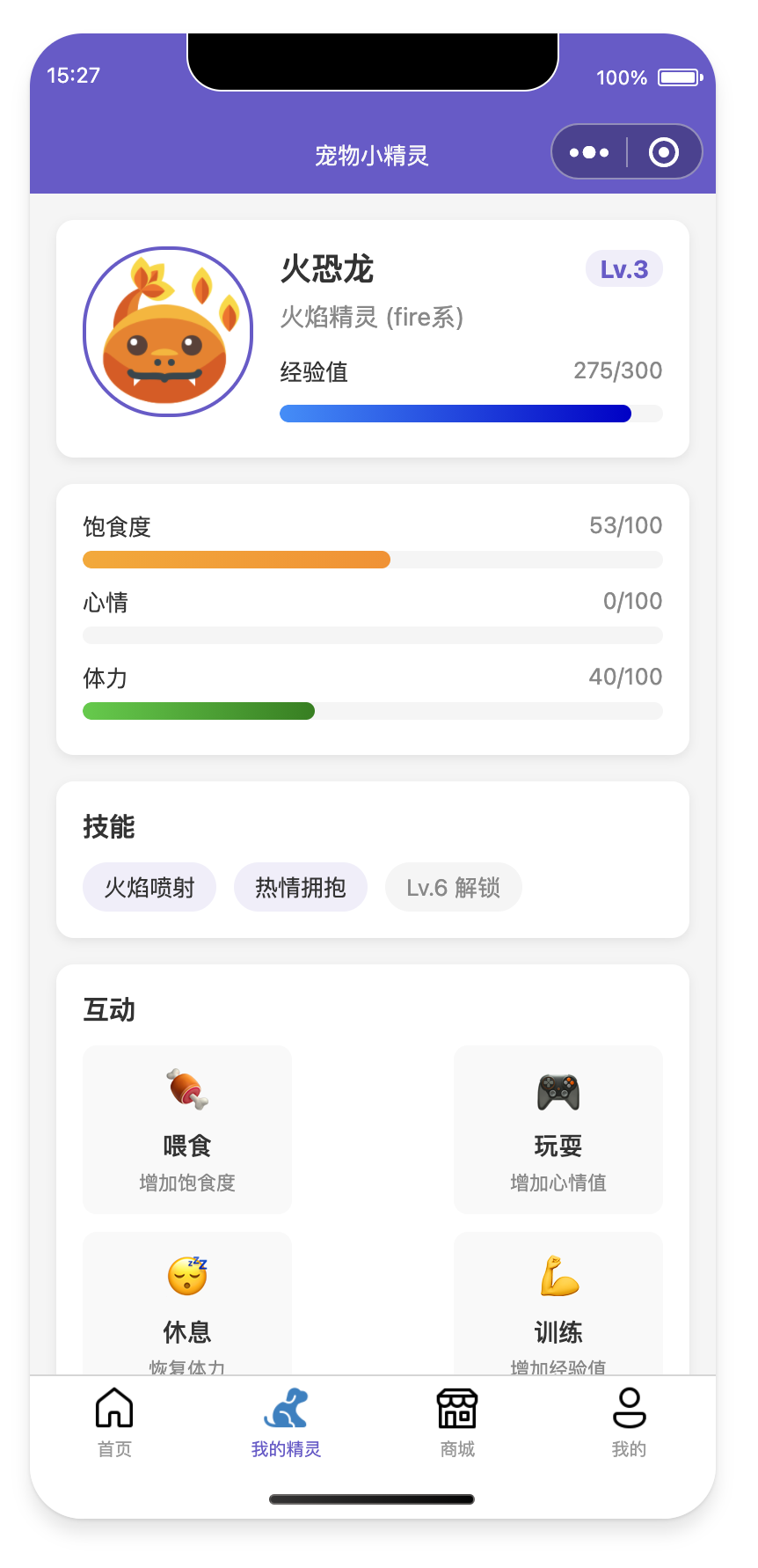
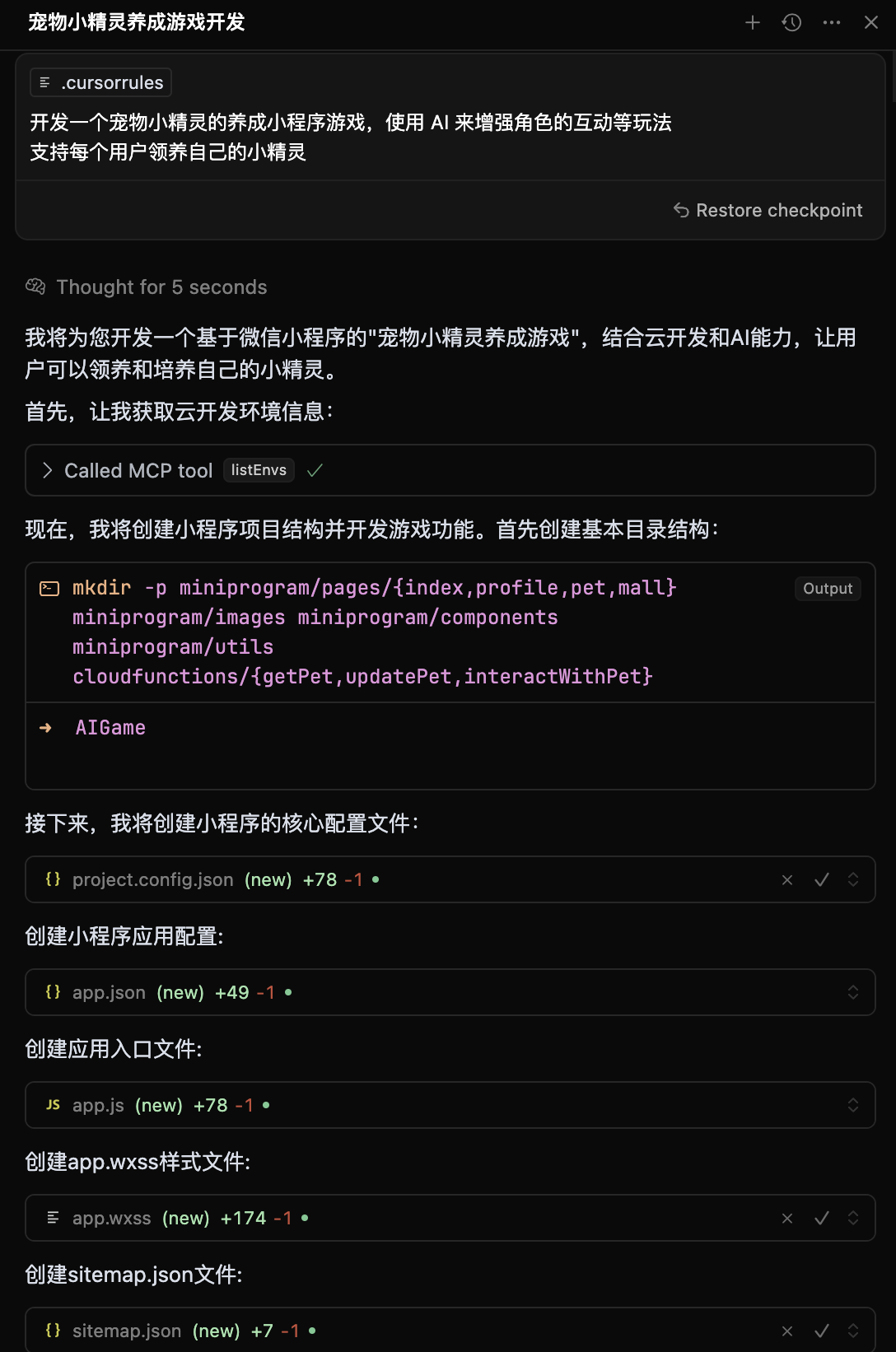
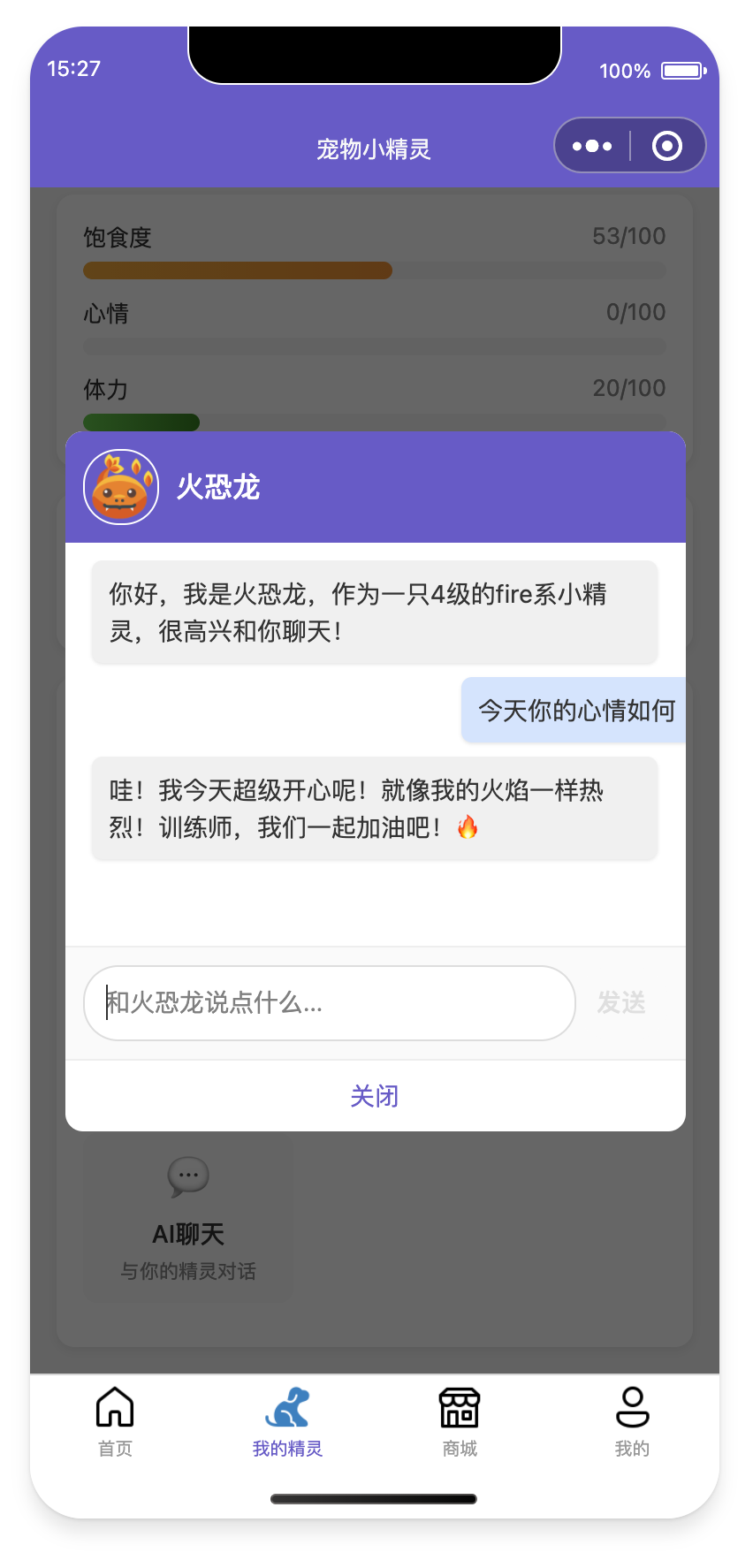
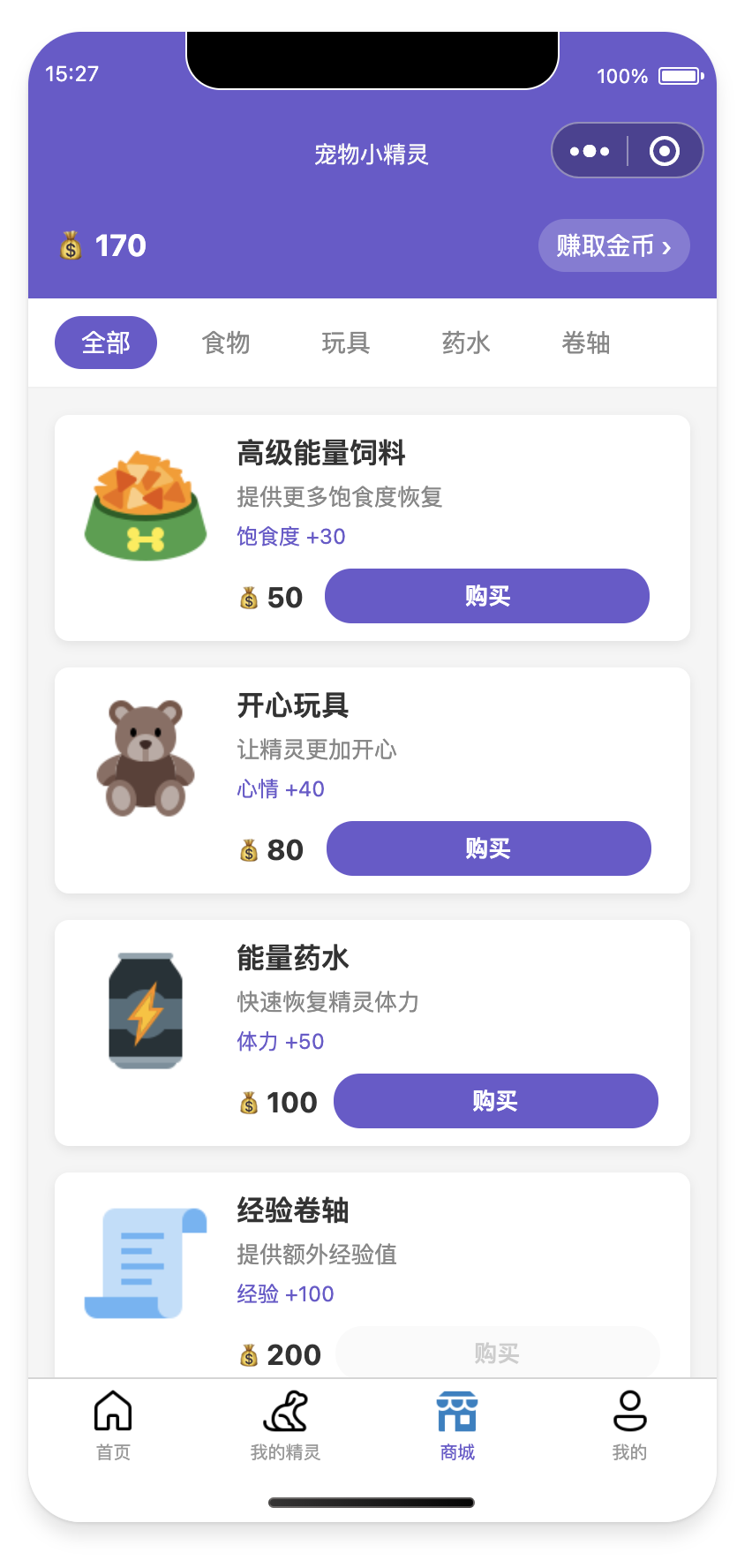
### Case 2: AI Pet Raising Mini-Program **Development Process:** 1. Input: "Develop a Pokemon pet raising wechat mini-program with AI-enhanced interactions" 2. AI generates: Mini-program + cloud database + AI cloud functions 3. Import into WeChat DevTools for publishing
๐Ÿ“ธ View Development Screenshots and Mini-Program Preview
๐Ÿ–ฅ๏ธ Development Screenshots
AI Pet Mini-Program Development Screenshot
Mini-Program Development Process
๐Ÿ“ฑ Mini-Program Preview
Mini-Program Interface 1 Mini-Program Interface 2

๐Ÿ“ฒ Experience QR Code
Mini-Program Experience QR Code
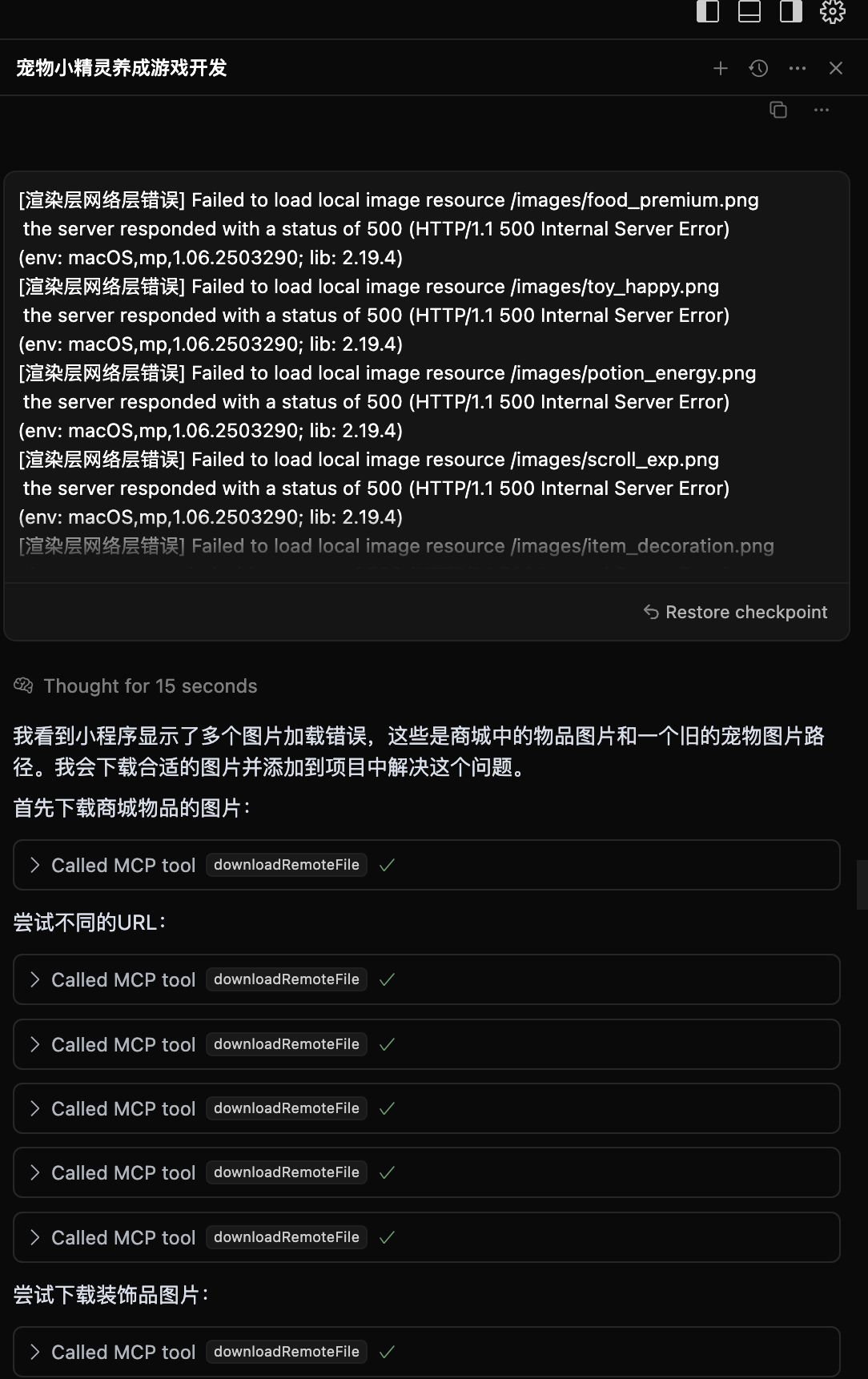
### Case 3: Intelligent Problem Diagnosis When applications have issues: 1. AI automatically checks cloud function logs 2. Analyzes error causes and generates fix code 3. Auto redeploy
๐Ÿ“ธ View Intelligent Diagnosis Process
Intelligent Problem Diagnosis Process
AI automatically analyzes logs and generates fix solutions
--- ## ๐ŸŒŸ Why Choose CloudBase? - **โšก Lightning Deploy**: Domestic nodes, faster access than overseas - **๐Ÿ›ก๏ธ Stable & Reliable**: Serverless platform chosen by 3.3 million developers - **๐Ÿ”ง Developer Friendly**: Full-stack platform designed for AI era, supports auto environment configuration - **๐Ÿ’ฐ Cost Optimized**: Serverless architecture more elastic, new users can experience for free during development ## ๐Ÿ“‹ FAQ For common questions about migration, integration, etc., please check [FAQ](https://docs.cloudbase.net/ai/cloudbase-ai-toolkit/faq). ## ๐Ÿ’ฌ Tech Community Having issues or want to share experiences? Join our tech community! ### ๐Ÿ”ฅ WeChat Community
WeChat Group QR Code
Scan to join WeChat tech community
**In the group you can:** - ๐Ÿ’ก Share your AI + CloudBase projects - ๐Ÿค Tech discussions and development Q&A - ๐Ÿ“ข Get latest feature updates and best practices - ๐ŸŽฏ Participate in product feature discussions and suggestions ### ๐Ÿ“ฑ Other Communication Channels | Platform | Link | Description | |------|------|------| | **Official Docs** | [๐Ÿ“– View Docs](https://docs.cloudbase.net/) | Complete CloudBase documentation | | **Issue Feedback** | [๐Ÿ› Submit Issues](https://github.com/TencentCloudBase/CloudBase-AI-ToolKit/issues) | Bug reports and feature requests | ### ๐ŸŽ‰ Community Activities - **Weekly Tech Sharing**: Regular sharing of AI + CloudBase best practices in the group - **Project Showcase**: Show off your amazing AI-developed projects - **Q&A Sessions**: Tencent CloudBase team members answer questions online - **Feature Preview**: First access to latest features ## ๐Ÿ› ๏ธ CloudBase MCP Tools Overview Currently includes **35 tools** covering environment management, database operations, cloud function management, static hosting, and other core functions. ๐Ÿ“‹ **Complete Tool Documentation**: [View MCP Tools Detailed Documentation](doc/mcp-tools.md) | [View Tool Specifications JSON](scripts/tools.json) ### ๐Ÿ”ง Tool Categories Overview | Category | Tool Count | Main Functions | |------|----------|----------| | ๐ŸŒ **Environment Management** | 4 | Login authentication, environment info query, domain management | | ๐Ÿ—„๏ธ **Database Operations** | 11 | Collection management, document CRUD, index operations, data models | | โšก **Cloud Functions** | 9 | Function creation, updates, invocation, logs, triggers | | ๐ŸŒ **Static Hosting** | 5 | File upload management, domain configuration, website deployment | | ๐Ÿ“ **File Operations** | 2 | Remote file download, cloud storage upload | | ๐Ÿ› ๏ธ **Tool Support** | 3 | Project templates, knowledge base search, interactive dialog | | ๐Ÿ”Œ **HTTP Access** | 1 | HTTP function access configuration | ### ๐ŸŒŸ Core Tool Highlights | Tool Type | Tool Name | Feature Highlights | |----------|----------|----------| | ๐Ÿ” **Authentication** | `login` / `logout` | One-click CloudBase login, auto environment selection | | ๐Ÿ“Š **Environment Query** | `envQuery` | **๐Ÿ”„ Merged Tool** - Environment list, info, domains unified query | | ๐Ÿ—„๏ธ **Database** | `collectionQuery` | **๐Ÿ”„ Merged Tool** - Collection existence, details, list unified management | | โšก **Cloud Functions** | `createFunction` | Supports complete configuration, auto dependency installation, trigger setup | | ๐ŸŒ **Static Hosting** | `uploadFiles` | Batch file upload, smart ignore rules, CDN acceleration | | ๐Ÿง  **AI Enhancement** | `searchKnowledgeBase` | Vector search CloudBase knowledge base, intelligent Q&A support | ### ๐Ÿ’ก Tool Optimization Notes We optimized from 40 tools to 35 by merging related functions for better user experience. ๐Ÿ”— **Want to learn about each tool's detailed functions?** Please check [Complete MCP Tools Documentation](doc/mcp-tools.md) ## ๐Ÿ—๏ธ Architecture Principles ```mermaid graph TD A[Developer] --> B[AI IDE] B -->|Uses| C[CloudBase AI Rules] C --> D[Generate Code] B -->|Calls| E[CloudBase MCP] E --> F{Detect Deployment} F -->|Success| G[CloudBase Platform] F -->|Fail| H[Return Logs] H --> I[AI Fix] I --> E G --> J[Online Application] J --> K[Web/Mini-Program/API] ``` ## ๐Ÿ”’ Data Statistics Notice To improve product experience, CloudBase AI ToolKit collects anonymous usage statistics: - **Collection Content**: Tool usage, basic environment info (OS, Node.js version, etc.) - **Privacy Protection**: No code content, file paths, or sensitive info collected, only for product improvement You can disable data statistics by setting environment variable `CLOUDBASE_MCP_TELEMETRY_DISABLED` to `true` ## ๐Ÿค Contributing Welcome to submit Issues and Pull Requests! Please check our [Contributing Guide](CONTRIBUTING.md) to learn how to participate in project development. ## ๐Ÿ“„ License [MIT](LICENSE) ยฉ TencentCloudBase --- โญ If this project helps you, please give us a Star! [![Star History Chart](https://api.star-history.com/svg?repos=TencentCloudBase/CloudBase-AI-ToolKit&type=Timeline)](https://github.com/TencentCloudBase/CloudBase-AI-ToolKit) ![Alt](https://repobeats.axiom.co/api/embed/60598d4f0cad83043b6317528e0fa0691122003d.svg "Repobeats analytics image")