# EColorPicker
**Repository Path**: Rickyal/EColorPicker
## Basic Information
- **Project Name**: EColorPicker
- **Description**: 一个Android颜色选择套件。
- **Primary Language**: Java
- **License**: Apache-2.0
- **Default Branch**: main
- **Homepage**: None
- **GVP Project**: No
## Statistics
- **Stars**: 0
- **Forks**: 0
- **Created**: 2021-10-01
- **Last Updated**: 2021-10-07
## Categories & Tags
**Categories**: Uncategorized
**Tags**: None
## README
# EColorPicker
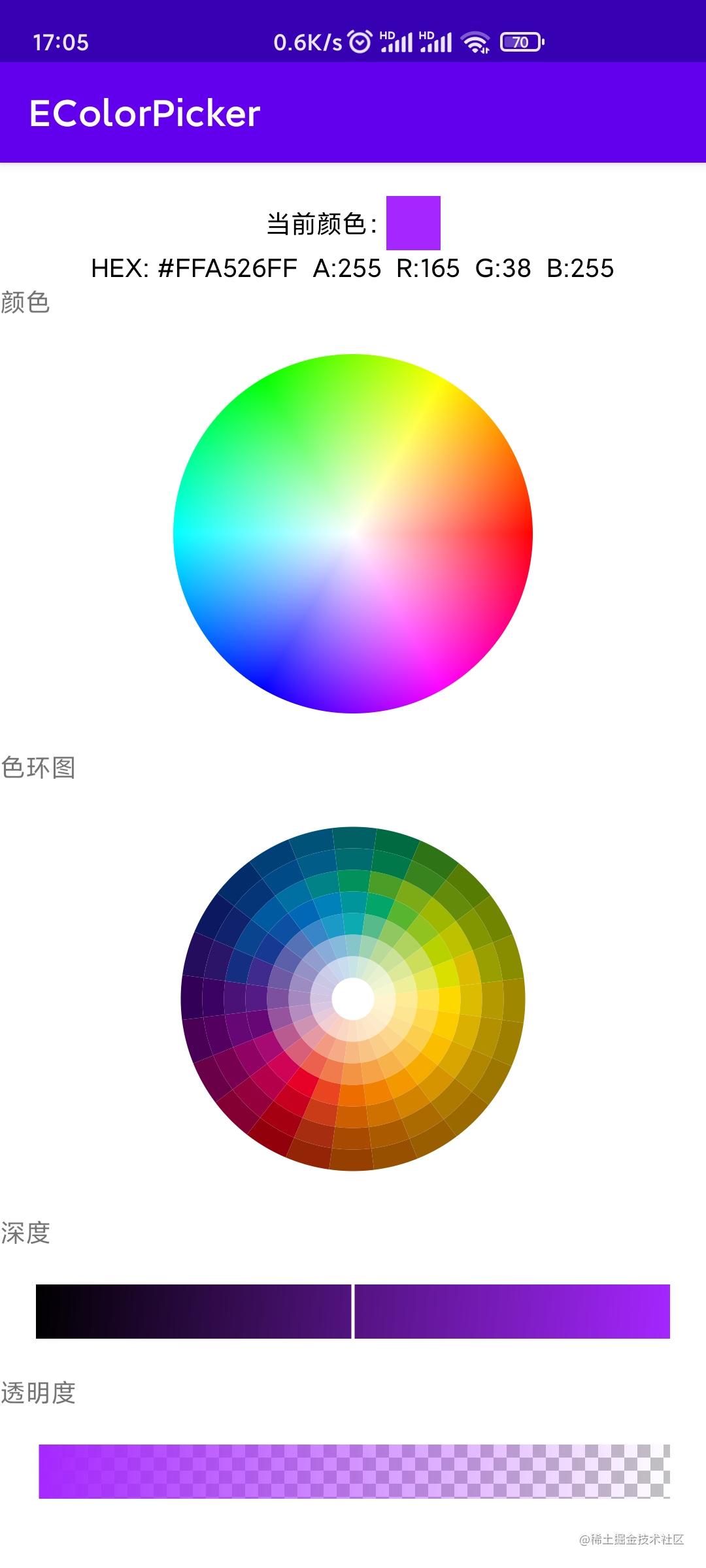
一个Android颜色选择套件,具体效果见下图。[](https://jitpack.io/#RickyHal/EColorPicker)
 # 依赖配置
项目 build.gradle
```groovy
allprojects {
repositories {
...
maven { url 'https://www.jitpack.io' }
}
}
```
模块 build.gradle
```groovy
dependencies {
implementation 'com.github.RickyHal:EColorPicker:$latest_version'
}
```
# 使用方式
### 颜色选择器
```kotlin
```
默认宽高300dp,获取选择的颜色:
```kotlin
binding.colorPickerView.setOnColorSelectedListener(object : OnColorSelectedListener {
override fun onColorSelecting(color: Int) {
// 手指触摸中当前的颜色
}
override fun onColorSelected(color: Int) {
// 手指弹起时最后的颜色
}
})
```
设置是否显示颜色放大镜以及放大镜半径:
```kotlin
binding.colorPickerView.hasScaleMirror = true
binding.colorPickerView.mirrorRadius = 10.dp
```
### 色环选择器
```kotlin
```
默认宽高300dp,获取选择的颜色:
```kotlin
binding.colorRingPickerView.setOnColorSelectedListener(object : OnColorSelectedListener {
override fun onColorSelecting(color: Int) {
// 手指触摸中当前的颜色
}
override fun onColorSelected(color: Int) {
// 手指弹起时最后的颜色
}
})
```
设置是否显示颜色放大镜以及放大镜半径:
```kotlin
binding.colorPickerView.hasScaleMirror = true
binding.colorPickerView.mirrorRadius = 10.dp
```
设置圆环颜色值,从内到外,为一个24*7的16进制颜色字符串二维数组:
```kotlin
binding.colorRingView.setColor(colorList)
```
默认色环颜色值为:
```java
private String[][] colorArray = {
{
"#fef5ce", "#fff3cd", "#feeeca", "#fdeac9", "#fee7c7", "#fce3c4",
"#fbddc1", "#fad7c3", "#fad0c2", "#f2ced0", "#e6cad9",
"#d9c7e1", "#d2c3e0", "#cfc6e3", "#cac7e4", "#c9cde8",
"#c7d6ed", "#c7dced", "#c7e3e6", "#d2e9d9", "#deedce",
"#e7f1cf", "#eef4d0", "#f5f7d0"
},
{
"#ffeb95", "#fee591", "#fcdf8f", "#fcd68d", "#facd89", "#f9c385",
"#f7b882", "#f5ab86", "#f29a82", "#e599a3", "#ce93b3",
"#b48cbe", "#a588be", "#9d8cc2", "#9491c6", "#919dcf",
"#89abd9", "#85bada", "#86c5ca", "#9fd2b1", "#bada99",
"#cbe198", "#dde899", "#edf099"
},
{
"#fee250", "#fed84f", "#fbce4d", "#f9c04c", "#f7b24a", "#f6a347",
"#f39444", "#f07c4d", "#ec614e", "#d95f78", "#b95b90",
"#96549e", "#7c509d", "#6e59a4", "#5c60aa", "#5572b6",
"#3886c8", "#1c99c7", "#0daab1", "#57ba8b", "#90c761",
"#b0d35f", "#ccdd5b", "#e5e756"
},
{
"#FDD900", "#FCCC00", "#fabd00", "#f6ab00", "#f39801", "#f18101",
"#ed6d00", "#e94520", "#e60027", "#cf0456", "#a60b73",
"#670775", "#541b86", "#3f2b8e", "#173993", "#0c50a3",
"#0168b7", "#0081ba", "#00959b", "#03a569", "#58b530",
"#90c320", "#b8d201", "#dadf00"
},
{
"#DBBC01", "#DAB101", "#D9A501", "#D69400", "#D28300", "#CF7100",
"#CD5F00", "#CA3C18", "#C7001F", "#B4004A", "#900264",
"#670775", "#4A1277", "#142E82", "#0A448E", "#005AA0",
"#0070A2", "#018287", "#02915B", "#4A9D27", "#7DAB17",
"#9EB801", "#BCC200", "#DBBC01"
},
{
"#B49900", "#B39000", "#B18701", "#AD7901", "#AB6B01", "#AA5B00",
"#A84A00", "#A62D10", "#A50011", "#94003C", "#770050",
"#540060", "#3B0263", "#2B1568", "#10226C", "#053577",
"#004A87", "#005D88", "#006C6F", "#00784A", "#38831E",
"#648B0A", "#829601", "#999F01"
},
{
"#9F8700", "#9E7F00", "#9D7601", "#9A6900", "#995E00", "#975000",
"#954000", "#932406", "#92000B", "#840032", "#6A0048",
"#4A0055", "#320057", "#240D5D", "#0C1860", "#032C6A",
"#014076", "#005278", "#016064", "#006B41", "#2E7316",
"#567C03", "#718500", "#888D00"
}
};
```
设置选中状态时色块的颜色值:
```kotlin
binding.colorRingView.setSelectedBlockColor(Color.WHITE)
```
### 深度选择器
```kotlin
```
需要给定宽高,获取当前值
```kotlin
binding.colorRingPickerView.setOnColorSelectedListener(object : OnColorSelectedListener {
override fun onColorSelecting(color: Int) {
// 手指触摸中当前的颜色
}
override fun onColorSelected(color: Int) {
// 手指弹起时最后的颜色
}
})
```
设置基准颜色:
```kotlin
binding.colorSlideView.setBaseColor(Color.WHITE)
```
设置当前位置:
```kotlin
binding.colorSlideView.setPosition(0.5f)
```
### 透明度选择器
```kotlin
```
同样需要给定宽高,获取当前透明度
```kotlin
binding.alphaSlideView.setOnAlphaSelectedListener(object : OnAlphaSelectedListener {
override fun onAlphaSelecting(alpha: Float) {
// 手指触摸中的透明度
}
override fun onAlphaSelected(alpha: Float) {
// 手指弹起时的透明度
}
})
```
设置基准颜色:
```kotlin
binding.colorSlideView.setBaseColor(Color.WHITE)
```
设置当前位置:
```kotlin
binding.colorSlideView.setPosition(0.5f)
```
### 颜色工具
在Util.kt中,以单例模式提供,
```kotlin
// 颜色int值转16进制
fun color2Hex(color: Int, alpha: Int = 255, isUpperCase: Boolean = true): String
// 16进制字符串转颜色值
fun hex2Color(hex: String): Int?
// 是否是合法的16进制颜色字符串
fun isValidHex(color: String): Boolean
```
## License
> ```
> Copyright 2021 RickyHal
>
> Licensed under the Apache License, Version 2.0 (the "License");
> you may not use this file except in compliance with the License.
> You may obtain a copy of the License at
>
> http://www.apache.org/licenses/LICENSE-2.0
>
> Unless required by applicable law or agreed to in writing, software
> distributed under the License is distributed on an "AS IS" BASIS,
> WITHOUT WARRANTIES OR CONDITIONS OF ANY KIND, either express or implied.
> See the License for the specific language governing permissions and
> limitations under the License.
> ```
# 依赖配置
项目 build.gradle
```groovy
allprojects {
repositories {
...
maven { url 'https://www.jitpack.io' }
}
}
```
模块 build.gradle
```groovy
dependencies {
implementation 'com.github.RickyHal:EColorPicker:$latest_version'
}
```
# 使用方式
### 颜色选择器
```kotlin
```
默认宽高300dp,获取选择的颜色:
```kotlin
binding.colorPickerView.setOnColorSelectedListener(object : OnColorSelectedListener {
override fun onColorSelecting(color: Int) {
// 手指触摸中当前的颜色
}
override fun onColorSelected(color: Int) {
// 手指弹起时最后的颜色
}
})
```
设置是否显示颜色放大镜以及放大镜半径:
```kotlin
binding.colorPickerView.hasScaleMirror = true
binding.colorPickerView.mirrorRadius = 10.dp
```
### 色环选择器
```kotlin
```
默认宽高300dp,获取选择的颜色:
```kotlin
binding.colorRingPickerView.setOnColorSelectedListener(object : OnColorSelectedListener {
override fun onColorSelecting(color: Int) {
// 手指触摸中当前的颜色
}
override fun onColorSelected(color: Int) {
// 手指弹起时最后的颜色
}
})
```
设置是否显示颜色放大镜以及放大镜半径:
```kotlin
binding.colorPickerView.hasScaleMirror = true
binding.colorPickerView.mirrorRadius = 10.dp
```
设置圆环颜色值,从内到外,为一个24*7的16进制颜色字符串二维数组:
```kotlin
binding.colorRingView.setColor(colorList)
```
默认色环颜色值为:
```java
private String[][] colorArray = {
{
"#fef5ce", "#fff3cd", "#feeeca", "#fdeac9", "#fee7c7", "#fce3c4",
"#fbddc1", "#fad7c3", "#fad0c2", "#f2ced0", "#e6cad9",
"#d9c7e1", "#d2c3e0", "#cfc6e3", "#cac7e4", "#c9cde8",
"#c7d6ed", "#c7dced", "#c7e3e6", "#d2e9d9", "#deedce",
"#e7f1cf", "#eef4d0", "#f5f7d0"
},
{
"#ffeb95", "#fee591", "#fcdf8f", "#fcd68d", "#facd89", "#f9c385",
"#f7b882", "#f5ab86", "#f29a82", "#e599a3", "#ce93b3",
"#b48cbe", "#a588be", "#9d8cc2", "#9491c6", "#919dcf",
"#89abd9", "#85bada", "#86c5ca", "#9fd2b1", "#bada99",
"#cbe198", "#dde899", "#edf099"
},
{
"#fee250", "#fed84f", "#fbce4d", "#f9c04c", "#f7b24a", "#f6a347",
"#f39444", "#f07c4d", "#ec614e", "#d95f78", "#b95b90",
"#96549e", "#7c509d", "#6e59a4", "#5c60aa", "#5572b6",
"#3886c8", "#1c99c7", "#0daab1", "#57ba8b", "#90c761",
"#b0d35f", "#ccdd5b", "#e5e756"
},
{
"#FDD900", "#FCCC00", "#fabd00", "#f6ab00", "#f39801", "#f18101",
"#ed6d00", "#e94520", "#e60027", "#cf0456", "#a60b73",
"#670775", "#541b86", "#3f2b8e", "#173993", "#0c50a3",
"#0168b7", "#0081ba", "#00959b", "#03a569", "#58b530",
"#90c320", "#b8d201", "#dadf00"
},
{
"#DBBC01", "#DAB101", "#D9A501", "#D69400", "#D28300", "#CF7100",
"#CD5F00", "#CA3C18", "#C7001F", "#B4004A", "#900264",
"#670775", "#4A1277", "#142E82", "#0A448E", "#005AA0",
"#0070A2", "#018287", "#02915B", "#4A9D27", "#7DAB17",
"#9EB801", "#BCC200", "#DBBC01"
},
{
"#B49900", "#B39000", "#B18701", "#AD7901", "#AB6B01", "#AA5B00",
"#A84A00", "#A62D10", "#A50011", "#94003C", "#770050",
"#540060", "#3B0263", "#2B1568", "#10226C", "#053577",
"#004A87", "#005D88", "#006C6F", "#00784A", "#38831E",
"#648B0A", "#829601", "#999F01"
},
{
"#9F8700", "#9E7F00", "#9D7601", "#9A6900", "#995E00", "#975000",
"#954000", "#932406", "#92000B", "#840032", "#6A0048",
"#4A0055", "#320057", "#240D5D", "#0C1860", "#032C6A",
"#014076", "#005278", "#016064", "#006B41", "#2E7316",
"#567C03", "#718500", "#888D00"
}
};
```
设置选中状态时色块的颜色值:
```kotlin
binding.colorRingView.setSelectedBlockColor(Color.WHITE)
```
### 深度选择器
```kotlin
```
需要给定宽高,获取当前值
```kotlin
binding.colorRingPickerView.setOnColorSelectedListener(object : OnColorSelectedListener {
override fun onColorSelecting(color: Int) {
// 手指触摸中当前的颜色
}
override fun onColorSelected(color: Int) {
// 手指弹起时最后的颜色
}
})
```
设置基准颜色:
```kotlin
binding.colorSlideView.setBaseColor(Color.WHITE)
```
设置当前位置:
```kotlin
binding.colorSlideView.setPosition(0.5f)
```
### 透明度选择器
```kotlin
```
同样需要给定宽高,获取当前透明度
```kotlin
binding.alphaSlideView.setOnAlphaSelectedListener(object : OnAlphaSelectedListener {
override fun onAlphaSelecting(alpha: Float) {
// 手指触摸中的透明度
}
override fun onAlphaSelected(alpha: Float) {
// 手指弹起时的透明度
}
})
```
设置基准颜色:
```kotlin
binding.colorSlideView.setBaseColor(Color.WHITE)
```
设置当前位置:
```kotlin
binding.colorSlideView.setPosition(0.5f)
```
### 颜色工具
在Util.kt中,以单例模式提供,
```kotlin
// 颜色int值转16进制
fun color2Hex(color: Int, alpha: Int = 255, isUpperCase: Boolean = true): String
// 16进制字符串转颜色值
fun hex2Color(hex: String): Int?
// 是否是合法的16进制颜色字符串
fun isValidHex(color: String): Boolean
```
## License
> ```
> Copyright 2021 RickyHal
>
> Licensed under the Apache License, Version 2.0 (the "License");
> you may not use this file except in compliance with the License.
> You may obtain a copy of the License at
>
> http://www.apache.org/licenses/LICENSE-2.0
>
> Unless required by applicable law or agreed to in writing, software
> distributed under the License is distributed on an "AS IS" BASIS,
> WITHOUT WARRANTIES OR CONDITIONS OF ANY KIND, either express or implied.
> See the License for the specific language governing permissions and
> limitations under the License.
> ```